Description
Free User Support
Not sure how to get your product to work properly? Contact our professional and friendly support team for quick solutions!
Bluetooth Pairing:
1.Turn on the "L" and "R" earphones at the same time until the blue lights flash;wait until the red and blue lights on the "R" earpiece (system default) automatically flash alternately(*DO NOT directly press and hold the Power Button until the red and blue lights flash alternately);
2.Enable Bluetooth on your phone and search for "S3", click to connect.
Tips:
If you cannot pair your earbuds the first time due to incorrect operation, please reset them to the factory pairing mode:
1. Long press the Power buttons of the left and right earphones at the same time for about 5-10 seconds. The red and blue lights will begin to flash alternately;
2. Click the Power button of either earphone (main) and the red and blue lights will begin to flash alternately. Wait until the two headphones pairing with each other;
3. The slow flashing of the blue light on the remaining earphone (auxiliary) indicates that they have been paired;
4. When the red and blue lights on the "R" earphone begin flashing, please enable the Bluetooth on the phone and search for "S3" to connect(*Do Not directly press and hold the Power button until the red and blue lights flash alternately).
Specification
Bluetooth Version: V4.2
Power Input: DC5V
Operating Voltage: 3.2V-4.2V
Battery Capacity: 3.7V/45mAh
Battery Running Time: about 2-3 hours
Charging Time: about 60 minutes
Battery Charger Capacity: 3.7V/220mAh x2
Bluetooth Protocols: HSP/HFP/A2DP/ACRCP
Sensitivity: 120±5db
Frequency Range: 2.4-2.48GHZ
Impedance: 32Ω
What's in the box?
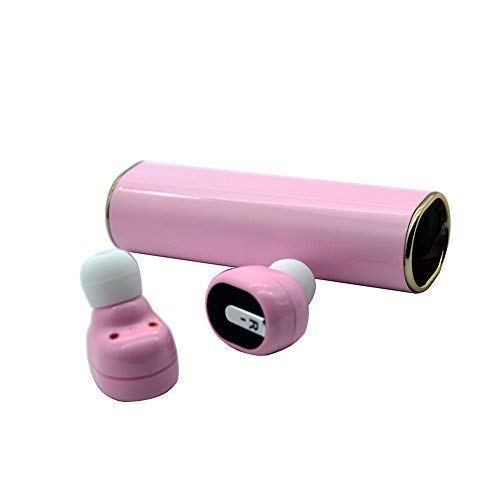
✔2x Bluetooth Earbuds
✔1x Portable Charging Case
✔1x USB Charging Cable
✔3x Earpiece Silicone Cover: Small, Middle, Large
✔1x User Manual
Not sure how to get your product to work properly? Contact our professional and friendly support team for quick solutions!
Bluetooth Pairing:
1.Turn on the "L" and "R" earphones at the same time until the blue lights flash;wait until the red and blue lights on the "R" earpiece (system default) automatically flash alternately(*DO NOT directly press and hold the Power Button until the red and blue lights flash alternately);
2.Enable Bluetooth on your phone and search for "S3", click to connect.
Tips:
If you cannot pair your earbuds the first time due to incorrect operation, please reset them to the factory pairing mode:
1. Long press the Power buttons of the left and right earphones at the same time for about 5-10 seconds. The red and blue lights will begin to flash alternately;
2. Click the Power button of either earphone (main) and the red and blue lights will begin to flash alternately. Wait until the two headphones pairing with each other;
3. The slow flashing of the blue light on the remaining earphone (auxiliary) indicates that they have been paired;
4. When the red and blue lights on the "R" earphone begin flashing, please enable the Bluetooth on the phone and search for "S3" to connect(*Do Not directly press and hold the Power button until the red and blue lights flash alternately).
Specification
Bluetooth Version: V4.2
Power Input: DC5V
Operating Voltage: 3.2V-4.2V
Battery Capacity: 3.7V/45mAh
Battery Running Time: about 2-3 hours
Charging Time: about 60 minutes
Battery Charger Capacity: 3.7V/220mAh x2
Bluetooth Protocols: HSP/HFP/A2DP/ACRCP
Sensitivity: 120±5db
Frequency Range: 2.4-2.48GHZ
Impedance: 32Ω
What's in the box?
✔2x Bluetooth Earbuds
✔1x Portable Charging Case
✔1x USB Charging Cable
✔3x Earpiece Silicone Cover: Small, Middle, Large
✔1x User Manual
True Wireless Earbuds, LEELVIS Mini Noise Cancelling in-Ear Bluetooth Headphone, Sweat-Proof Earphone with Microphone (Pink)
Price is below average
Current Price
$25
Average
$39.87
Min Price
$25
Max Price
$49.99
Price dynamics
37%
Description
Free User Support
Not sure how to get your product to work properly? Contact our professional and friendly support team for quick solutions!
Bluetooth Pairing:
1.Turn on the "L" and "R" earphones at the same time until the blue lights flash;wait until the red and blue lights on the "R" earpiece (system default) automatically flash alternately(*DO NOT directly press and hold the Power Button until the red and blue lights flash alternately);
2.Enable Bluetooth on your phone and search for "S3", click to connect.
Tips:
If you cannot pair your earbuds the first time due to incorrect operation, please reset them to the factory pairing mode:
1. Long press the Power buttons of the left and right earphones at the same time for about 5-10 seconds. The red and blue lights will begin to flash alternately;
2. Click the Power button of either earphone (main) and the red and blue lights will begin to flash alternately. Wait until the two headphones pairing with each other;
3. The slow flashing of the blue light on the remaining earphone (auxiliary) indicates that they have been paired;
4. When the red and blue lights on the "R" earphone begin flashing, please enable the Bluetooth on the phone and search for "S3" to connect(*Do Not directly press and hold the Power button until the red and blue lights flash alternately).
Specification
Bluetooth Version: V4.2
Power Input: DC5V
Operating Voltage: 3.2V-4.2V
Battery Capacity: 3.7V/45mAh
Battery Running Time: about 2-3 hours
Charging Time: about 60 minutes
Battery Charger Capacity: 3.7V/220mAh x2
Bluetooth Protocols: HSP/HFP/A2DP/ACRCP
Sensitivity: 120±5db
Frequency Range: 2.4-2.48GHZ
Impedance: 32Ω
What's in the box?
✔2x Bluetooth Earbuds
✔1x Portable Charging Case
✔1x USB Charging Cable
✔3x Earpiece Silicone Cover: Small, Middle, Large
✔1x User Manual
Not sure how to get your product to work properly? Contact our professional and friendly support team for quick solutions!
Bluetooth Pairing:
1.Turn on the "L" and "R" earphones at the same time until the blue lights flash;wait until the red and blue lights on the "R" earpiece (system default) automatically flash alternately(*DO NOT directly press and hold the Power Button until the red and blue lights flash alternately);
2.Enable Bluetooth on your phone and search for "S3", click to connect.
Tips:
If you cannot pair your earbuds the first time due to incorrect operation, please reset them to the factory pairing mode:
1. Long press the Power buttons of the left and right earphones at the same time for about 5-10 seconds. The red and blue lights will begin to flash alternately;
2. Click the Power button of either earphone (main) and the red and blue lights will begin to flash alternately. Wait until the two headphones pairing with each other;
3. The slow flashing of the blue light on the remaining earphone (auxiliary) indicates that they have been paired;
4. When the red and blue lights on the "R" earphone begin flashing, please enable the Bluetooth on the phone and search for "S3" to connect(*Do Not directly press and hold the Power button until the red and blue lights flash alternately).
Specification
Bluetooth Version: V4.2
Power Input: DC5V
Operating Voltage: 3.2V-4.2V
Battery Capacity: 3.7V/45mAh
Battery Running Time: about 2-3 hours
Charging Time: about 60 minutes
Battery Charger Capacity: 3.7V/220mAh x2
Bluetooth Protocols: HSP/HFP/A2DP/ACRCP
Sensitivity: 120±5db
Frequency Range: 2.4-2.48GHZ
Impedance: 32Ω
What's in the box?
✔2x Bluetooth Earbuds
✔1x Portable Charging Case
✔1x USB Charging Cable
✔3x Earpiece Silicone Cover: Small, Middle, Large
✔1x User Manual
Price will be lower
in next 2 weeks
in next 2 weeks
According to the data, price will be lower in next two weeks, so not waste your money and track better price!
Product review & video
this episode's sponsored by Wix so these things they've been requested by a large number of you on Twitter in the YouTube comments you guys know I really enjoy looking at headphones it's not very often that you get a completely new form factor in the headphone territory in the headphone segment we have earbuds we have over ear headphones we have on ear headphones of course with a headband associated we have the full wireless stuff of course the very popular ear pods now air pod anyhow here we end up on this a completely new take it's called human headphones and when you wear it that's what it looks like it's crazy how is it on there how does it stay put that's what's happening right here she's wearing it he's wearing it for this to work out it's gonna have to deliver sound quality above what the earbud is capable of big big sound full-size speaker drivers so doesn't I say look we're not



Similar products