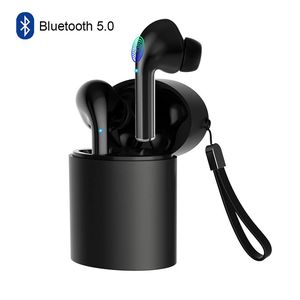
Description
Features:
1.Bluetooth version: Realtek V5.0+EDR
2.Working range: up to 33 feets on open air
4.Playing time: 4-6 hours
5.Standby time: 100 hours
6.Charging Time: about 1-2 hour
8.Working temperature: -10 - 55 C
9.Compatible with Most bluetooth enabled Smartphones and devices
Multi-function Button:
Double click -- play / pause music,answer a call,hang up
Three click the left headset -- play the previous song
Three click the right headset -- play the next song
Long press the touch key -- reject call,activating Siri
Box Content:
2 x TWS Bluetooth Stereo Earphones(Left&Right)
1 x Charging Case
1 x Micro USB Charge Cable
1 x User Manual
Reset Steps:
1. Long press the touch key on both sides 5 seconds to turn off the earphone first,then keep to press 10 more seconds then release, the reset operation is completed.
2. Please put them into the charging case and take them out again(or long press the touch key about 5seconds you will hear a voice say power on.)
3. The headsets are entering paring mode, wait for a while and you will hear a voice say "tws connected". Then you can connect your device. If you device shows two earphones in the Bluetooth menu you will need to repeat the steps above as they are not paired with each other.
Twins Pairing:
1. Take out the earbuds,they will auto power on and pairing.
2. When one earbuds flash red and blue light,another not flash light,both earbuds pair successfully.
3. Turn on the Bluetooth on your device and search "TWS" to connect.When the led flash not flash,they pair successfully.
Single Pairing:
1. If you need pair with two phones,please take out and pair right earbud first.
2. After right earbuds paired successfully,then pair your left earbud.
Helose team the best customer services,if you have any questions about the product,please be free to ask,would be glad to help.
1.Bluetooth version: Realtek V5.0+EDR
2.Working range: up to 33 feets on open air
4.Playing time: 4-6 hours
5.Standby time: 100 hours
6.Charging Time: about 1-2 hour
8.Working temperature: -10 - 55 C
9.Compatible with Most bluetooth enabled Smartphones and devices
Multi-function Button:
Double click -- play / pause music,answer a call,hang up
Three click the left headset -- play the previous song
Three click the right headset -- play the next song
Long press the touch key -- reject call,activating Siri
Box Content:
2 x TWS Bluetooth Stereo Earphones(Left&Right)
1 x Charging Case
1 x Micro USB Charge Cable
1 x User Manual
Reset Steps:
1. Long press the touch key on both sides 5 seconds to turn off the earphone first,then keep to press 10 more seconds then release, the reset operation is completed.
2. Please put them into the charging case and take them out again(or long press the touch key about 5seconds you will hear a voice say power on.)
3. The headsets are entering paring mode, wait for a while and you will hear a voice say "tws connected". Then you can connect your device. If you device shows two earphones in the Bluetooth menu you will need to repeat the steps above as they are not paired with each other.
Twins Pairing:
1. Take out the earbuds,they will auto power on and pairing.
2. When one earbuds flash red and blue light,another not flash light,both earbuds pair successfully.
3. Turn on the Bluetooth on your device and search "TWS" to connect.When the led flash not flash,they pair successfully.
Single Pairing:
1. If you need pair with two phones,please take out and pair right earbud first.
2. After right earbuds paired successfully,then pair your left earbud.
Helose team the best customer services,if you have any questions about the product,please be free to ask,would be glad to help.
True Wireless Earbuds, Smart Touch Control Wireless Bluetooth 5.0 Headphones TWS in-Ear Headsets Built-in Microphone Noise Cancelling for iPhone Android with Charging Case Black
Price is below average
Current Price
$31.99
Average
$32.95
Min Price
$31.99
Max Price
$33.9
Price dynamics
3%
Description
Features:
1.Bluetooth version: Realtek V5.0+EDR
2.Working range: up to 33 feets on open air
4.Playing time: 4-6 hours
5.Standby time: 100 hours
6.Charging Time: about 1-2 hour
8.Working temperature: -10 - 55 C
9.Compatible with Most bluetooth enabled Smartphones and devices
Multi-function Button:
Double click -- play / pause music,answer a call,hang up
Three click the left headset -- play the previous song
Three click the right headset -- play the next song
Long press the touch key -- reject call,activating Siri
Box Content:
2 x TWS Bluetooth Stereo Earphones(Left&Right)
1 x Charging Case
1 x Micro USB Charge Cable
1 x User Manual
Reset Steps:
1. Long press the touch key on both sides 5 seconds to turn off the earphone first,then keep to press 10 more seconds then release, the reset operation is completed.
2. Please put them into the charging case and take them out again(or long press the touch key about 5seconds you will hear a voice say power on.)
3. The headsets are entering paring mode, wait for a while and you will hear a voice say "tws connected". Then you can connect your device. If you device shows two earphones in the Bluetooth menu you will need to repeat the steps above as they are not paired with each other.
Twins Pairing:
1. Take out the earbuds,they will auto power on and pairing.
2. When one earbuds flash red and blue light,another not flash light,both earbuds pair successfully.
3. Turn on the Bluetooth on your device and search "TWS" to connect.When the led flash not flash,they pair successfully.
Single Pairing:
1. If you need pair with two phones,please take out and pair right earbud first.
2. After right earbuds paired successfully,then pair your left earbud.
Helose team the best customer services,if you have any questions about the product,please be free to ask,would be glad to help.
1.Bluetooth version: Realtek V5.0+EDR
2.Working range: up to 33 feets on open air
4.Playing time: 4-6 hours
5.Standby time: 100 hours
6.Charging Time: about 1-2 hour
8.Working temperature: -10 - 55 C
9.Compatible with Most bluetooth enabled Smartphones and devices
Multi-function Button:
Double click -- play / pause music,answer a call,hang up
Three click the left headset -- play the previous song
Three click the right headset -- play the next song
Long press the touch key -- reject call,activating Siri
Box Content:
2 x TWS Bluetooth Stereo Earphones(Left&Right)
1 x Charging Case
1 x Micro USB Charge Cable
1 x User Manual
Reset Steps:
1. Long press the touch key on both sides 5 seconds to turn off the earphone first,then keep to press 10 more seconds then release, the reset operation is completed.
2. Please put them into the charging case and take them out again(or long press the touch key about 5seconds you will hear a voice say power on.)
3. The headsets are entering paring mode, wait for a while and you will hear a voice say "tws connected". Then you can connect your device. If you device shows two earphones in the Bluetooth menu you will need to repeat the steps above as they are not paired with each other.
Twins Pairing:
1. Take out the earbuds,they will auto power on and pairing.
2. When one earbuds flash red and blue light,another not flash light,both earbuds pair successfully.
3. Turn on the Bluetooth on your device and search "TWS" to connect.When the led flash not flash,they pair successfully.
Single Pairing:
1. If you need pair with two phones,please take out and pair right earbud first.
2. After right earbuds paired successfully,then pair your left earbud.
Helose team the best customer services,if you have any questions about the product,please be free to ask,would be glad to help.
Price will be lower
in next 2 weeks
in next 2 weeks
According to the data, price will be lower in next two weeks, so not waste your money and track better price!
Product review & video
so today's video is sponsored by the company minimal case now I've always been curious to why people go out and buy the latest greatest sleek looking design phones only to cover them up with those huge bulky cases so that's where the company minimal case comes in now they offer cases for the newest phones while keeping the phone looking the way it was intended to look now my personal favorite is the transparent case which basically looks like you don't have a case at all and that's the one that I have on my pixel for it so but they also offer colors in frosted white frosted black and matte black so there's no flashy colors they try to keep it simple which is the overall idea behind their cases now if you go to their site and use the code game ski you can save 25% off I'm also gonna put a link in the description that if you use that it will automatically apply the discount when you go to



Similar products



































