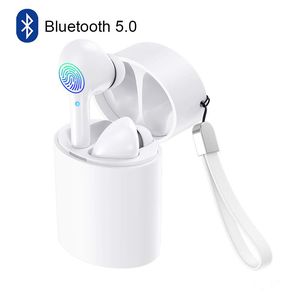
Description
Features:
1.Bluetooth version: Realtek V5.0+EDR
2.Working range: up to 33 feets on open air
4.Playing time: 4-6 hours
5.Standby time: 100 hours
6.Charging Time: about 1-2 hour
8.Working temperature: -10 - 55 C
9.Compatible with Most bluetooth enabled Smartphones and devices
Multi-function Button:
Double click -- play / pause music,answer a call,hang up
Three click the left headset -- play the previous song
Three click the right headset -- play the next song
Long press the touch key -- reject call,activating Siri
Box Content:
2 x TWS Bluetooth Stereo Earphones(Left&Right)
1 x Charging Case
1 x Micro USB Charge Cable
1 x User Manual
Reset Steps:
1. Long press the touch key on both sides 5 seconds to turn off the earphone first,then keep to press 10 more seconds then release, the reset operation is completed.
2. Please put them into the charging case and take them out again(or long press the touch key about 5seconds you will hear a voice say power on.)
3. The headsets are entering paring mode, wait for a while and you will hear a voice say "tws connected". Then you can connect your device. If you device shows two earphones in the Bluetooth menu you will need to repeat the steps above as they are not paired with each other.
Twins Pairing:
1. Take out the earbuds,they will auto power on and pairing.
2. When one earbuds flash red and blue light,another not flash light,both earbuds pair successfully.
3. Turn on the Bluetooth on your device and search "TWS" to connect.When the led flash not flash,they pair successfully.
Single Pairing:
1. If you need pair with two phones,please take out and pair right earbud first.
2. After right earbuds paired successfully,then pair your left earbud.
Helose team the best customer services,if you have any questions about the product,please be free to ask,would be glad to help.
1.Bluetooth version: Realtek V5.0+EDR
2.Working range: up to 33 feets on open air
4.Playing time: 4-6 hours
5.Standby time: 100 hours
6.Charging Time: about 1-2 hour
8.Working temperature: -10 - 55 C
9.Compatible with Most bluetooth enabled Smartphones and devices
Multi-function Button:
Double click -- play / pause music,answer a call,hang up
Three click the left headset -- play the previous song
Three click the right headset -- play the next song
Long press the touch key -- reject call,activating Siri
Box Content:
2 x TWS Bluetooth Stereo Earphones(Left&Right)
1 x Charging Case
1 x Micro USB Charge Cable
1 x User Manual
Reset Steps:
1. Long press the touch key on both sides 5 seconds to turn off the earphone first,then keep to press 10 more seconds then release, the reset operation is completed.
2. Please put them into the charging case and take them out again(or long press the touch key about 5seconds you will hear a voice say power on.)
3. The headsets are entering paring mode, wait for a while and you will hear a voice say "tws connected". Then you can connect your device. If you device shows two earphones in the Bluetooth menu you will need to repeat the steps above as they are not paired with each other.
Twins Pairing:
1. Take out the earbuds,they will auto power on and pairing.
2. When one earbuds flash red and blue light,another not flash light,both earbuds pair successfully.
3. Turn on the Bluetooth on your device and search "TWS" to connect.When the led flash not flash,they pair successfully.
Single Pairing:
1. If you need pair with two phones,please take out and pair right earbud first.
2. After right earbuds paired successfully,then pair your left earbud.
Helose team the best customer services,if you have any questions about the product,please be free to ask,would be glad to help.
True Wireless Earbuds, Smart Touch Control Wireless Bluetooth 5.0 Headphones TWS in-Ear Headsets Built-in Microphone Noise Cancelling for iPhone Android with Charging Case White
Price is below average
Current Price
$31.99
Average
$32.95
Min Price
$31.99
Max Price
$33.9
Price dynamics
3%
Description
Features:
1.Bluetooth version: Realtek V5.0+EDR
2.Working range: up to 33 feets on open air
4.Playing time: 4-6 hours
5.Standby time: 100 hours
6.Charging Time: about 1-2 hour
8.Working temperature: -10 - 55 C
9.Compatible with Most bluetooth enabled Smartphones and devices
Multi-function Button:
Double click -- play / pause music,answer a call,hang up
Three click the left headset -- play the previous song
Three click the right headset -- play the next song
Long press the touch key -- reject call,activating Siri
Box Content:
2 x TWS Bluetooth Stereo Earphones(Left&Right)
1 x Charging Case
1 x Micro USB Charge Cable
1 x User Manual
Reset Steps:
1. Long press the touch key on both sides 5 seconds to turn off the earphone first,then keep to press 10 more seconds then release, the reset operation is completed.
2. Please put them into the charging case and take them out again(or long press the touch key about 5seconds you will hear a voice say power on.)
3. The headsets are entering paring mode, wait for a while and you will hear a voice say "tws connected". Then you can connect your device. If you device shows two earphones in the Bluetooth menu you will need to repeat the steps above as they are not paired with each other.
Twins Pairing:
1. Take out the earbuds,they will auto power on and pairing.
2. When one earbuds flash red and blue light,another not flash light,both earbuds pair successfully.
3. Turn on the Bluetooth on your device and search "TWS" to connect.When the led flash not flash,they pair successfully.
Single Pairing:
1. If you need pair with two phones,please take out and pair right earbud first.
2. After right earbuds paired successfully,then pair your left earbud.
Helose team the best customer services,if you have any questions about the product,please be free to ask,would be glad to help.
1.Bluetooth version: Realtek V5.0+EDR
2.Working range: up to 33 feets on open air
4.Playing time: 4-6 hours
5.Standby time: 100 hours
6.Charging Time: about 1-2 hour
8.Working temperature: -10 - 55 C
9.Compatible with Most bluetooth enabled Smartphones and devices
Multi-function Button:
Double click -- play / pause music,answer a call,hang up
Three click the left headset -- play the previous song
Three click the right headset -- play the next song
Long press the touch key -- reject call,activating Siri
Box Content:
2 x TWS Bluetooth Stereo Earphones(Left&Right)
1 x Charging Case
1 x Micro USB Charge Cable
1 x User Manual
Reset Steps:
1. Long press the touch key on both sides 5 seconds to turn off the earphone first,then keep to press 10 more seconds then release, the reset operation is completed.
2. Please put them into the charging case and take them out again(or long press the touch key about 5seconds you will hear a voice say power on.)
3. The headsets are entering paring mode, wait for a while and you will hear a voice say "tws connected". Then you can connect your device. If you device shows two earphones in the Bluetooth menu you will need to repeat the steps above as they are not paired with each other.
Twins Pairing:
1. Take out the earbuds,they will auto power on and pairing.
2. When one earbuds flash red and blue light,another not flash light,both earbuds pair successfully.
3. Turn on the Bluetooth on your device and search "TWS" to connect.When the led flash not flash,they pair successfully.
Single Pairing:
1. If you need pair with two phones,please take out and pair right earbud first.
2. After right earbuds paired successfully,then pair your left earbud.
Helose team the best customer services,if you have any questions about the product,please be free to ask,would be glad to help.
Price will be lower
in next 2 weeks
in next 2 weeks
According to the data, price will be lower in next two weeks, so not waste your money and track better price!
Product review & video
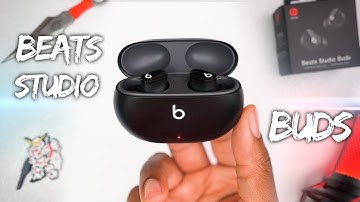
what's going on guys it's your average consumer and today we're going to be checking out the brand new beats studio buds now these are just announced today and you've probably seen them in a few places lebron james has been wearing them during nba games they've leaked a little bit but today we are going to officially take a look at them and first we're going to start off with the unboxing experience so here we've got the retail packaging for the beats studio buds and it's actually a pretty small box when you jump inside you're greeted with a few accessories like the usbc charging cable which i was actually a bit surprised to see instead of lightning and you also get some extra ear tips and behind those you'll see a quick start guide on how to use the buds and some paperwork behind it nothing too special with the paperwork here but there is a beat sticker included if you care about that


Similar products



































