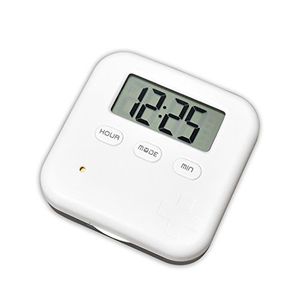
Description
Specification:
6 Compartments Size: 93x65x21 mm
4 Compartments Size: 65x65x21 mm
Net Weight: 50 g
Color: Black, Blue
Material: ABS + PP+ PC
Standard: Food Grade Material
Battery: CR2032-3V button cell battery
Battery Life: 1 Year
Operation manual:
【Clock Mode】
1. Long press "MODE" button and start to set the time.
2. Press "HOUR" / "MINUTE" button to set the time.
3. Press "MODE" button again to finish the setup.
●Press the "HOUR" button to change the 12/24 hour format.
【Alarm Mode】
1. Press the "MODE" button to switch the alarm mode.
2. Select the corresponding alarm, long press the "MODE" button to set the alarm time.
●The seted alarm will be displayed on the clock interface.
【Turn off the alarm】
1. Press the "MODE" button to switch the alarm mode.
2. Select the appropriate alarm, press the "MINUTE" button to turn off the alarm.
●The alarm clock has a memory function. Press the "MINUTE" button again to restart the alarm and do not need to reset.
【Countdown function】
1. Press the "MODE" button to switch the countdown mode.
2. Long press "MODE" button to set the countdown time. (Max.: 23:59')
3. Press the "MINUTE" key to start / pause the countdown.
Package included:
1 * Digital Pillbox
1 * Manual
6 Compartments Size: 93x65x21 mm
4 Compartments Size: 65x65x21 mm
Net Weight: 50 g
Color: Black, Blue
Material: ABS + PP+ PC
Standard: Food Grade Material
Battery: CR2032-3V button cell battery
Battery Life: 1 Year
Operation manual:
【Clock Mode】
1. Long press "MODE" button and start to set the time.
2. Press "HOUR" / "MINUTE" button to set the time.
3. Press "MODE" button again to finish the setup.
●Press the "HOUR" button to change the 12/24 hour format.
【Alarm Mode】
1. Press the "MODE" button to switch the alarm mode.
2. Select the corresponding alarm, long press the "MODE" button to set the alarm time.
●The seted alarm will be displayed on the clock interface.
【Turn off the alarm】
1. Press the "MODE" button to switch the alarm mode.
2. Select the appropriate alarm, press the "MINUTE" button to turn off the alarm.
●The alarm clock has a memory function. Press the "MINUTE" button again to restart the alarm and do not need to reset.
【Countdown function】
1. Press the "MODE" button to switch the countdown mode.
2. Long press "MODE" button to set the countdown time. (Max.: 23:59')
3. Press the "MINUTE" key to start / pause the countdown.
Package included:
1 * Digital Pillbox
1 * Manual
U-Trak Pill Box Alarm Pill Organizer Mini Portable Daily Pill Case with Digital Alarm Clock Reminder for Pills/Vitamin/Supplements Travel Outdoor 4 Compartments Black
Current Price
$11.99
Average
$10.99
Min Price
$8.99
Max Price
$11.99
Price dynamics
8%
Description
Specification:
6 Compartments Size: 93x65x21 mm
4 Compartments Size: 65x65x21 mm
Net Weight: 50 g
Color: Black, Blue
Material: ABS + PP+ PC
Standard: Food Grade Material
Battery: CR2032-3V button cell battery
Battery Life: 1 Year
Operation manual:
【Clock Mode】
1. Long press "MODE" button and start to set the time.
2. Press "HOUR" / "MINUTE" button to set the time.
3. Press "MODE" button again to finish the setup.
●Press the "HOUR" button to change the 12/24 hour format.
【Alarm Mode】
1. Press the "MODE" button to switch the alarm mode.
2. Select the corresponding alarm, long press the "MODE" button to set the alarm time.
●The seted alarm will be displayed on the clock interface.
【Turn off the alarm】
1. Press the "MODE" button to switch the alarm mode.
2. Select the appropriate alarm, press the "MINUTE" button to turn off the alarm.
●The alarm clock has a memory function. Press the "MINUTE" button again to restart the alarm and do not need to reset.
【Countdown function】
1. Press the "MODE" button to switch the countdown mode.
2. Long press "MODE" button to set the countdown time. (Max.: 23:59')
3. Press the "MINUTE" key to start / pause the countdown.
Package included:
1 * Digital Pillbox
1 * Manual
6 Compartments Size: 93x65x21 mm
4 Compartments Size: 65x65x21 mm
Net Weight: 50 g
Color: Black, Blue
Material: ABS + PP+ PC
Standard: Food Grade Material
Battery: CR2032-3V button cell battery
Battery Life: 1 Year
Operation manual:
【Clock Mode】
1. Long press "MODE" button and start to set the time.
2. Press "HOUR" / "MINUTE" button to set the time.
3. Press "MODE" button again to finish the setup.
●Press the "HOUR" button to change the 12/24 hour format.
【Alarm Mode】
1. Press the "MODE" button to switch the alarm mode.
2. Select the corresponding alarm, long press the "MODE" button to set the alarm time.
●The seted alarm will be displayed on the clock interface.
【Turn off the alarm】
1. Press the "MODE" button to switch the alarm mode.
2. Select the appropriate alarm, press the "MINUTE" button to turn off the alarm.
●The alarm clock has a memory function. Press the "MINUTE" button again to restart the alarm and do not need to reset.
【Countdown function】
1. Press the "MODE" button to switch the countdown mode.
2. Long press "MODE" button to set the countdown time. (Max.: 23:59')
3. Press the "MINUTE" key to start / pause the countdown.
Package included:
1 * Digital Pillbox
1 * Manual
Price will be lower
in next 2 weeks
in next 2 weeks
According to the data, price will be lower in next two weeks, so not waste your money and track better price!

Similar products