Description
Specifications:
Material: Aluminum alloys
Plug & Play: Yes
Dimensions: 5.0*2.6*0.6 inches
Cable Length: 6.8 inches
Weight: 4.2 Oz
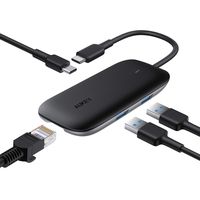
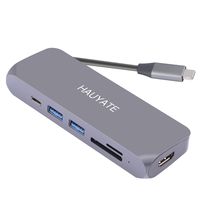
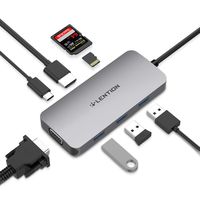
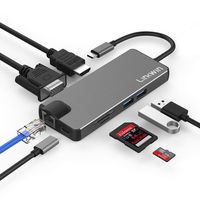
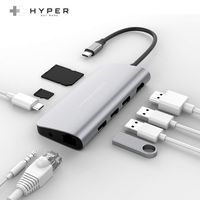
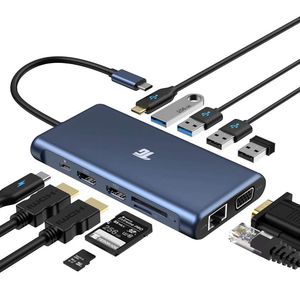
1 x PD Charging Port [100W power delivery]
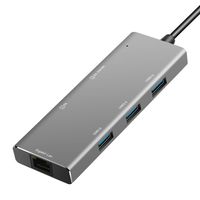
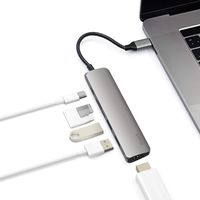
2 x HDMI Port [up to 4k resolution]
1 x VGA Port [up to 1080p resolution]
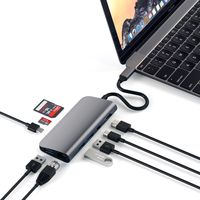
1 x TF Card Slot [up to 5Gbps]
1 x SD Card Slot [up to 5Gbps]
1 x Ethernet/RJ-45 Port [10/100/1000M]
1 x USB Type-C Port 3.0 [up to 5Gbps]
2 x USB Type-A Port 3.0 [up to 5Gbps]
2 x USB Type-A Port 2.0 [up to 4Mbps]
Compatible Devices:(Not a full list)
Apple MacBook Pro (2016 / 2017 / 2018 / 2019)
Apple MacBook Air (2018 / 2019)
Apple iMac / iMac Pro (21.5 in & 27 in)
iPad Pro 2018 / 2019 (with iPad OS 13.0 beta or above)
Google Chromebook Pixel (2016 / 2017)
HUAWEI: MateBook / X / X Pro / E
Dell: XPS13 / XPS15
Lenovo: Yoga Pro / Think pad/Mlix 720
HP: Pavlion / EliteBook Folio G1
Microsoft: Surface Book 2
*Please ensure that your laptop is equipped with a USB-C port which supports Display Alt mode. If you’re not sure, our customer service is very glad to help.
Incompatible Devices:(Not a full list)
Nintendo Switch
Apple USB Super Drive
Note:
*Triple Display: When using MST with three external monitors, one of your four screens will turn off. We recommend you to user HDMI ports.
*If you want to use three external monitors at the same time, turn off your laptop screen by clicking “second screen only” in your setting.
*We highly recommend you to use ONLY ONE hard drive and plug your power adapter into the hub.
*Charging speed depends on your power adapter. Please use 72W or above adapter for optimal charging experience.
Material: Aluminum alloys
Plug & Play: Yes
Dimensions: 5.0*2.6*0.6 inches
Cable Length: 6.8 inches
Weight: 4.2 Oz
1 x PD Charging Port [100W power delivery]
2 x HDMI Port [up to 4k resolution]
1 x VGA Port [up to 1080p resolution]
1 x TF Card Slot [up to 5Gbps]
1 x SD Card Slot [up to 5Gbps]
1 x Ethernet/RJ-45 Port [10/100/1000M]
1 x USB Type-C Port 3.0 [up to 5Gbps]
2 x USB Type-A Port 3.0 [up to 5Gbps]
2 x USB Type-A Port 2.0 [up to 4Mbps]
Compatible Devices:(Not a full list)
Apple MacBook Pro (2016 / 2017 / 2018 / 2019)
Apple MacBook Air (2018 / 2019)
Apple iMac / iMac Pro (21.5 in & 27 in)
iPad Pro 2018 / 2019 (with iPad OS 13.0 beta or above)
Google Chromebook Pixel (2016 / 2017)
HUAWEI: MateBook / X / X Pro / E
Dell: XPS13 / XPS15
Lenovo: Yoga Pro / Think pad/Mlix 720
HP: Pavlion / EliteBook Folio G1
Microsoft: Surface Book 2
*Please ensure that your laptop is equipped with a USB-C port which supports Display Alt mode. If you’re not sure, our customer service is very glad to help.
Incompatible Devices:(Not a full list)
Nintendo Switch
Apple USB Super Drive
Note:
*Triple Display: When using MST with three external monitors, one of your four screens will turn off. We recommend you to user HDMI ports.
*If you want to use three external monitors at the same time, turn off your laptop screen by clicking “second screen only” in your setting.
*We highly recommend you to use ONLY ONE hard drive and plug your power adapter into the hub.
*Charging speed depends on your power adapter. Please use 72W or above adapter for optimal charging experience.
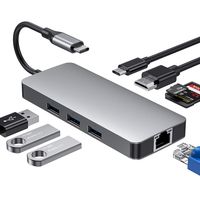
USB C Hub, USB C Adapter, Tiergrade 12 in 1 Triple Display Adapter with Dual 4K HDMI, VGA, 100W Pd 3.0, RJ45 Ethernet, USB-A USB-C Ports, Tf/SD Card Reader for MacBook and Type-C Laptops
Current Price
$79.99
Average
$79.99
Min Price
$79.99
Max Price
$79.99
Description
Specifications:
Material: Aluminum alloys
Plug & Play: Yes
Dimensions: 5.0*2.6*0.6 inches
Cable Length: 6.8 inches
Weight: 4.2 Oz
1 x PD Charging Port [100W power delivery]
2 x HDMI Port [up to 4k resolution]
1 x VGA Port [up to 1080p resolution]
1 x TF Card Slot [up to 5Gbps]
1 x SD Card Slot [up to 5Gbps]
1 x Ethernet/RJ-45 Port [10/100/1000M]
1 x USB Type-C Port 3.0 [up to 5Gbps]
2 x USB Type-A Port 3.0 [up to 5Gbps]
2 x USB Type-A Port 2.0 [up to 4Mbps]
Compatible Devices:(Not a full list)
Apple MacBook Pro (2016 / 2017 / 2018 / 2019)
Apple MacBook Air (2018 / 2019)
Apple iMac / iMac Pro (21.5 in & 27 in)
iPad Pro 2018 / 2019 (with iPad OS 13.0 beta or above)
Google Chromebook Pixel (2016 / 2017)
HUAWEI: MateBook / X / X Pro / E
Dell: XPS13 / XPS15
Lenovo: Yoga Pro / Think pad/Mlix 720
HP: Pavlion / EliteBook Folio G1
Microsoft: Surface Book 2
*Please ensure that your laptop is equipped with a USB-C port which supports Display Alt mode. If you’re not sure, our customer service is very glad to help.
Incompatible Devices:(Not a full list)
Nintendo Switch
Apple USB Super Drive
Note:
*Triple Display: When using MST with three external monitors, one of your four screens will turn off. We recommend you to user HDMI ports.
*If you want to use three external monitors at the same time, turn off your laptop screen by clicking “second screen only” in your setting.
*We highly recommend you to use ONLY ONE hard drive and plug your power adapter into the hub.
*Charging speed depends on your power adapter. Please use 72W or above adapter for optimal charging experience.
Material: Aluminum alloys
Plug & Play: Yes
Dimensions: 5.0*2.6*0.6 inches
Cable Length: 6.8 inches
Weight: 4.2 Oz
1 x PD Charging Port [100W power delivery]
2 x HDMI Port [up to 4k resolution]
1 x VGA Port [up to 1080p resolution]
1 x TF Card Slot [up to 5Gbps]
1 x SD Card Slot [up to 5Gbps]
1 x Ethernet/RJ-45 Port [10/100/1000M]
1 x USB Type-C Port 3.0 [up to 5Gbps]
2 x USB Type-A Port 3.0 [up to 5Gbps]
2 x USB Type-A Port 2.0 [up to 4Mbps]
Compatible Devices:(Not a full list)
Apple MacBook Pro (2016 / 2017 / 2018 / 2019)
Apple MacBook Air (2018 / 2019)
Apple iMac / iMac Pro (21.5 in & 27 in)
iPad Pro 2018 / 2019 (with iPad OS 13.0 beta or above)
Google Chromebook Pixel (2016 / 2017)
HUAWEI: MateBook / X / X Pro / E
Dell: XPS13 / XPS15
Lenovo: Yoga Pro / Think pad/Mlix 720
HP: Pavlion / EliteBook Folio G1
Microsoft: Surface Book 2
*Please ensure that your laptop is equipped with a USB-C port which supports Display Alt mode. If you’re not sure, our customer service is very glad to help.
Incompatible Devices:(Not a full list)
Nintendo Switch
Apple USB Super Drive
Note:
*Triple Display: When using MST with three external monitors, one of your four screens will turn off. We recommend you to user HDMI ports.
*If you want to use three external monitors at the same time, turn off your laptop screen by clicking “second screen only” in your setting.
*We highly recommend you to use ONLY ONE hard drive and plug your power adapter into the hub.
*Charging speed depends on your power adapter. Please use 72W or above adapter for optimal charging experience.
Price will be lower
in next 2 weeks
in next 2 weeks
According to the data, price will be lower in next two weeks, so not waste your money and track better price!
Product review & video
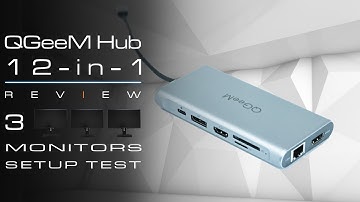
get everyone be asian day here one of my viewers from one of my videos requested me to have a look at this company called qgm now this company mostly makes adapters cables and port converters now the one that we're really interested is the port converters and this is one of the things that i've been requesting from my channel a lot is about docking stations or docking ports so this is why i actually went and reached out to that company to see if i can get any products for review now after a couple of months i actually did say they were going to send me some products but i have not received them yet after i think now about cost about three months i've kind of given up i then actually ordered the products myself to on your behalf to so i can test it out after two months of shipping it finally arrived in australia so this is the 12 in one usbc multi-converter port so i chose this one speci

Similar products