Description
the line, if the navigation host Only one square control line, please connect the receiving box KEY1, KEY2 line to the navigation at the same time.
4. Enter the DVD navigation settings to find the multi-function button learning (steering wheel setting), press and hold the button to learn the corresponding function (for details, please refer to the DVD navigation manual)
5. Enter Android navigation or DVD navigation (steering wheel settings, or steering wheel learning interface) volume -, volume +, mute, previous song, next song 5 buttons together for 10 seconds to pair, after successful pairing, square control receiving From the row of plugs, you can see that a red light will be on, which proves that the pairing has been successful (you can see the red light in the small hole of the square control receiver at night). The button on the phone and the phone is the same as the front. Then enter Android navigation or DVD navigation (steering wheel settings, or steering wheel learning interface) for each key learning
Notes:
1. The receiving box should straighten the antenna as close as possible to the steering wheel. Some manufacturers may interfere with the reception, so try to leave the navigation position close to the steering wheel position, which can greatly improve the receiving effect.
2. When operating the button, press and hold the button for more than 0.5 seconds to improve the button recognition ability.
3. Do not connect the positive and negative poles of the receiving box power supply. The receiving port should be treated with menopause to avoid damage to the equipment.
Specifications:
Color: Black
Material: ABS
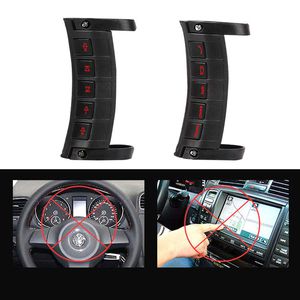
Product Size: Shown as pic.
Package Size: 16*14*10cm / 6.3*5.51*3.9in
Package Weight: 160g / 5.64oz
Package List:
1 * Receive Box
2 * Button Control
1 * Power Cord Set
2 * Screws Set
1 * User Manual
4. Enter the DVD navigation settings to find the multi-function button learning (steering wheel setting), press and hold the button to learn the corresponding function (for details, please refer to the DVD navigation manual)
5. Enter Android navigation or DVD navigation (steering wheel settings, or steering wheel learning interface) volume -, volume +, mute, previous song, next song 5 buttons together for 10 seconds to pair, after successful pairing, square control receiving From the row of plugs, you can see that a red light will be on, which proves that the pairing has been successful (you can see the red light in the small hole of the square control receiver at night). The button on the phone and the phone is the same as the front. Then enter Android navigation or DVD navigation (steering wheel settings, or steering wheel learning interface) for each key learning
Notes:
1. The receiving box should straighten the antenna as close as possible to the steering wheel. Some manufacturers may interfere with the reception, so try to leave the navigation position close to the steering wheel position, which can greatly improve the receiving effect.
2. When operating the button, press and hold the button for more than 0.5 seconds to improve the button recognition ability.
3. Do not connect the positive and negative poles of the receiving box power supply. The receiving port should be treated with menopause to avoid damage to the equipment.
Specifications:
Color: Black
Material: ABS
Product Size: Shown as pic.
Package Size: 16*14*10cm / 6.3*5.51*3.9in
Package Weight: 160g / 5.64oz
Package List:
1 * Receive Box
2 * Button Control
1 * Power Cord Set
2 * Screws Set
1 * User Manual
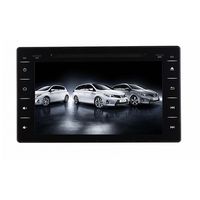
Universal Car Steering Wheel Remote Control Wireless Multi-Function DVD Navigation Button Control for Android Windows Ce System Player
Current Price
$35.18
Average
$35.18
Min Price
$35.18
Max Price
$35.18
Description
the line, if the navigation host Only one square control line, please connect the receiving box KEY1, KEY2 line to the navigation at the same time.
4. Enter the DVD navigation settings to find the multi-function button learning (steering wheel setting), press and hold the button to learn the corresponding function (for details, please refer to the DVD navigation manual)
5. Enter Android navigation or DVD navigation (steering wheel settings, or steering wheel learning interface) volume -, volume +, mute, previous song, next song 5 buttons together for 10 seconds to pair, after successful pairing, square control receiving From the row of plugs, you can see that a red light will be on, which proves that the pairing has been successful (you can see the red light in the small hole of the square control receiver at night). The button on the phone and the phone is the same as the front. Then enter Android navigation or DVD navigation (steering wheel settings, or steering wheel learning interface) for each key learning
Notes:
1. The receiving box should straighten the antenna as close as possible to the steering wheel. Some manufacturers may interfere with the reception, so try to leave the navigation position close to the steering wheel position, which can greatly improve the receiving effect.
2. When operating the button, press and hold the button for more than 0.5 seconds to improve the button recognition ability.
3. Do not connect the positive and negative poles of the receiving box power supply. The receiving port should be treated with menopause to avoid damage to the equipment.
Specifications:
Color: Black
Material: ABS
Product Size: Shown as pic.
Package Size: 16*14*10cm / 6.3*5.51*3.9in
Package Weight: 160g / 5.64oz
Package List:
1 * Receive Box
2 * Button Control
1 * Power Cord Set
2 * Screws Set
1 * User Manual
4. Enter the DVD navigation settings to find the multi-function button learning (steering wheel setting), press and hold the button to learn the corresponding function (for details, please refer to the DVD navigation manual)
5. Enter Android navigation or DVD navigation (steering wheel settings, or steering wheel learning interface) volume -, volume +, mute, previous song, next song 5 buttons together for 10 seconds to pair, after successful pairing, square control receiving From the row of plugs, you can see that a red light will be on, which proves that the pairing has been successful (you can see the red light in the small hole of the square control receiver at night). The button on the phone and the phone is the same as the front. Then enter Android navigation or DVD navigation (steering wheel settings, or steering wheel learning interface) for each key learning
Notes:
1. The receiving box should straighten the antenna as close as possible to the steering wheel. Some manufacturers may interfere with the reception, so try to leave the navigation position close to the steering wheel position, which can greatly improve the receiving effect.
2. When operating the button, press and hold the button for more than 0.5 seconds to improve the button recognition ability.
3. Do not connect the positive and negative poles of the receiving box power supply. The receiving port should be treated with menopause to avoid damage to the equipment.
Specifications:
Color: Black
Material: ABS
Product Size: Shown as pic.
Package Size: 16*14*10cm / 6.3*5.51*3.9in
Package Weight: 160g / 5.64oz
Package List:
1 * Receive Box
2 * Button Control
1 * Power Cord Set
2 * Screws Set
1 * User Manual
Price will be lower
in next 2 weeks
in next 2 weeks
According to the data, price will be lower in next two weeks, so not waste your money and track better price!
Similar products