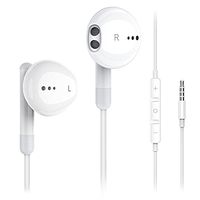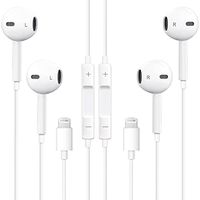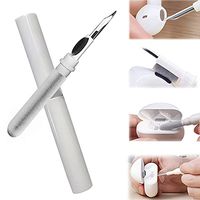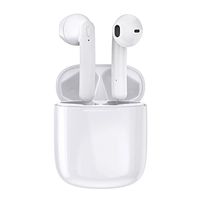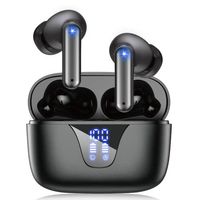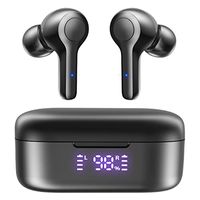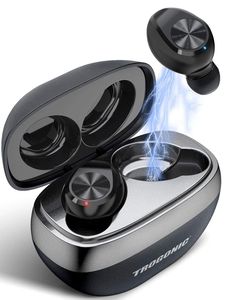
Description
How to Pair?
In the first time, need to take out 2 earbuds from charging case one by one (Left earbud first), and search [TROGONIC-TE1] on BT list of your device to connect. After it, when take out 2 earbuds one by one (Left earbud first), or the Main(L) earbud from charging case, they will connect automatically.
Note(Under Single-earbud Mode):
1.Suggest to use the Main (L) earbud to connect device.
2.Re-enter 2-earbuds mode, need to put 2 earbuds into charging case, then take them out one by one (Left earbud first).
How to Use Control Button?
Previous Song:Double press the button of Left earbud
Next Song:Dounble press the button of Right earbud
Play/ Pause: Press button of any earbud
Volume +: Triple press the Right button
Volume -:Triple press the left button
Answer/end call:Press once of one earbud
Decline Incoming call: Double press the button of one earbud
How to Use Siri or Bixby?
(IOS User ONLY) Hold press any button 1 second, awake Siri or Bixby
How to Reset?
(When 2 earbuds can't be paired & No sound of Right earbud & Indicator light of earbuds keep blink red&blue)
1. Clear records: Make sure both earbuds battery enough and pick out them from charging case, hold press both button 5 seconds to turn off, hold press again 15 seconds until indicators change from blink red and blue and pink to turn off.
2. Put them back into charging case to reactive it, red indicator turn on .
3. Delete the [TROGONIC-TE1] and [TROGONIC-TE1-R] BT device on your phone.
4. Take out 2 earbuds (Left earbuds first). Then research and connect [ TROGONIC-TE1 ] on BT list.
What You Should Pay Attention to?
When first use please check the earbuds contact pins and remove the plastic protection film.
In the first time, need to take out 2 earbuds from charging case one by one (Left earbud first), and search [TROGONIC-TE1] on BT list of your device to connect. After it, when take out 2 earbuds one by one (Left earbud first), or the Main(L) earbud from charging case, they will connect automatically.
Note(Under Single-earbud Mode):
1.Suggest to use the Main (L) earbud to connect device.
2.Re-enter 2-earbuds mode, need to put 2 earbuds into charging case, then take them out one by one (Left earbud first).
How to Use Control Button?
Previous Song:Double press the button of Left earbud
Next Song:Dounble press the button of Right earbud
Play/ Pause: Press button of any earbud
Volume +: Triple press the Right button
Volume -:Triple press the left button
Answer/end call:Press once of one earbud
Decline Incoming call: Double press the button of one earbud
How to Use Siri or Bixby?
(IOS User ONLY) Hold press any button 1 second, awake Siri or Bixby
How to Reset?
(When 2 earbuds can't be paired & No sound of Right earbud & Indicator light of earbuds keep blink red&blue)
1. Clear records: Make sure both earbuds battery enough and pick out them from charging case, hold press both button 5 seconds to turn off, hold press again 15 seconds until indicators change from blink red and blue and pink to turn off.
2. Put them back into charging case to reactive it, red indicator turn on .
3. Delete the [TROGONIC-TE1] and [TROGONIC-TE1-R] BT device on your phone.
4. Take out 2 earbuds (Left earbuds first). Then research and connect [ TROGONIC-TE1 ] on BT list.
What You Should Pay Attention to?
When first use please check the earbuds contact pins and remove the plastic protection film.
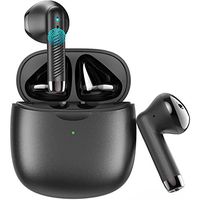
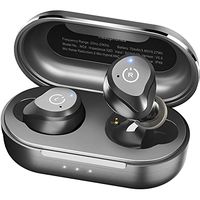
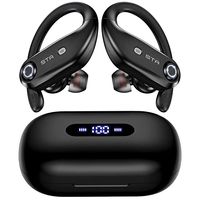
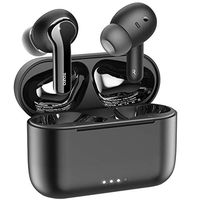
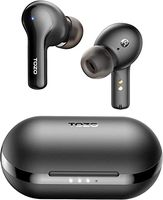
[Upgrade Version] Trogonic TE1 True Wireless Earbuds, IPX5 Waterproof Bluetooth Earbuds TWS 5.0 Cobblestone Design Charging Case, Deep Bass in-Ear with Silicon Mic Binaural Call Headphones for Sport
Current Price
$35.99
Average
$33.99
Min Price
$29.99
Max Price
$36.99
Price dynamics
6%
Description
How to Pair?
In the first time, need to take out 2 earbuds from charging case one by one (Left earbud first), and search [TROGONIC-TE1] on BT list of your device to connect. After it, when take out 2 earbuds one by one (Left earbud first), or the Main(L) earbud from charging case, they will connect automatically.
Note(Under Single-earbud Mode):
1.Suggest to use the Main (L) earbud to connect device.
2.Re-enter 2-earbuds mode, need to put 2 earbuds into charging case, then take them out one by one (Left earbud first).
How to Use Control Button?
Previous Song:Double press the button of Left earbud
Next Song:Dounble press the button of Right earbud
Play/ Pause: Press button of any earbud
Volume +: Triple press the Right button
Volume -:Triple press the left button
Answer/end call:Press once of one earbud
Decline Incoming call: Double press the button of one earbud
How to Use Siri or Bixby?
(IOS User ONLY) Hold press any button 1 second, awake Siri or Bixby
How to Reset?
(When 2 earbuds can't be paired & No sound of Right earbud & Indicator light of earbuds keep blink red&blue)
1. Clear records: Make sure both earbuds battery enough and pick out them from charging case, hold press both button 5 seconds to turn off, hold press again 15 seconds until indicators change from blink red and blue and pink to turn off.
2. Put them back into charging case to reactive it, red indicator turn on .
3. Delete the [TROGONIC-TE1] and [TROGONIC-TE1-R] BT device on your phone.
4. Take out 2 earbuds (Left earbuds first). Then research and connect [ TROGONIC-TE1 ] on BT list.
What You Should Pay Attention to?
When first use please check the earbuds contact pins and remove the plastic protection film.
In the first time, need to take out 2 earbuds from charging case one by one (Left earbud first), and search [TROGONIC-TE1] on BT list of your device to connect. After it, when take out 2 earbuds one by one (Left earbud first), or the Main(L) earbud from charging case, they will connect automatically.
Note(Under Single-earbud Mode):
1.Suggest to use the Main (L) earbud to connect device.
2.Re-enter 2-earbuds mode, need to put 2 earbuds into charging case, then take them out one by one (Left earbud first).
How to Use Control Button?
Previous Song:Double press the button of Left earbud
Next Song:Dounble press the button of Right earbud
Play/ Pause: Press button of any earbud
Volume +: Triple press the Right button
Volume -:Triple press the left button
Answer/end call:Press once of one earbud
Decline Incoming call: Double press the button of one earbud
How to Use Siri or Bixby?
(IOS User ONLY) Hold press any button 1 second, awake Siri or Bixby
How to Reset?
(When 2 earbuds can't be paired & No sound of Right earbud & Indicator light of earbuds keep blink red&blue)
1. Clear records: Make sure both earbuds battery enough and pick out them from charging case, hold press both button 5 seconds to turn off, hold press again 15 seconds until indicators change from blink red and blue and pink to turn off.
2. Put them back into charging case to reactive it, red indicator turn on .
3. Delete the [TROGONIC-TE1] and [TROGONIC-TE1-R] BT device on your phone.
4. Take out 2 earbuds (Left earbuds first). Then research and connect [ TROGONIC-TE1 ] on BT list.
What You Should Pay Attention to?
When first use please check the earbuds contact pins and remove the plastic protection film.
Price will be lower
in next 2 weeks
in next 2 weeks
According to the data, price will be lower in next two weeks, so not waste your money and track better price!
Product review & video
hey guys digital David its I'm excited to be unboxing or viewing for you also wireless earbuds right here they do connect via bluetooth so this is really cool I did receive these products to review my channel but any opinion expressed in this video is truly my own so that being said this is feel the music it's the tws dual ear training wireless earbuds and this is how they come packaged tree from amazon go ahead I'll throw a link in my video scription below go ahead check it out let me know what you think you can go see photos read some more tech details on these earbuds from Amazon and see the most accurate price so these are definitely for somebody that's on a budget and they're really cool so it's wireless earbuds seriously no ear no wire between the two buds it's truly wireless so they sync to each other than they seem to your phone and it has that charging case built-in which is re


Similar products