Description
Specification
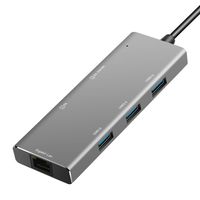
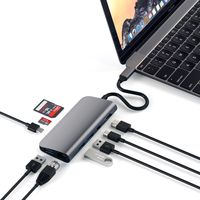
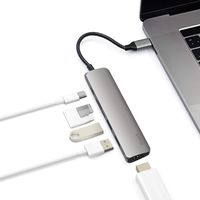
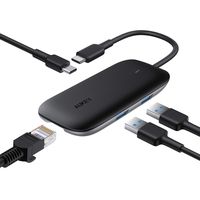
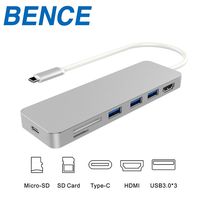
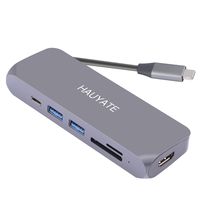
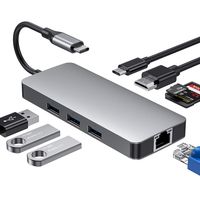
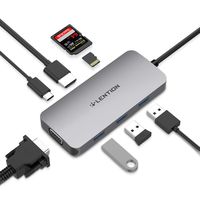
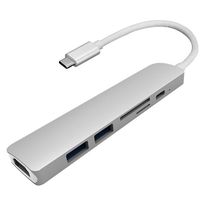
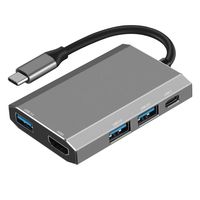
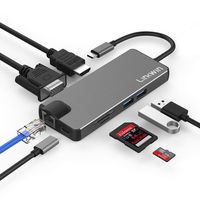
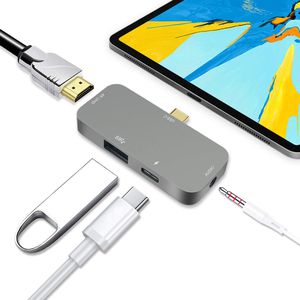
All in one : PD charging, 3.5mm headphone jack, USB 3.0 port, HDMI 4K@30HZ
HDMI Output Port : Provide full HD vedio and HD images up to 4K@30HZ(ipal Macbook Pro not support ) or 1080P@60HZ, but you have to know how high resolution your device supports.
USB 3.0 Port : up to 5Gbps data transfer
USB C PD Charging : only charing for your devices
Tested compatible Mini USB-C Hub:
1.MACBOOK 2015 12inch、 MACBOOK Pro 2016 2017 13 inch、 MACBOOK Pro 2018 13inch & 15inch、IPAD 2018 IPAD MINI IPAD PRO.
2. Samsung Galaxy S9 Plus/S9、 8 Plus/8、 Note 9/8
3.Huawei Mate10 Pro/Mate10、 Huawei Matebook E、 Huawei P20、 Huawei Mate 20 Pro/Mate20
4.Microsoft Chrome book、 Microsoft Lumia 950、 Microsoft Lumla 950XL
5.Lenovo ThinkPad P50、ThinkPad T470、Lenovo YOGA 5 Pro Lenovo YOGA 6 Pro
6.Dell XPS 13 Dell XPS 13 Dell P83G001
7.Nintendo Switch(This device requires Nintendo original charger power supply to use)
notes:
When connecting to the iPad
1.Due to the iPad device, when the audio is played, the device cannot adjust the audio size.
2.When reading the USB flash drive, you need firstly to change the name of the file in your flash drive:
(1)Home folder must be named "DCIM".
(2)A folder under your Home Folder must be named "100APPLE" or supported camera name.
(3)The image file name must be named "IMG_xxxx" (xxxx is any number and must have 4 numbers).
(4)The video file name must be named ''SAM_xxxx''(xxxx is any number and must have 4 numbers).
Make an example:
If your want to read your flash drive, you need to do it:
. DCIM/100APPLE/IMG_xxxx or . DCIM/100APPLE/SAM_xxxx
3.Can read camera memory card via USB port
4.Can't support the Mouse
All in one : PD charging, 3.5mm headphone jack, USB 3.0 port, HDMI 4K@30HZ
HDMI Output Port : Provide full HD vedio and HD images up to 4K@30HZ(ipal Macbook Pro not support ) or 1080P@60HZ, but you have to know how high resolution your device supports.
USB 3.0 Port : up to 5Gbps data transfer
USB C PD Charging : only charing for your devices
Tested compatible Mini USB-C Hub:
1.MACBOOK 2015 12inch、 MACBOOK Pro 2016 2017 13 inch、 MACBOOK Pro 2018 13inch & 15inch、IPAD 2018 IPAD MINI IPAD PRO.
2. Samsung Galaxy S9 Plus/S9、 8 Plus/8、 Note 9/8
3.Huawei Mate10 Pro/Mate10、 Huawei Matebook E、 Huawei P20、 Huawei Mate 20 Pro/Mate20
4.Microsoft Chrome book、 Microsoft Lumia 950、 Microsoft Lumla 950XL
5.Lenovo ThinkPad P50、ThinkPad T470、Lenovo YOGA 5 Pro Lenovo YOGA 6 Pro
6.Dell XPS 13 Dell XPS 13 Dell P83G001
7.Nintendo Switch(This device requires Nintendo original charger power supply to use)
notes:
When connecting to the iPad
1.Due to the iPad device, when the audio is played, the device cannot adjust the audio size.
2.When reading the USB flash drive, you need firstly to change the name of the file in your flash drive:
(1)Home folder must be named "DCIM".
(2)A folder under your Home Folder must be named "100APPLE" or supported camera name.
(3)The image file name must be named "IMG_xxxx" (xxxx is any number and must have 4 numbers).
(4)The video file name must be named ''SAM_xxxx''(xxxx is any number and must have 4 numbers).
Make an example:
If your want to read your flash drive, you need to do it:
. DCIM/100APPLE/IMG_xxxx or . DCIM/100APPLE/SAM_xxxx
3.Can read camera memory card via USB port
4.Can't support the Mouse
USB C Hub for iPad pro 2018, USB Type-C to 4K HDMI Adapter with 3.5mm Headphone Jack, USB 3.0 Ports, PD Charging for MacBook Pro 2018/2017/2016, MacBook Air 2018
Price is below average
Current Price
$28.99
Average
$33.95
Min Price
$28.99
Max Price
$39.99
Price dynamics
15%
Description
Specification
All in one : PD charging, 3.5mm headphone jack, USB 3.0 port, HDMI 4K@30HZ
HDMI Output Port : Provide full HD vedio and HD images up to 4K@30HZ(ipal Macbook Pro not support ) or 1080P@60HZ, but you have to know how high resolution your device supports.
USB 3.0 Port : up to 5Gbps data transfer
USB C PD Charging : only charing for your devices
Tested compatible Mini USB-C Hub:
1.MACBOOK 2015 12inch、 MACBOOK Pro 2016 2017 13 inch、 MACBOOK Pro 2018 13inch & 15inch、IPAD 2018 IPAD MINI IPAD PRO.
2. Samsung Galaxy S9 Plus/S9、 8 Plus/8、 Note 9/8
3.Huawei Mate10 Pro/Mate10、 Huawei Matebook E、 Huawei P20、 Huawei Mate 20 Pro/Mate20
4.Microsoft Chrome book、 Microsoft Lumia 950、 Microsoft Lumla 950XL
5.Lenovo ThinkPad P50、ThinkPad T470、Lenovo YOGA 5 Pro Lenovo YOGA 6 Pro
6.Dell XPS 13 Dell XPS 13 Dell P83G001
7.Nintendo Switch(This device requires Nintendo original charger power supply to use)
notes:
When connecting to the iPad
1.Due to the iPad device, when the audio is played, the device cannot adjust the audio size.
2.When reading the USB flash drive, you need firstly to change the name of the file in your flash drive:
(1)Home folder must be named "DCIM".
(2)A folder under your Home Folder must be named "100APPLE" or supported camera name.
(3)The image file name must be named "IMG_xxxx" (xxxx is any number and must have 4 numbers).
(4)The video file name must be named ''SAM_xxxx''(xxxx is any number and must have 4 numbers).
Make an example:
If your want to read your flash drive, you need to do it:
. DCIM/100APPLE/IMG_xxxx or . DCIM/100APPLE/SAM_xxxx
3.Can read camera memory card via USB port
4.Can't support the Mouse
All in one : PD charging, 3.5mm headphone jack, USB 3.0 port, HDMI 4K@30HZ
HDMI Output Port : Provide full HD vedio and HD images up to 4K@30HZ(ipal Macbook Pro not support ) or 1080P@60HZ, but you have to know how high resolution your device supports.
USB 3.0 Port : up to 5Gbps data transfer
USB C PD Charging : only charing for your devices
Tested compatible Mini USB-C Hub:
1.MACBOOK 2015 12inch、 MACBOOK Pro 2016 2017 13 inch、 MACBOOK Pro 2018 13inch & 15inch、IPAD 2018 IPAD MINI IPAD PRO.
2. Samsung Galaxy S9 Plus/S9、 8 Plus/8、 Note 9/8
3.Huawei Mate10 Pro/Mate10、 Huawei Matebook E、 Huawei P20、 Huawei Mate 20 Pro/Mate20
4.Microsoft Chrome book、 Microsoft Lumia 950、 Microsoft Lumla 950XL
5.Lenovo ThinkPad P50、ThinkPad T470、Lenovo YOGA 5 Pro Lenovo YOGA 6 Pro
6.Dell XPS 13 Dell XPS 13 Dell P83G001
7.Nintendo Switch(This device requires Nintendo original charger power supply to use)
notes:
When connecting to the iPad
1.Due to the iPad device, when the audio is played, the device cannot adjust the audio size.
2.When reading the USB flash drive, you need firstly to change the name of the file in your flash drive:
(1)Home folder must be named "DCIM".
(2)A folder under your Home Folder must be named "100APPLE" or supported camera name.
(3)The image file name must be named "IMG_xxxx" (xxxx is any number and must have 4 numbers).
(4)The video file name must be named ''SAM_xxxx''(xxxx is any number and must have 4 numbers).
Make an example:
If your want to read your flash drive, you need to do it:
. DCIM/100APPLE/IMG_xxxx or . DCIM/100APPLE/SAM_xxxx
3.Can read camera memory card via USB port
4.Can't support the Mouse
Price will be lower
in next 2 weeks
in next 2 weeks
According to the data, price will be lower in next two weeks, so not waste your money and track better price!
Similar products