Description
Increase Your Productivity
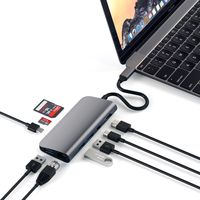
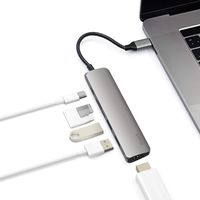
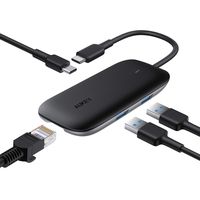
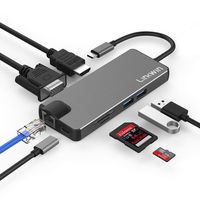
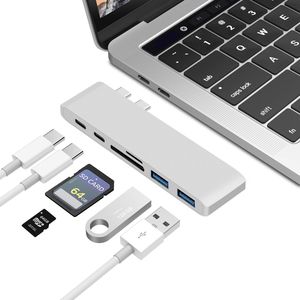
The type C Hub is designed for MacBook Pro 13" 15" 2016-2018, Macbook Air 2018, increases your productivity by expanding the female USB C port on your devices to multiple possibilities of connectivity. Easily connect multiple devices to your MacBook Pro at the same time.
The Function of Thunderbolt 3 Hub
The Thunderbolt 3 USB-C HUB port supports data transfer, video output, and charging while the traditional USB-C port only supports data transfer and does not support USB-C video output or USB-C charging.
Specifications:
Item: USBC Hub Adapter
Interfaces:
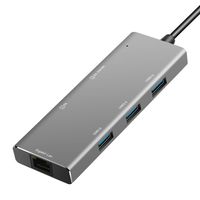
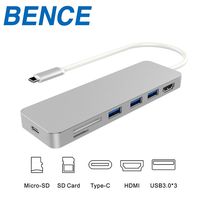
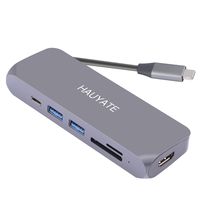
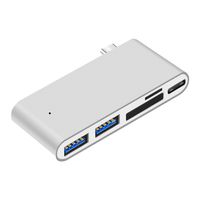
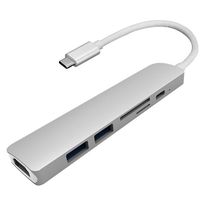
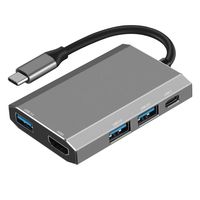
2 x USB 3.0 Type-A port (5Gb/s data speed)
1 x Thunderbolt 3 USB-C port (40Gb/s data, Max 100W Power Delivery)
1 x Standard USB-C port (5Gb/s data speed, Max 60W Power Delivery)
1 x Micro SD/TF card slot (Read/write speed 50MB/S)
1 x SD card slot (Read/write speed 50MB/S)
Material: CNC Aluminium Alloy
Dimension: 4.33 x 1.1 x 0.41 inches / 11 x 2.8 x 1.05 cm (L x W x H)
Weight: 2.11oz / 60g
Color: Silver
Warm Tips:
1. To ensure a stable connection, do not use this hub with high power equipment.
2. Kocbelle USB type C Hub is specially attached to the left side of all the MacBook Pro 2016-2018. It doesn't fit for the right side of MacBook Pro 2018.
3. System requirements: 2016/2017 MacBook Pro (13 or 15 in) with Mac OS Sierra or above operating systems.
4. Cables or other accessories are not included.
5. USB-A ports do not support Apple SuperDrive. But the USB c dock can support the Apple Super Drive through an USBC to USB adapter.
6.IF the power LED at the front is not lit or the hub has a connection problem/any other problems, a free replacement is assured.
Package Including:
1 x Mac Thunderbolt 3 Adapter
1 x User Guide
1 x Packing Box
The type C Hub is designed for MacBook Pro 13" 15" 2016-2018, Macbook Air 2018, increases your productivity by expanding the female USB C port on your devices to multiple possibilities of connectivity. Easily connect multiple devices to your MacBook Pro at the same time.
The Function of Thunderbolt 3 Hub
The Thunderbolt 3 USB-C HUB port supports data transfer, video output, and charging while the traditional USB-C port only supports data transfer and does not support USB-C video output or USB-C charging.
Specifications:
Item: USBC Hub Adapter
Interfaces:
2 x USB 3.0 Type-A port (5Gb/s data speed)
1 x Thunderbolt 3 USB-C port (40Gb/s data, Max 100W Power Delivery)
1 x Standard USB-C port (5Gb/s data speed, Max 60W Power Delivery)
1 x Micro SD/TF card slot (Read/write speed 50MB/S)
1 x SD card slot (Read/write speed 50MB/S)
Material: CNC Aluminium Alloy
Dimension: 4.33 x 1.1 x 0.41 inches / 11 x 2.8 x 1.05 cm (L x W x H)
Weight: 2.11oz / 60g
Color: Silver
Warm Tips:
1. To ensure a stable connection, do not use this hub with high power equipment.
2. Kocbelle USB type C Hub is specially attached to the left side of all the MacBook Pro 2016-2018. It doesn't fit for the right side of MacBook Pro 2018.
3. System requirements: 2016/2017 MacBook Pro (13 or 15 in) with Mac OS Sierra or above operating systems.
4. Cables or other accessories are not included.
5. USB-A ports do not support Apple SuperDrive. But the USB c dock can support the Apple Super Drive through an USBC to USB adapter.
6.IF the power LED at the front is not lit or the hub has a connection problem/any other problems, a free replacement is assured.
Package Including:
1 x Mac Thunderbolt 3 Adapter
1 x User Guide
1 x Packing Box
USB C Hub Multiport Adapter - C Dock USBC Hub 6-in-1 Compatible with MacBook Pro 2018/2017/2016, Thunderbolt 3 USB-C Port, USB C Port, 2 x USB 3.0 Ports, SD/Micro SD/TF Card Reader
Current Price
$19.99
Average
$19.99
Min Price
$19.99
Max Price
$19.99
Description
Increase Your Productivity
The type C Hub is designed for MacBook Pro 13" 15" 2016-2018, Macbook Air 2018, increases your productivity by expanding the female USB C port on your devices to multiple possibilities of connectivity. Easily connect multiple devices to your MacBook Pro at the same time.
The Function of Thunderbolt 3 Hub
The Thunderbolt 3 USB-C HUB port supports data transfer, video output, and charging while the traditional USB-C port only supports data transfer and does not support USB-C video output or USB-C charging.
Specifications:
Item: USBC Hub Adapter
Interfaces:
2 x USB 3.0 Type-A port (5Gb/s data speed)
1 x Thunderbolt 3 USB-C port (40Gb/s data, Max 100W Power Delivery)
1 x Standard USB-C port (5Gb/s data speed, Max 60W Power Delivery)
1 x Micro SD/TF card slot (Read/write speed 50MB/S)
1 x SD card slot (Read/write speed 50MB/S)
Material: CNC Aluminium Alloy
Dimension: 4.33 x 1.1 x 0.41 inches / 11 x 2.8 x 1.05 cm (L x W x H)
Weight: 2.11oz / 60g
Color: Silver
Warm Tips:
1. To ensure a stable connection, do not use this hub with high power equipment.
2. Kocbelle USB type C Hub is specially attached to the left side of all the MacBook Pro 2016-2018. It doesn't fit for the right side of MacBook Pro 2018.
3. System requirements: 2016/2017 MacBook Pro (13 or 15 in) with Mac OS Sierra or above operating systems.
4. Cables or other accessories are not included.
5. USB-A ports do not support Apple SuperDrive. But the USB c dock can support the Apple Super Drive through an USBC to USB adapter.
6.IF the power LED at the front is not lit or the hub has a connection problem/any other problems, a free replacement is assured.
Package Including:
1 x Mac Thunderbolt 3 Adapter
1 x User Guide
1 x Packing Box
The type C Hub is designed for MacBook Pro 13" 15" 2016-2018, Macbook Air 2018, increases your productivity by expanding the female USB C port on your devices to multiple possibilities of connectivity. Easily connect multiple devices to your MacBook Pro at the same time.
The Function of Thunderbolt 3 Hub
The Thunderbolt 3 USB-C HUB port supports data transfer, video output, and charging while the traditional USB-C port only supports data transfer and does not support USB-C video output or USB-C charging.
Specifications:
Item: USBC Hub Adapter
Interfaces:
2 x USB 3.0 Type-A port (5Gb/s data speed)
1 x Thunderbolt 3 USB-C port (40Gb/s data, Max 100W Power Delivery)
1 x Standard USB-C port (5Gb/s data speed, Max 60W Power Delivery)
1 x Micro SD/TF card slot (Read/write speed 50MB/S)
1 x SD card slot (Read/write speed 50MB/S)
Material: CNC Aluminium Alloy
Dimension: 4.33 x 1.1 x 0.41 inches / 11 x 2.8 x 1.05 cm (L x W x H)
Weight: 2.11oz / 60g
Color: Silver
Warm Tips:
1. To ensure a stable connection, do not use this hub with high power equipment.
2. Kocbelle USB type C Hub is specially attached to the left side of all the MacBook Pro 2016-2018. It doesn't fit for the right side of MacBook Pro 2018.
3. System requirements: 2016/2017 MacBook Pro (13 or 15 in) with Mac OS Sierra or above operating systems.
4. Cables or other accessories are not included.
5. USB-A ports do not support Apple SuperDrive. But the USB c dock can support the Apple Super Drive through an USBC to USB adapter.
6.IF the power LED at the front is not lit or the hub has a connection problem/any other problems, a free replacement is assured.
Package Including:
1 x Mac Thunderbolt 3 Adapter
1 x User Guide
1 x Packing Box
Price will be lower
in next 2 weeks
in next 2 weeks
According to the data, price will be lower in next two weeks, so not waste your money and track better price!
Product review & video
hey there what's up I hope you're staying safe in this video I'm gonna be showing you how you can get your MacBook Pro or MacBook Air to read HDMI ports SD cards micro SD cards and regular USB cables let's go as you are very well aware of especially if you own a MacBook Air or MacBook Pro one of the newer ones from the previous years I believe from like 2016 or 2017 till today all Mac books come with only USB type-c slot so as you can see here these are the new USB C slots that all of the Mac books come with so they don't come with regular USB ports anymore you know making it difficult to be able to connect the cables to connect your iPhone to charge or simply connect other devices that you want to either transfer data into or out to and also they don't come with HDMI ports in case you want to connect it to maybe your TV or a bigger display but in this video I'm gonna be showing you how


Similar products