Description
Specifications:
Material: Aluminum alloys
Plug & Play: Yes
Dimensions: 5.0*2.6*0.6 inches
Cable Length: 6.8 inches
Weight: 4.2 Oz
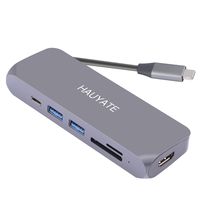
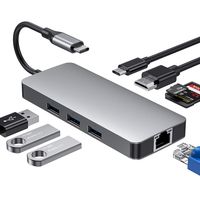
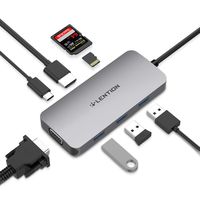
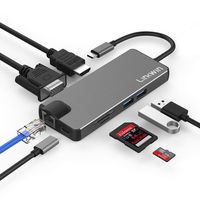
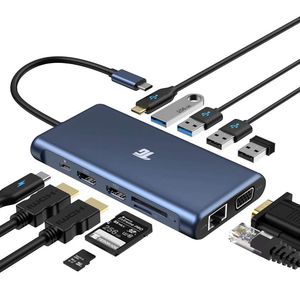
1 x PD Charging Port [100W power delivery]
2 x HDMI Port [up to 4k resolution]
1 x VGA Port [up to 1080p resolution]
1 x TF Card Slot [up to 5Gbps]
1 x SD Card Slot [up to 5Gbps]
1 x Ethernet/RJ-45 Port [10/100/1000M]
1 x USB Type-C Port 3.0 [up to 5Gbps]
2 x USB Type-A Port 3.0 [up to 5Gbps]
2 x USB Type-A Port 2.0 [up to 4Mbps]
Compatible Devices:(Not a full list)
Apple MacBook Pro (2016 / 2017 / 2018 / 2019)
Apple MacBook Air (2018 / 2019)
Apple iMac / iMac Pro (21.5 in & 27 in)
iPad Pro 2018 / 2019 (with iPad OS 13.0 beta or above)
Google Chromebook Pixel (2016 / 2017)
HUAWEI: MateBook / X / X Pro / E
Dell: XPS13 / XPS15
Lenovo: Yoga Pro / Think pad/Mlix 720
HP: Pavlion / EliteBook Folio G1
Microsoft: Surface Book 2
*Please ensure that your laptop is equipped with a USB-C port which supports Display Alt mode. If you’re not sure, our customer service is very glad to help.
Incompatible Devices:(Not a full list)
Nintendo Switch
Apple USB Super Drive
Note:
*Triple Display: When using MST with three external monitors, one of your four screens will turn off. We recommend you to user HDMI ports.
*If you want to use three external monitors at the same time, turn off your laptop screen by clicking “second screen only” in your setting.
*We highly recommend you to use ONLY ONE hard drive and plug your power adapter into the hub.
*Charging speed depends on your power adapter. Please use 72W or above adapter for optimal charging experience.
Material: Aluminum alloys
Plug & Play: Yes
Dimensions: 5.0*2.6*0.6 inches
Cable Length: 6.8 inches
Weight: 4.2 Oz
1 x PD Charging Port [100W power delivery]
2 x HDMI Port [up to 4k resolution]
1 x VGA Port [up to 1080p resolution]
1 x TF Card Slot [up to 5Gbps]
1 x SD Card Slot [up to 5Gbps]
1 x Ethernet/RJ-45 Port [10/100/1000M]
1 x USB Type-C Port 3.0 [up to 5Gbps]
2 x USB Type-A Port 3.0 [up to 5Gbps]
2 x USB Type-A Port 2.0 [up to 4Mbps]
Compatible Devices:(Not a full list)
Apple MacBook Pro (2016 / 2017 / 2018 / 2019)
Apple MacBook Air (2018 / 2019)
Apple iMac / iMac Pro (21.5 in & 27 in)
iPad Pro 2018 / 2019 (with iPad OS 13.0 beta or above)
Google Chromebook Pixel (2016 / 2017)
HUAWEI: MateBook / X / X Pro / E
Dell: XPS13 / XPS15
Lenovo: Yoga Pro / Think pad/Mlix 720
HP: Pavlion / EliteBook Folio G1
Microsoft: Surface Book 2
*Please ensure that your laptop is equipped with a USB-C port which supports Display Alt mode. If you’re not sure, our customer service is very glad to help.
Incompatible Devices:(Not a full list)
Nintendo Switch
Apple USB Super Drive
Note:
*Triple Display: When using MST with three external monitors, one of your four screens will turn off. We recommend you to user HDMI ports.
*If you want to use three external monitors at the same time, turn off your laptop screen by clicking “second screen only” in your setting.
*We highly recommend you to use ONLY ONE hard drive and plug your power adapter into the hub.
*Charging speed depends on your power adapter. Please use 72W or above adapter for optimal charging experience.
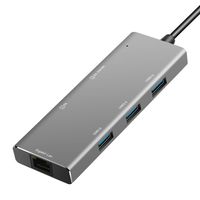
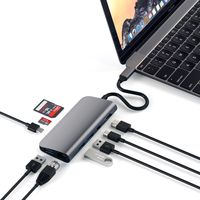
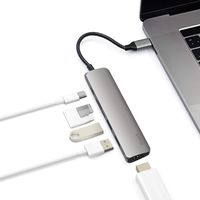
USB C Hub, USB C Adapter, Tiergrade 12 in 1 Triple Display Adapter with Dual 4K HDMI, VGA, 100W Pd 3.0, RJ45 Ethernet, USB-A USB-C Ports, Tf/SD Card Reader for MacBook and Type-C Laptops
Current Price
$79.99
Average
$79.99
Min Price
$79.99
Max Price
$79.99
Description
Specifications:
Material: Aluminum alloys
Plug & Play: Yes
Dimensions: 5.0*2.6*0.6 inches
Cable Length: 6.8 inches
Weight: 4.2 Oz
1 x PD Charging Port [100W power delivery]
2 x HDMI Port [up to 4k resolution]
1 x VGA Port [up to 1080p resolution]
1 x TF Card Slot [up to 5Gbps]
1 x SD Card Slot [up to 5Gbps]
1 x Ethernet/RJ-45 Port [10/100/1000M]
1 x USB Type-C Port 3.0 [up to 5Gbps]
2 x USB Type-A Port 3.0 [up to 5Gbps]
2 x USB Type-A Port 2.0 [up to 4Mbps]
Compatible Devices:(Not a full list)
Apple MacBook Pro (2016 / 2017 / 2018 / 2019)
Apple MacBook Air (2018 / 2019)
Apple iMac / iMac Pro (21.5 in & 27 in)
iPad Pro 2018 / 2019 (with iPad OS 13.0 beta or above)
Google Chromebook Pixel (2016 / 2017)
HUAWEI: MateBook / X / X Pro / E
Dell: XPS13 / XPS15
Lenovo: Yoga Pro / Think pad/Mlix 720
HP: Pavlion / EliteBook Folio G1
Microsoft: Surface Book 2
*Please ensure that your laptop is equipped with a USB-C port which supports Display Alt mode. If you’re not sure, our customer service is very glad to help.
Incompatible Devices:(Not a full list)
Nintendo Switch
Apple USB Super Drive
Note:
*Triple Display: When using MST with three external monitors, one of your four screens will turn off. We recommend you to user HDMI ports.
*If you want to use three external monitors at the same time, turn off your laptop screen by clicking “second screen only” in your setting.
*We highly recommend you to use ONLY ONE hard drive and plug your power adapter into the hub.
*Charging speed depends on your power adapter. Please use 72W or above adapter for optimal charging experience.
Material: Aluminum alloys
Plug & Play: Yes
Dimensions: 5.0*2.6*0.6 inches
Cable Length: 6.8 inches
Weight: 4.2 Oz
1 x PD Charging Port [100W power delivery]
2 x HDMI Port [up to 4k resolution]
1 x VGA Port [up to 1080p resolution]
1 x TF Card Slot [up to 5Gbps]
1 x SD Card Slot [up to 5Gbps]
1 x Ethernet/RJ-45 Port [10/100/1000M]
1 x USB Type-C Port 3.0 [up to 5Gbps]
2 x USB Type-A Port 3.0 [up to 5Gbps]
2 x USB Type-A Port 2.0 [up to 4Mbps]
Compatible Devices:(Not a full list)
Apple MacBook Pro (2016 / 2017 / 2018 / 2019)
Apple MacBook Air (2018 / 2019)
Apple iMac / iMac Pro (21.5 in & 27 in)
iPad Pro 2018 / 2019 (with iPad OS 13.0 beta or above)
Google Chromebook Pixel (2016 / 2017)
HUAWEI: MateBook / X / X Pro / E
Dell: XPS13 / XPS15
Lenovo: Yoga Pro / Think pad/Mlix 720
HP: Pavlion / EliteBook Folio G1
Microsoft: Surface Book 2
*Please ensure that your laptop is equipped with a USB-C port which supports Display Alt mode. If you’re not sure, our customer service is very glad to help.
Incompatible Devices:(Not a full list)
Nintendo Switch
Apple USB Super Drive
Note:
*Triple Display: When using MST with three external monitors, one of your four screens will turn off. We recommend you to user HDMI ports.
*If you want to use three external monitors at the same time, turn off your laptop screen by clicking “second screen only” in your setting.
*We highly recommend you to use ONLY ONE hard drive and plug your power adapter into the hub.
*Charging speed depends on your power adapter. Please use 72W or above adapter for optimal charging experience.
Price will be lower
in next 2 weeks
in next 2 weeks
According to the data, price will be lower in next two weeks, so not waste your money and track better price!
Similar products