- HomeElectronicsAccessories & SuppliesAudio & Video AccessoriesCables & InterconnectsVideo CablesHDMI Cables
Description
Features:
TPE cable, strong and durable, better heat insulation.
6.6 feet of length long enough for most usage needs.
Plug and play, no need driver and set up, no need personal hotspot, WIFI or bluetooth.
USB-C to HDMI Cable with Power Supply allow you charge the computer or mobile once power is short.
Compatible Devices:
Laptops:
for Apple MacBook 12" /MacBook Pro 2016/2017/2018 /Mac mini /MacBook Air 2018
iPad:
iPad Pro 11" 2018 / iPad Pro 12.9" 2018
Phones:
for Samsung Galaxy S8/S9/S10/S10E/S8 Plus/S8 Active /S9 Plus/S10 Plus/Note 8/Note 9
How to use:
1. Plug the adapter cable to the power supply first before use it.
2. Plug Type C data cable to your Cellphone or Tablet directly.
3. Plug HDMI cable to your TV(output device) and switch the TV(output device) to HDMI channel.
4. Please push the "trust" when your device show the message.
5. Wait 5 seconds or so, the synchronization screen is complete.
Notes:
Due to copyright protection, the usb c to HDMI cable won't support certain paid Apps, such as Netflix, iTunes, Amazon Prime videos, CBS CNNGO, BT SPORT, SBS, Periscope, Tonton, Hulu, Comcast tv, Xfinity, Vudu, DIRECTV, etc.
TPE cable, strong and durable, better heat insulation.
6.6 feet of length long enough for most usage needs.
Plug and play, no need driver and set up, no need personal hotspot, WIFI or bluetooth.
USB-C to HDMI Cable with Power Supply allow you charge the computer or mobile once power is short.
Compatible Devices:
Laptops:
for Apple MacBook 12" /MacBook Pro 2016/2017/2018 /Mac mini /MacBook Air 2018
iPad:
iPad Pro 11" 2018 / iPad Pro 12.9" 2018
Phones:
for Samsung Galaxy S8/S9/S10/S10E/S8 Plus/S8 Active /S9 Plus/S10 Plus/Note 8/Note 9
How to use:
1. Plug the adapter cable to the power supply first before use it.
2. Plug Type C data cable to your Cellphone or Tablet directly.
3. Plug HDMI cable to your TV(output device) and switch the TV(output device) to HDMI channel.
4. Please push the "trust" when your device show the message.
5. Wait 5 seconds or so, the synchronization screen is complete.
Notes:
Due to copyright protection, the usb c to HDMI cable won't support certain paid Apps, such as Netflix, iTunes, Amazon Prime videos, CBS CNNGO, BT SPORT, SBS, Periscope, Tonton, Hulu, Comcast tv, Xfinity, Vudu, DIRECTV, etc.
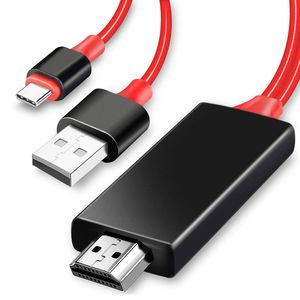
USB C to HDMI Cable, Moresky Type C to HDMI Cable 6.6ft Phone to TV Mirroring 1080P HDMI Connector Compatible with Samsung Galaxy S10 S9 S8 Plus Note 10 Note 9 Note 8, MacBook Pro/Air
Current Price
$14.99
Average
$14.99
Min Price
$14.99
Max Price
$14.99
Description
Features:
TPE cable, strong and durable, better heat insulation.
6.6 feet of length long enough for most usage needs.
Plug and play, no need driver and set up, no need personal hotspot, WIFI or bluetooth.
USB-C to HDMI Cable with Power Supply allow you charge the computer or mobile once power is short.
Compatible Devices:
Laptops:
for Apple MacBook 12" /MacBook Pro 2016/2017/2018 /Mac mini /MacBook Air 2018
iPad:
iPad Pro 11" 2018 / iPad Pro 12.9" 2018
Phones:
for Samsung Galaxy S8/S9/S10/S10E/S8 Plus/S8 Active /S9 Plus/S10 Plus/Note 8/Note 9
How to use:
1. Plug the adapter cable to the power supply first before use it.
2. Plug Type C data cable to your Cellphone or Tablet directly.
3. Plug HDMI cable to your TV(output device) and switch the TV(output device) to HDMI channel.
4. Please push the "trust" when your device show the message.
5. Wait 5 seconds or so, the synchronization screen is complete.
Notes:
Due to copyright protection, the usb c to HDMI cable won't support certain paid Apps, such as Netflix, iTunes, Amazon Prime videos, CBS CNNGO, BT SPORT, SBS, Periscope, Tonton, Hulu, Comcast tv, Xfinity, Vudu, DIRECTV, etc.
TPE cable, strong and durable, better heat insulation.
6.6 feet of length long enough for most usage needs.
Plug and play, no need driver and set up, no need personal hotspot, WIFI or bluetooth.
USB-C to HDMI Cable with Power Supply allow you charge the computer or mobile once power is short.
Compatible Devices:
Laptops:
for Apple MacBook 12" /MacBook Pro 2016/2017/2018 /Mac mini /MacBook Air 2018
iPad:
iPad Pro 11" 2018 / iPad Pro 12.9" 2018
Phones:
for Samsung Galaxy S8/S9/S10/S10E/S8 Plus/S8 Active /S9 Plus/S10 Plus/Note 8/Note 9
How to use:
1. Plug the adapter cable to the power supply first before use it.
2. Plug Type C data cable to your Cellphone or Tablet directly.
3. Plug HDMI cable to your TV(output device) and switch the TV(output device) to HDMI channel.
4. Please push the "trust" when your device show the message.
5. Wait 5 seconds or so, the synchronization screen is complete.
Notes:
Due to copyright protection, the usb c to HDMI cable won't support certain paid Apps, such as Netflix, iTunes, Amazon Prime videos, CBS CNNGO, BT SPORT, SBS, Periscope, Tonton, Hulu, Comcast tv, Xfinity, Vudu, DIRECTV, etc.
Price will be lower
in next 2 weeks
in next 2 weeks
According to the data, price will be lower in next two weeks, so not waste your money and track better price!

Similar products






































