Description
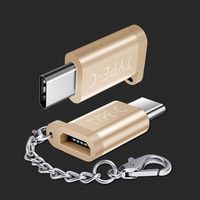
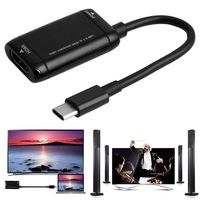
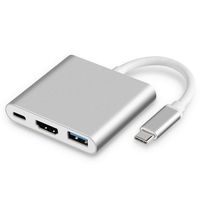
USB C to HDMI VGA adapter, Onten Type C to HDMI VGA Adapter with audio and indicator for Dell XPS 13 XPS 15 S9 to TV/Monitor/Projector- Black
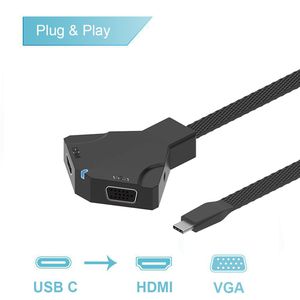
Type-C to HDMI VGA adapter is offer plug-and-play solution for connecting your laptop or notebook to an external display and other essential devices.
With HDMI and VGA output, it covers most of the devices, it gives you the flexibility to use a wide variety of monitors to expand your desktop and stay productive while managing multiple applications.
Compatible Devices(not all):
Laptops:
2017 / 2016 MacBook Pro, 2017 iMac, 2015 Macbook
Dell XPS 13/14/15
Microsoft Surface Pro 4
ChromeBook Pixel
HP Spectre X360 Pavilion X2 EliteBook Folio G1
LenovoYoga 910
Acer V15 Nitro
Samsung Notebook 9 900X5L-K01
Phones:
Samsung Galaxy S8 / S8 Plus / Note 8/ S9
Huawei Mate 10
How to use:
1. Connect the adapter to TV via hdmi cable( sold separately), and select the signal to the corresponding HDMI channel.
2.Connect the adapter to the USB-C devices, and wait a few seconds, the screen would be streamed to the TV.
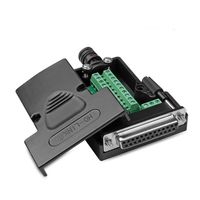
3. the same operation for the VGA output.
Note:
1. When hdmi and vga work at the same time, the highest resolution of HDMI only up to 1080P.
2. The two external monitors will show the same content when work at the same time.
3.Only support the Type C smart phones or Notebooks which support the DP Alt mode.
4. Some USB C ports only has charging or data transfer function, no video output function.
Please make sure USB C Port has video output function before purchase (For example, it can't work for AUSU UX360C, HP envy 13 )
5. To manually adjust resolution for yourMacBook / MacBook Pro, hold down the "option" key and then click "Scaled"
6. HDMI Cable and VGA Cable Sold Separately.
Type-C to HDMI VGA adapter is offer plug-and-play solution for connecting your laptop or notebook to an external display and other essential devices.
With HDMI and VGA output, it covers most of the devices, it gives you the flexibility to use a wide variety of monitors to expand your desktop and stay productive while managing multiple applications.
Compatible Devices(not all):
Laptops:
2017 / 2016 MacBook Pro, 2017 iMac, 2015 Macbook
Dell XPS 13/14/15
Microsoft Surface Pro 4
ChromeBook Pixel
HP Spectre X360 Pavilion X2 EliteBook Folio G1
LenovoYoga 910
Acer V15 Nitro
Samsung Notebook 9 900X5L-K01
Phones:
Samsung Galaxy S8 / S8 Plus / Note 8/ S9
Huawei Mate 10
How to use:
1. Connect the adapter to TV via hdmi cable( sold separately), and select the signal to the corresponding HDMI channel.
2.Connect the adapter to the USB-C devices, and wait a few seconds, the screen would be streamed to the TV.
3. the same operation for the VGA output.
Note:
1. When hdmi and vga work at the same time, the highest resolution of HDMI only up to 1080P.
2. The two external monitors will show the same content when work at the same time.
3.Only support the Type C smart phones or Notebooks which support the DP Alt mode.
4. Some USB C ports only has charging or data transfer function, no video output function.
Please make sure USB C Port has video output function before purchase (For example, it can't work for AUSU UX360C, HP envy 13 )
5. To manually adjust resolution for yourMacBook / MacBook Pro, hold down the "option" key and then click "Scaled"
6. HDMI Cable and VGA Cable Sold Separately.
USB C to HDMI VGA Adapter, Onten Type C to HDMI VGA Adapter with Audio and Indicator for Dell XPS 13 XPS 15 S9 to TV/Monitor/Projector-Black
Price is below average
Current Price
$12.99
Average
$15.3
Min Price
$9.99
Max Price
$26.99
Price dynamics
15%
Description
USB C to HDMI VGA adapter, Onten Type C to HDMI VGA Adapter with audio and indicator for Dell XPS 13 XPS 15 S9 to TV/Monitor/Projector- Black
Type-C to HDMI VGA adapter is offer plug-and-play solution for connecting your laptop or notebook to an external display and other essential devices.
With HDMI and VGA output, it covers most of the devices, it gives you the flexibility to use a wide variety of monitors to expand your desktop and stay productive while managing multiple applications.
Compatible Devices(not all):
Laptops:
2017 / 2016 MacBook Pro, 2017 iMac, 2015 Macbook
Dell XPS 13/14/15
Microsoft Surface Pro 4
ChromeBook Pixel
HP Spectre X360 Pavilion X2 EliteBook Folio G1
LenovoYoga 910
Acer V15 Nitro
Samsung Notebook 9 900X5L-K01
Phones:
Samsung Galaxy S8 / S8 Plus / Note 8/ S9
Huawei Mate 10
How to use:
1. Connect the adapter to TV via hdmi cable( sold separately), and select the signal to the corresponding HDMI channel.
2.Connect the adapter to the USB-C devices, and wait a few seconds, the screen would be streamed to the TV.
3. the same operation for the VGA output.
Note:
1. When hdmi and vga work at the same time, the highest resolution of HDMI only up to 1080P.
2. The two external monitors will show the same content when work at the same time.
3.Only support the Type C smart phones or Notebooks which support the DP Alt mode.
4. Some USB C ports only has charging or data transfer function, no video output function.
Please make sure USB C Port has video output function before purchase (For example, it can't work for AUSU UX360C, HP envy 13 )
5. To manually adjust resolution for yourMacBook / MacBook Pro, hold down the "option" key and then click "Scaled"
6. HDMI Cable and VGA Cable Sold Separately.
Type-C to HDMI VGA adapter is offer plug-and-play solution for connecting your laptop or notebook to an external display and other essential devices.
With HDMI and VGA output, it covers most of the devices, it gives you the flexibility to use a wide variety of monitors to expand your desktop and stay productive while managing multiple applications.
Compatible Devices(not all):
Laptops:
2017 / 2016 MacBook Pro, 2017 iMac, 2015 Macbook
Dell XPS 13/14/15
Microsoft Surface Pro 4
ChromeBook Pixel
HP Spectre X360 Pavilion X2 EliteBook Folio G1
LenovoYoga 910
Acer V15 Nitro
Samsung Notebook 9 900X5L-K01
Phones:
Samsung Galaxy S8 / S8 Plus / Note 8/ S9
Huawei Mate 10
How to use:
1. Connect the adapter to TV via hdmi cable( sold separately), and select the signal to the corresponding HDMI channel.
2.Connect the adapter to the USB-C devices, and wait a few seconds, the screen would be streamed to the TV.
3. the same operation for the VGA output.
Note:
1. When hdmi and vga work at the same time, the highest resolution of HDMI only up to 1080P.
2. The two external monitors will show the same content when work at the same time.
3.Only support the Type C smart phones or Notebooks which support the DP Alt mode.
4. Some USB C ports only has charging or data transfer function, no video output function.
Please make sure USB C Port has video output function before purchase (For example, it can't work for AUSU UX360C, HP envy 13 )
5. To manually adjust resolution for yourMacBook / MacBook Pro, hold down the "option" key and then click "Scaled"
6. HDMI Cable and VGA Cable Sold Separately.
Price will be lower
in next 2 weeks
in next 2 weeks
According to the data, price will be lower in next two weeks, so not waste your money and track better price!
Product review & video
everybody in this video I'm gonna show you how to get 4k resolution at 60 Hertz from your monitor maybe it's not a problem if you just bought a new laptop or desktop computer but if it's a relatively old stuff there might be some compatibility issues so before invest money and any monitor cables or adapters check the specs of your HDMI here is BC and display ports in order to get 4k at 60 Hertz you need at least HDMI 2.0 or DisplayPort 1.2 version you can also use Thunderbolt 3 or USB 3.0 ports which combine the feature of DisplayPort technology and of course you need a cpu and the graphics card that can handle 4k resolution so in my case I got 2019 they´ll 4k monitor which has one HDMI 2.0 port and two DisplayPort 1.2 version and I'm gonna connect that monitor to this 2016 Dell Inspiron which has Intel Core i5 6 a generation CPU and integrated intelligence which is capable of deliverin


Similar products