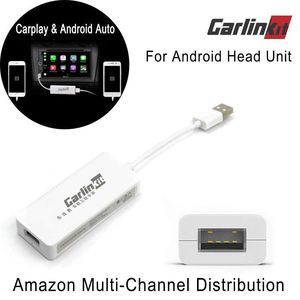
Description
Features:
Material: ABS material, ultrasonic compression
Upgrade method: Online upgrade
Operating system: Apple carplay, Android Auto
Support map: Google/WAZE/Gaode Maps
Support phone type: iPhoneX/8/8Plus/7/7Plus/6s/6splus/6/6plus/5s and android phone after 2014 years Car machine requirements: Andriod 4.2 or above.
Functions:
1.This carplay dongle can use your phone, without taking your hand off the wheel.
2.Support both Android and Apple system.
3.Control audio playback using voice commands.
4.Apple Car Play makes driving smarter (Tap the icons to take calls, check voicemails and text messages, or bring up maps).
5.Listen to your favorite songs using iTunes, Apple Music, or installed apps.
6 Additional, product main have Carplay,Carlife,Android Auto and Mobile Screen featureS and so on.
HOW TO INSTALL THE APK THEN USE THE USB CARPLAY DONGLE :
The APK:http://121.40.123.198:8080/autokit/autokit.apk
1. Need to prepare a USB flash drive, download it and send your APK file to the USB flash drive (the QR code on the package is also the download address)
2. Insert the USB flash drive into the USB port of the navigation machine, find the file management menu, select the APK file in the USB, install the APK, and after installation, the navigation opportunity comes out with an icon.
3. Plug our machine into the USB of the navigation machine, plug in the mobile phone data cable, connect the phone, wait a few seconds to connect.
If it can not be identified the USB Carplay Dongle, please insure:
1. The car has two USB, whether whether all test.
2. The mobile phone data cable needs original or good quality.
3. Open the APK first, then insert the product. See if there is any identification 4. Open the upper left corner and select Compatible.
5. Take the navigation machine apart. Two USB cable pairs are adjusted.
Material: ABS material, ultrasonic compression
Upgrade method: Online upgrade
Operating system: Apple carplay, Android Auto
Support map: Google/WAZE/Gaode Maps
Support phone type: iPhoneX/8/8Plus/7/7Plus/6s/6splus/6/6plus/5s and android phone after 2014 years Car machine requirements: Andriod 4.2 or above.
Functions:
1.This carplay dongle can use your phone, without taking your hand off the wheel.
2.Support both Android and Apple system.
3.Control audio playback using voice commands.
4.Apple Car Play makes driving smarter (Tap the icons to take calls, check voicemails and text messages, or bring up maps).
5.Listen to your favorite songs using iTunes, Apple Music, or installed apps.
6 Additional, product main have Carplay,Carlife,Android Auto and Mobile Screen featureS and so on.
HOW TO INSTALL THE APK THEN USE THE USB CARPLAY DONGLE :
The APK:http://121.40.123.198:8080/autokit/autokit.apk
1. Need to prepare a USB flash drive, download it and send your APK file to the USB flash drive (the QR code on the package is also the download address)
2. Insert the USB flash drive into the USB port of the navigation machine, find the file management menu, select the APK file in the USB, install the APK, and after installation, the navigation opportunity comes out with an icon.
3. Plug our machine into the USB of the navigation machine, plug in the mobile phone data cable, connect the phone, wait a few seconds to connect.
If it can not be identified the USB Carplay Dongle, please insure:
1. The car has two USB, whether whether all test.
2. The mobile phone data cable needs original or good quality.
3. Open the APK first, then insert the product. See if there is any identification 4. Open the upper left corner and select Compatible.
5. Take the navigation machine apart. Two USB cable pairs are adjusted.
USB Carplay Dongle,Carlinkit Mini Smartphone Link Receiver Adapter Compatible Android Car Auto Navigation Multimedia Player Support Touch and Voice Control(White)
Current Price
$59.99
Average
$59.99
Min Price
$59.99
Max Price
$59.99
Price dynamics
0%
Description
Features:
Material: ABS material, ultrasonic compression
Upgrade method: Online upgrade
Operating system: Apple carplay, Android Auto
Support map: Google/WAZE/Gaode Maps
Support phone type: iPhoneX/8/8Plus/7/7Plus/6s/6splus/6/6plus/5s and android phone after 2014 years Car machine requirements: Andriod 4.2 or above.
Functions:
1.This carplay dongle can use your phone, without taking your hand off the wheel.
2.Support both Android and Apple system.
3.Control audio playback using voice commands.
4.Apple Car Play makes driving smarter (Tap the icons to take calls, check voicemails and text messages, or bring up maps).
5.Listen to your favorite songs using iTunes, Apple Music, or installed apps.
6 Additional, product main have Carplay,Carlife,Android Auto and Mobile Screen featureS and so on.
HOW TO INSTALL THE APK THEN USE THE USB CARPLAY DONGLE :
The APK:http://121.40.123.198:8080/autokit/autokit.apk
1. Need to prepare a USB flash drive, download it and send your APK file to the USB flash drive (the QR code on the package is also the download address)
2. Insert the USB flash drive into the USB port of the navigation machine, find the file management menu, select the APK file in the USB, install the APK, and after installation, the navigation opportunity comes out with an icon.
3. Plug our machine into the USB of the navigation machine, plug in the mobile phone data cable, connect the phone, wait a few seconds to connect.
If it can not be identified the USB Carplay Dongle, please insure:
1. The car has two USB, whether whether all test.
2. The mobile phone data cable needs original or good quality.
3. Open the APK first, then insert the product. See if there is any identification 4. Open the upper left corner and select Compatible.
5. Take the navigation machine apart. Two USB cable pairs are adjusted.
Material: ABS material, ultrasonic compression
Upgrade method: Online upgrade
Operating system: Apple carplay, Android Auto
Support map: Google/WAZE/Gaode Maps
Support phone type: iPhoneX/8/8Plus/7/7Plus/6s/6splus/6/6plus/5s and android phone after 2014 years Car machine requirements: Andriod 4.2 or above.
Functions:
1.This carplay dongle can use your phone, without taking your hand off the wheel.
2.Support both Android and Apple system.
3.Control audio playback using voice commands.
4.Apple Car Play makes driving smarter (Tap the icons to take calls, check voicemails and text messages, or bring up maps).
5.Listen to your favorite songs using iTunes, Apple Music, or installed apps.
6 Additional, product main have Carplay,Carlife,Android Auto and Mobile Screen featureS and so on.
HOW TO INSTALL THE APK THEN USE THE USB CARPLAY DONGLE :
The APK:http://121.40.123.198:8080/autokit/autokit.apk
1. Need to prepare a USB flash drive, download it and send your APK file to the USB flash drive (the QR code on the package is also the download address)
2. Insert the USB flash drive into the USB port of the navigation machine, find the file management menu, select the APK file in the USB, install the APK, and after installation, the navigation opportunity comes out with an icon.
3. Plug our machine into the USB of the navigation machine, plug in the mobile phone data cable, connect the phone, wait a few seconds to connect.
If it can not be identified the USB Carplay Dongle, please insure:
1. The car has two USB, whether whether all test.
2. The mobile phone data cable needs original or good quality.
3. Open the APK first, then insert the product. See if there is any identification 4. Open the upper left corner and select Compatible.
5. Take the navigation machine apart. Two USB cable pairs are adjusted.
Price will be lower
in next 2 weeks
in next 2 weeks
According to the data, price will be lower in next two weeks, so not waste your money and track better price!
Product review & video
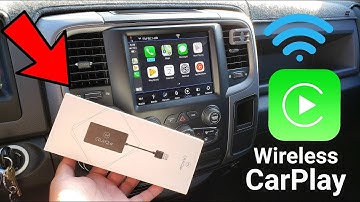
[Music] [Applause] what is going on youtubers here here from ma G and J today in this video I'm about to show you a very cool little item that I got from this company and it is called the C play to air and even though the price is not the most affordable out there I have seen some companies on Amazon with the prime service of course selling the same device but they don't have the same qualities as this particular one the one that you guys are seeing on this video is about 160 dollars approximately and basically what it does is that it provides wireless carplay from your smartphone to your car now this will only work with vehicles equipped with carplay and android auto from factory as you guys know I own the RAM 1500 it's a 2017 model and I got the radio from the 2018 model but it is considered a factory radio so for that reason this is supported on my Ram 1500 my brother was the first o


Similar products





































