Description
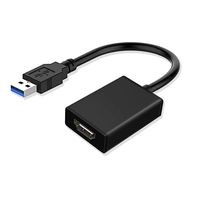
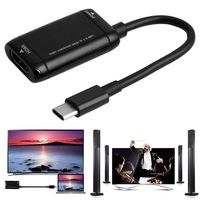
FOINNEX USB to HDMI Adapter with Audio and Video
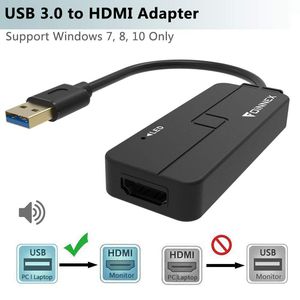
USB to HDMI converter Allows you connect a computer with USB 3.0 output to monitors, projector or HDTV with HDMI input to extend or mirror the desktop display
Features:
Interface: 1 x USB 3.0 port, 1 x HDMI port
Supports resolution up to 1920x1080@60Hz (1080P) over USB 3.0.
Extend or mirror your workstation to another screen.
Audio and video synchronous transmission
Instructions:
1.Connect a HDMI Cable (sold seperately) to the adapter, and connect the HDMI end to your monitor, USB end to PC's USB 3.0 port directly, then turn on your monitor and your PC.
2.Built-in driver Installation
Double click "computer". double click "FL2000DX" disk, then click the "FL2000-2.134054.0" to install, or you can download the driver from this link:https://support.frescologic.com/portal/kb/articles/latest-drivers
3.After the installation, you will be prompted to restart your computer. please unplug the USB end and click "Yes" to restart the computer.
4.Then you can duplicate or extend your display.
If your monitor is not displaying correctly, please change the screen resolution first.
Warming Tips:
1.For first time to use, you need install the drive first, or it can't work.
2.Only compatible with Windows 10/8.1/8/7, NOT support XP/Vista/Mac/Linux/Chrome OS.
3.If your computer only has a USB 2.0 port, DO NOT suggest using this cable. For the USB 2.0 port, the maximum resolution is only 800 * 600.
4. You may can not make it to work smoothly due to problems of driver installation, please feel free to contact us at service@foinnex.com, we will try our best to solve the problems.
USB to HDMI converter Allows you connect a computer with USB 3.0 output to monitors, projector or HDTV with HDMI input to extend or mirror the desktop display
Features:
Interface: 1 x USB 3.0 port, 1 x HDMI port
Supports resolution up to 1920x1080@60Hz (1080P) over USB 3.0.
Extend or mirror your workstation to another screen.
Audio and video synchronous transmission
Instructions:
1.Connect a HDMI Cable (sold seperately) to the adapter, and connect the HDMI end to your monitor, USB end to PC's USB 3.0 port directly, then turn on your monitor and your PC.
2.Built-in driver Installation
Double click "computer". double click "FL2000DX" disk, then click the "FL2000-2.134054.0" to install, or you can download the driver from this link:https://support.frescologic.com/portal/kb/articles/latest-drivers
3.After the installation, you will be prompted to restart your computer. please unplug the USB end and click "Yes" to restart the computer.
4.Then you can duplicate or extend your display.
If your monitor is not displaying correctly, please change the screen resolution first.
Warming Tips:
1.For first time to use, you need install the drive first, or it can't work.
2.Only compatible with Windows 10/8.1/8/7, NOT support XP/Vista/Mac/Linux/Chrome OS.
3.If your computer only has a USB 2.0 port, DO NOT suggest using this cable. For the USB 2.0 port, the maximum resolution is only 800 * 600.
4. You may can not make it to work smoothly due to problems of driver installation, please feel free to contact us at service@foinnex.com, we will try our best to solve the problems.
USB to HDMI Adapter Only Support Windows 10/8.1/8/7(NO XP/Vista/Mac OS),USB 3.0 to HDMI Converter/Connector with Audio Video HD 1080P for Surface Pro,PC,Laptop,Computer to TV,Monitor,Projector
Current Price
$21.99
Average
$21.99
Min Price
$21.99
Max Price
$21.99
Price dynamics
0%
Description
FOINNEX USB to HDMI Adapter with Audio and Video
USB to HDMI converter Allows you connect a computer with USB 3.0 output to monitors, projector or HDTV with HDMI input to extend or mirror the desktop display
Features:
Interface: 1 x USB 3.0 port, 1 x HDMI port
Supports resolution up to 1920x1080@60Hz (1080P) over USB 3.0.
Extend or mirror your workstation to another screen.
Audio and video synchronous transmission
Instructions:
1.Connect a HDMI Cable (sold seperately) to the adapter, and connect the HDMI end to your monitor, USB end to PC's USB 3.0 port directly, then turn on your monitor and your PC.
2.Built-in driver Installation
Double click "computer". double click "FL2000DX" disk, then click the "FL2000-2.134054.0" to install, or you can download the driver from this link:https://support.frescologic.com/portal/kb/articles/latest-drivers
3.After the installation, you will be prompted to restart your computer. please unplug the USB end and click "Yes" to restart the computer.
4.Then you can duplicate or extend your display.
If your monitor is not displaying correctly, please change the screen resolution first.
Warming Tips:
1.For first time to use, you need install the drive first, or it can't work.
2.Only compatible with Windows 10/8.1/8/7, NOT support XP/Vista/Mac/Linux/Chrome OS.
3.If your computer only has a USB 2.0 port, DO NOT suggest using this cable. For the USB 2.0 port, the maximum resolution is only 800 * 600.
4. You may can not make it to work smoothly due to problems of driver installation, please feel free to contact us at service@foinnex.com, we will try our best to solve the problems.
USB to HDMI converter Allows you connect a computer with USB 3.0 output to monitors, projector or HDTV with HDMI input to extend or mirror the desktop display
Features:
Interface: 1 x USB 3.0 port, 1 x HDMI port
Supports resolution up to 1920x1080@60Hz (1080P) over USB 3.0.
Extend or mirror your workstation to another screen.
Audio and video synchronous transmission
Instructions:
1.Connect a HDMI Cable (sold seperately) to the adapter, and connect the HDMI end to your monitor, USB end to PC's USB 3.0 port directly, then turn on your monitor and your PC.
2.Built-in driver Installation
Double click "computer". double click "FL2000DX" disk, then click the "FL2000-2.134054.0" to install, or you can download the driver from this link:https://support.frescologic.com/portal/kb/articles/latest-drivers
3.After the installation, you will be prompted to restart your computer. please unplug the USB end and click "Yes" to restart the computer.
4.Then you can duplicate or extend your display.
If your monitor is not displaying correctly, please change the screen resolution first.
Warming Tips:
1.For first time to use, you need install the drive first, or it can't work.
2.Only compatible with Windows 10/8.1/8/7, NOT support XP/Vista/Mac/Linux/Chrome OS.
3.If your computer only has a USB 2.0 port, DO NOT suggest using this cable. For the USB 2.0 port, the maximum resolution is only 800 * 600.
4. You may can not make it to work smoothly due to problems of driver installation, please feel free to contact us at service@foinnex.com, we will try our best to solve the problems.
Price will be lower
in next 2 weeks
in next 2 weeks
According to the data, price will be lower in next two weeks, so not waste your money and track better price!
Product review & video
hey guys welcome back to another video here we have just come with another new product and the product name is usb 3.0 to hdmi adapter so here we have a hdmi adapter itself and we have one driver cd for installing the driver so now let's see closely this product here we have our standard usb 3.0 mail port on the another end it's a hdmi port so now let's taste this product and i will show you how to use this product so guys as i said earlier like you have to just install the driver to run this adapter we have already copied the driver into our system now just install it so now you can see we have dialog box like please attach your device to this computer anytime after the installation has finished now just press ok finish it so now just connect this usb port here we have hdmi mail to mail cable where one end goes to your adapter and another end goes to your hdmi display okay now you can


Similar products