Description
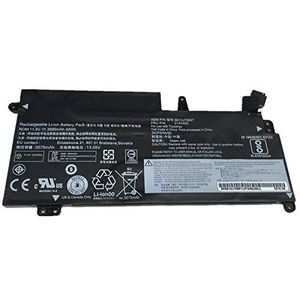
Type : Li-Ion Compatible Brand : Lenovo Battery Voltage : 11.4V Model Number : SB10J78997 Package : Yes Battery Cells : 4 Cells
Product usage details:
1: When the new battery is used for the first time, do not drain the remaining power in the battery. When the battery is in use, if the battery discharge is less than 6%, it must be shut down or charged. It is strictly prohibited to put the battery at 0%, which will easily damage the battery and accelerate the battery decay. After the battery is discharged to 6%, turn off the machine and charge it for about 12 hours to fully activate lithium ions to reach a large capacity, which can be cycled three times.
2: Each lithium battery is charged about 800 times. If the external power supply is used for a long time, please remove the battery. This will not only help reduce the heat of the machine, but also increase the durability of the battery, because every time the power supply is connected, the battery will be charged once. Do not plug and unplug the power supply repeatedly when the battery is installed, which is easy to damage the battery.
3: If you do not use the battery for a long time, please pay attention to the maintenance. Pay attention to the ambient temperature and humidity, please do not put it in a humid place. Keep ventilation. The battery must be kept with electricity. Charge it every other month or so. The electricity quantity is recommended to be kept at about 60%.
Product usage details:
1: When the new battery is used for the first time, do not drain the remaining power in the battery. When the battery is in use, if the battery discharge is less than 6%, it must be shut down or charged. It is strictly prohibited to put the battery at 0%, which will easily damage the battery and accelerate the battery decay. After the battery is discharged to 6%, turn off the machine and charge it for about 12 hours to fully activate lithium ions to reach a large capacity, which can be cycled three times.
2: Each lithium battery is charged about 800 times. If the external power supply is used for a long time, please remove the battery. This will not only help reduce the heat of the machine, but also increase the durability of the battery, because every time the power supply is connected, the battery will be charged once. Do not plug and unplug the power supply repeatedly when the battery is installed, which is easy to damage the battery.
3: If you do not use the battery for a long time, please pay attention to the maintenance. Pay attention to the ambient temperature and humidity, please do not put it in a humid place. Keep ventilation. The battery must be kept with electricity. Charge it every other month or so. The electricity quantity is recommended to be kept at about 60%.
Bter 11.4V 3685mAh 42Wh Laptop 01AV400 01AV401 01AV435 01AV437 Battery for Lenovo ThinkPad 13 20GL 13.3" SB10J78997
Current Price
$57.49
Average
$57.49
Min Price
$57.49
Max Price
$57.49
Description
Type : Li-Ion Compatible Brand : Lenovo Battery Voltage : 11.4V Model Number : SB10J78997 Package : Yes Battery Cells : 4 Cells
Product usage details:
1: When the new battery is used for the first time, do not drain the remaining power in the battery. When the battery is in use, if the battery discharge is less than 6%, it must be shut down or charged. It is strictly prohibited to put the battery at 0%, which will easily damage the battery and accelerate the battery decay. After the battery is discharged to 6%, turn off the machine and charge it for about 12 hours to fully activate lithium ions to reach a large capacity, which can be cycled three times.
2: Each lithium battery is charged about 800 times. If the external power supply is used for a long time, please remove the battery. This will not only help reduce the heat of the machine, but also increase the durability of the battery, because every time the power supply is connected, the battery will be charged once. Do not plug and unplug the power supply repeatedly when the battery is installed, which is easy to damage the battery.
3: If you do not use the battery for a long time, please pay attention to the maintenance. Pay attention to the ambient temperature and humidity, please do not put it in a humid place. Keep ventilation. The battery must be kept with electricity. Charge it every other month or so. The electricity quantity is recommended to be kept at about 60%.
Product usage details:
1: When the new battery is used for the first time, do not drain the remaining power in the battery. When the battery is in use, if the battery discharge is less than 6%, it must be shut down or charged. It is strictly prohibited to put the battery at 0%, which will easily damage the battery and accelerate the battery decay. After the battery is discharged to 6%, turn off the machine and charge it for about 12 hours to fully activate lithium ions to reach a large capacity, which can be cycled three times.
2: Each lithium battery is charged about 800 times. If the external power supply is used for a long time, please remove the battery. This will not only help reduce the heat of the machine, but also increase the durability of the battery, because every time the power supply is connected, the battery will be charged once. Do not plug and unplug the power supply repeatedly when the battery is installed, which is easy to damage the battery.
3: If you do not use the battery for a long time, please pay attention to the maintenance. Pay attention to the ambient temperature and humidity, please do not put it in a humid place. Keep ventilation. The battery must be kept with electricity. Charge it every other month or so. The electricity quantity is recommended to be kept at about 60%.
Price will be lower
in next 2 weeks
in next 2 weeks
According to the data, price will be lower in next two weeks, so not waste your money and track better price!
Product review & video
hey guys bring you another do-it-yourself computer video today I have a Lenovo laptop here and the problem I'm going to show you how to address today is a battery error perhaps your air is battery will charge 0% available plugged in not charging battery not detected any sort of errors like that sometimes you'll see a black X next to your battery and anything that's happening where your battery is not building up or receiving a charge or may not even be being read by your computer as being present so this is the problem I'm going to show you how to fix today keep in mind if you have any questions check out the frequently asked questions below in the description I do try to keep those updated if you don't see your question then leave me a comment I will try to get back to you a few times a day at least so the first thing you want to try with you know lenovo was a static discharge so i'm g


Similar products






































