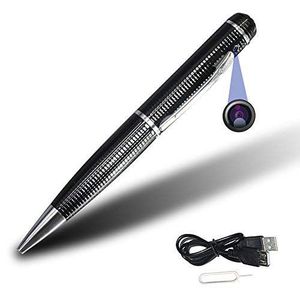
Description
How to use Pen Cam
How to use Pen Cam
1.Press the button on the top for a few seconds until the LED lights up.
2.It will flash purple a few times, then turn off. This means it has started recording,
when the light turns OFF. The LED is off during recording so people don't know that it's on
3.If you press the button once quickly again, the recording stops and the red LED will turn on and this indicates the pen is in STANDBY mode.
4.To turn off, press the button for a few seconds until the LED flashes purple a few times, then turns off.
5.To switch photo mode by going into standby mode and double clicking the button.
This changes the red LED to blue, which means photo mode.
Press the button once to take a photo (you know you are successful when the purple light blinks a few times).
6.To exit photo mode, you double click the button again and it goes into standby mode.
Advantages:
Record video only according to US laws
•75 mins last recording time
•1080P FHD resolution @30FPS
•Support Take photos
•16GB micro SD card build-in
•Built-in 300mah battery
Features:
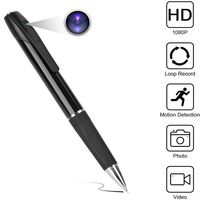
1.1080P HD Mini Pen Video recording Camera with small size
2.16GB SD card included,save more than 10USD
3.1920x1080P HD Resolution
4.0.6MM Pinhole lens,Hide more easily
5.65-75 minutes video record time
Specification:
●Resolution: 1080P 1920x1080P
●Record Mode:Manual/Photo Taking
●Image Sensor: CMOS
●Battery: 300mah (75 minutes video record )
●Indoor/Outdoor: Indoor
Camera Lens: 0.6MM
●View Angle: 50 degree
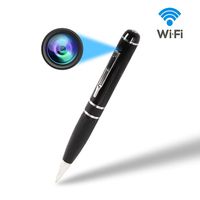
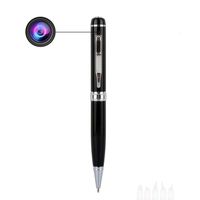
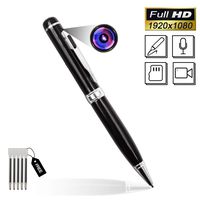
●Type: Writing Pen
●Size:182mmx90mmx34mm
●Power Supply:USB 5V 180mAh
●Video Stream:H.264 Single
●Storage:Mix to 32GB (16GB SD card included,Build-in)
What included:
1x Pen Video recorder camera with build-in 16GB SD Card
1x User manual
1xUSB Cable<
How to use Pen Cam
1.Press the button on the top for a few seconds until the LED lights up.
2.It will flash purple a few times, then turn off. This means it has started recording,
when the light turns OFF. The LED is off during recording so people don't know that it's on
3.If you press the button once quickly again, the recording stops and the red LED will turn on and this indicates the pen is in STANDBY mode.
4.To turn off, press the button for a few seconds until the LED flashes purple a few times, then turns off.
5.To switch photo mode by going into standby mode and double clicking the button.
This changes the red LED to blue, which means photo mode.
Press the button once to take a photo (you know you are successful when the purple light blinks a few times).
6.To exit photo mode, you double click the button again and it goes into standby mode.
Advantages:
Record video only according to US laws
•75 mins last recording time
•1080P FHD resolution @30FPS
•Support Take photos
•16GB micro SD card build-in
•Built-in 300mah battery
Features:
1.1080P HD Mini Pen Video recording Camera with small size
2.16GB SD card included,save more than 10USD
3.1920x1080P HD Resolution
4.0.6MM Pinhole lens,Hide more easily
5.65-75 minutes video record time
Specification:
●Resolution: 1080P 1920x1080P
●Record Mode:Manual/Photo Taking
●Image Sensor: CMOS
●Battery: 300mah (75 minutes video record )
●Indoor/Outdoor: Indoor
Camera Lens: 0.6MM
●View Angle: 50 degree
●Type: Writing Pen
●Size:182mmx90mmx34mm
●Power Supply:USB 5V 180mAh
●Video Stream:H.264 Single
●Storage:Mix to 32GB (16GB SD card included,Build-in)
What included:
1x Pen Video recorder camera with build-in 16GB SD Card
1x User manual
1xUSB Cable<
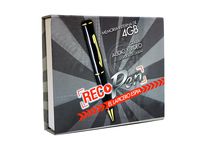
BSTCAM PVC-1080DVR 16GB Pen Hidden Camera for Window/Mac -16GB SD Card, Pen Cam, User manual -Black Clolor
Price is below average
Current Price
$29.99
Average
$46.37
Min Price
$25.99
Max Price
$99.99
Price dynamics
35%
Description
How to use Pen Cam
How to use Pen Cam
1.Press the button on the top for a few seconds until the LED lights up.
2.It will flash purple a few times, then turn off. This means it has started recording,
when the light turns OFF. The LED is off during recording so people don't know that it's on
3.If you press the button once quickly again, the recording stops and the red LED will turn on and this indicates the pen is in STANDBY mode.
4.To turn off, press the button for a few seconds until the LED flashes purple a few times, then turns off.
5.To switch photo mode by going into standby mode and double clicking the button.
This changes the red LED to blue, which means photo mode.
Press the button once to take a photo (you know you are successful when the purple light blinks a few times).
6.To exit photo mode, you double click the button again and it goes into standby mode.
Advantages:
Record video only according to US laws
•75 mins last recording time
•1080P FHD resolution @30FPS
•Support Take photos
•16GB micro SD card build-in
•Built-in 300mah battery
Features:
1.1080P HD Mini Pen Video recording Camera with small size
2.16GB SD card included,save more than 10USD
3.1920x1080P HD Resolution
4.0.6MM Pinhole lens,Hide more easily
5.65-75 minutes video record time
Specification:
●Resolution: 1080P 1920x1080P
●Record Mode:Manual/Photo Taking
●Image Sensor: CMOS
●Battery: 300mah (75 minutes video record )
●Indoor/Outdoor: Indoor
Camera Lens: 0.6MM
●View Angle: 50 degree
●Type: Writing Pen
●Size:182mmx90mmx34mm
●Power Supply:USB 5V 180mAh
●Video Stream:H.264 Single
●Storage:Mix to 32GB (16GB SD card included,Build-in)
What included:
1x Pen Video recorder camera with build-in 16GB SD Card
1x User manual
1xUSB Cable<
How to use Pen Cam
1.Press the button on the top for a few seconds until the LED lights up.
2.It will flash purple a few times, then turn off. This means it has started recording,
when the light turns OFF. The LED is off during recording so people don't know that it's on
3.If you press the button once quickly again, the recording stops and the red LED will turn on and this indicates the pen is in STANDBY mode.
4.To turn off, press the button for a few seconds until the LED flashes purple a few times, then turns off.
5.To switch photo mode by going into standby mode and double clicking the button.
This changes the red LED to blue, which means photo mode.
Press the button once to take a photo (you know you are successful when the purple light blinks a few times).
6.To exit photo mode, you double click the button again and it goes into standby mode.
Advantages:
Record video only according to US laws
•75 mins last recording time
•1080P FHD resolution @30FPS
•Support Take photos
•16GB micro SD card build-in
•Built-in 300mah battery
Features:
1.1080P HD Mini Pen Video recording Camera with small size
2.16GB SD card included,save more than 10USD
3.1920x1080P HD Resolution
4.0.6MM Pinhole lens,Hide more easily
5.65-75 minutes video record time
Specification:
●Resolution: 1080P 1920x1080P
●Record Mode:Manual/Photo Taking
●Image Sensor: CMOS
●Battery: 300mah (75 minutes video record )
●Indoor/Outdoor: Indoor
Camera Lens: 0.6MM
●View Angle: 50 degree
●Type: Writing Pen
●Size:182mmx90mmx34mm
●Power Supply:USB 5V 180mAh
●Video Stream:H.264 Single
●Storage:Mix to 32GB (16GB SD card included,Build-in)
What included:
1x Pen Video recorder camera with build-in 16GB SD Card
1x User manual
1xUSB Cable<
Price will be lower
in next 2 weeks
in next 2 weeks
According to the data, price will be lower in next two weeks, so not waste your money and track better price!
Similar products