Description
Compatible with:
13.5 inch Surface Book 2 intel core i7 CPU advanced version, This cover is not for i5 standard version
Product Description:
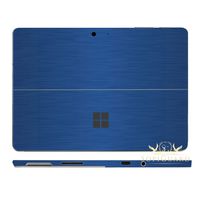
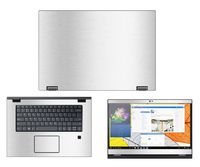
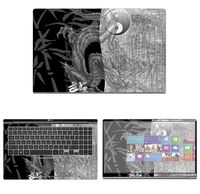
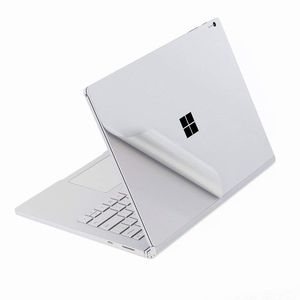
This is a wear-resistant thin film solution that can effectively protect the Surface Book against the deleterious effects of grease, scratches, smudges, and color-fade that accrete over time.
Package Included:
--1x Upper Body Skin Cover
--1x Bottom Body Skin Cover
--1x Full size Palm Rest Cover Skin
--1x Trackpad Protector Skin
--1x High quality wiping cloth and alcohol bag
Before paste the skins, please noted two issues:
--After the 3M skin paste completed, do not re-lift, otherwise, the skins will be damaged.
--We design the product off 0.3 mm gap to edge,please take care of its placeholder.if you stick it to 100% fit one edge, In the process of using if often scraped to the side, may cause roll up
Pasting Instruction:
1. Please use wiping cloth to clean surface before pasting stickers.
2. Align UPPER sticker SURFACE LOGO hole>edges>corners to the laptop body.
3. Peel off and cut half side of backing paper; Align upper sticker to LOGO hole mainly, then edges/corners of laptop body, paste it on laptop easily.
4. Slowly peel off the rest of backing paper, paste the other half skin at the same time.
4-1.If the alignment process is not good, you can slowly take it away, then re-alignment, paste again.
5. Use wiping cloth wipe the laptop and squeeze out bubbles. Finally, Bubbles be disappeared; sticker fit SURFACE LOGO hole and laptop UPPER side well.
6. Paste another stickers in the same way.
13.5 inch Surface Book 2 intel core i7 CPU advanced version, This cover is not for i5 standard version
Product Description:
This is a wear-resistant thin film solution that can effectively protect the Surface Book against the deleterious effects of grease, scratches, smudges, and color-fade that accrete over time.
Package Included:
--1x Upper Body Skin Cover
--1x Bottom Body Skin Cover
--1x Full size Palm Rest Cover Skin
--1x Trackpad Protector Skin
--1x High quality wiping cloth and alcohol bag
Before paste the skins, please noted two issues:
--After the 3M skin paste completed, do not re-lift, otherwise, the skins will be damaged.
--We design the product off 0.3 mm gap to edge,please take care of its placeholder.if you stick it to 100% fit one edge, In the process of using if often scraped to the side, may cause roll up
Pasting Instruction:
1. Please use wiping cloth to clean surface before pasting stickers.
2. Align UPPER sticker SURFACE LOGO hole>edges>corners to the laptop body.
3. Peel off and cut half side of backing paper; Align upper sticker to LOGO hole mainly, then edges/corners of laptop body, paste it on laptop easily.
4. Slowly peel off the rest of backing paper, paste the other half skin at the same time.
4-1.If the alignment process is not good, you can slowly take it away, then re-alignment, paste again.
5. Use wiping cloth wipe the laptop and squeeze out bubbles. Finally, Bubbles be disappeared; sticker fit SURFACE LOGO hole and laptop UPPER side well.
6. Paste another stickers in the same way.
Premium Skin Sticker Decal Protector,Decorative Protector for Microsoft Surface Book 2 (i7 CPU Configuration Version)-13.5 inch Silver
Price is below average
Current Price
$11.99
Average
$14.99
Min Price
$11.99
Max Price
$17.99
Price dynamics
20%
Description
Compatible with:
13.5 inch Surface Book 2 intel core i7 CPU advanced version, This cover is not for i5 standard version
Product Description:
This is a wear-resistant thin film solution that can effectively protect the Surface Book against the deleterious effects of grease, scratches, smudges, and color-fade that accrete over time.
Package Included:
--1x Upper Body Skin Cover
--1x Bottom Body Skin Cover
--1x Full size Palm Rest Cover Skin
--1x Trackpad Protector Skin
--1x High quality wiping cloth and alcohol bag
Before paste the skins, please noted two issues:
--After the 3M skin paste completed, do not re-lift, otherwise, the skins will be damaged.
--We design the product off 0.3 mm gap to edge,please take care of its placeholder.if you stick it to 100% fit one edge, In the process of using if often scraped to the side, may cause roll up
Pasting Instruction:
1. Please use wiping cloth to clean surface before pasting stickers.
2. Align UPPER sticker SURFACE LOGO hole>edges>corners to the laptop body.
3. Peel off and cut half side of backing paper; Align upper sticker to LOGO hole mainly, then edges/corners of laptop body, paste it on laptop easily.
4. Slowly peel off the rest of backing paper, paste the other half skin at the same time.
4-1.If the alignment process is not good, you can slowly take it away, then re-alignment, paste again.
5. Use wiping cloth wipe the laptop and squeeze out bubbles. Finally, Bubbles be disappeared; sticker fit SURFACE LOGO hole and laptop UPPER side well.
6. Paste another stickers in the same way.
13.5 inch Surface Book 2 intel core i7 CPU advanced version, This cover is not for i5 standard version
Product Description:
This is a wear-resistant thin film solution that can effectively protect the Surface Book against the deleterious effects of grease, scratches, smudges, and color-fade that accrete over time.
Package Included:
--1x Upper Body Skin Cover
--1x Bottom Body Skin Cover
--1x Full size Palm Rest Cover Skin
--1x Trackpad Protector Skin
--1x High quality wiping cloth and alcohol bag
Before paste the skins, please noted two issues:
--After the 3M skin paste completed, do not re-lift, otherwise, the skins will be damaged.
--We design the product off 0.3 mm gap to edge,please take care of its placeholder.if you stick it to 100% fit one edge, In the process of using if often scraped to the side, may cause roll up
Pasting Instruction:
1. Please use wiping cloth to clean surface before pasting stickers.
2. Align UPPER sticker SURFACE LOGO hole>edges>corners to the laptop body.
3. Peel off and cut half side of backing paper; Align upper sticker to LOGO hole mainly, then edges/corners of laptop body, paste it on laptop easily.
4. Slowly peel off the rest of backing paper, paste the other half skin at the same time.
4-1.If the alignment process is not good, you can slowly take it away, then re-alignment, paste again.
5. Use wiping cloth wipe the laptop and squeeze out bubbles. Finally, Bubbles be disappeared; sticker fit SURFACE LOGO hole and laptop UPPER side well.
6. Paste another stickers in the same way.
Price will be lower
in next 2 weeks
in next 2 weeks
According to the data, price will be lower in next two weeks, so not waste your money and track better price!
Product review & video
- So you bought yourself
a $3,000 Surface Book 2 and you want to actually protect it? Well I bit the bullet and
bought some Skinomi skins. I'm going to try this out
and see if it protects mine. Today I'll give you a quick review. Stay tuned. (upbeat drum music) Okay so let's talk a little
bit about this product. It goes for $24.95. That's for the full body protection and that includes the
screen protector too. And I have to admit, Skinomi has provided a lot of pieces here. Actually it is probably too
many pieces in my opinion. By that I mean they give
you lots of protection even for the hinge areas which I'm not really crazy about
adding protection to but obviously that is a
choice that they give you. You can basically put on how much you want or how little you want. For instance, if you just want to protect
the outside or the inside, you could do that and
that's a really good choice. N


Similar products