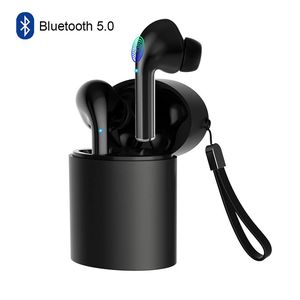
Description
Features:
1.Bluetooth version: Realtek V5.0+EDR
2.Working range: up to 33 feets on open air
4.Playing time: 4-6 hours
5.Standby time: 100 hours
6.Charging Time: about 1-2 hour
8.Working temperature: -10 - 55 C
9.Compatible with Most bluetooth enabled Smartphones and devices
Multi-function Button:
Double click -- play / pause music,answer a call,hang up
Three click the left headset -- play the previous song
Three click the right headset -- play the next song
Long press the touch key -- reject call,activating Siri
Box Content:
2 x TWS Bluetooth Stereo Earphones(Left&Right)
1 x Charging Case
1 x Micro USB Charge Cable
1 x User Manual
Reset Steps:
1. Long press the touch key on both sides 5 seconds to turn off the earphone first,then keep to press 10 more seconds then release, the reset operation is completed.
2. Please put them into the charging case and take them out again(or long press the touch key about 5seconds you will hear a voice say power on.)
3. The headsets are entering paring mode, wait for a while and you will hear a voice say "tws connected". Then you can connect your device. If you device shows two earphones in the Bluetooth menu you will need to repeat the steps above as they are not paired with each other.
Twins Pairing:
1. Take out the earbuds,they will auto power on and pairing.
2. When one earbuds flash red and blue light,another not flash light,both earbuds pair successfully.
3. Turn on the Bluetooth on your device and search "TWS" to connect.When the led flash not flash,they pair successfully.
Single Pairing:
1. If you need pair with two phones,please take out and pair right earbud first.
2. After right earbuds paired successfully,then pair your left earbud.
Helose team the best customer services,if you have any questions about the product,please be free to ask,would be glad to help.
1.Bluetooth version: Realtek V5.0+EDR
2.Working range: up to 33 feets on open air
4.Playing time: 4-6 hours
5.Standby time: 100 hours
6.Charging Time: about 1-2 hour
8.Working temperature: -10 - 55 C
9.Compatible with Most bluetooth enabled Smartphones and devices
Multi-function Button:
Double click -- play / pause music,answer a call,hang up
Three click the left headset -- play the previous song
Three click the right headset -- play the next song
Long press the touch key -- reject call,activating Siri
Box Content:
2 x TWS Bluetooth Stereo Earphones(Left&Right)
1 x Charging Case
1 x Micro USB Charge Cable
1 x User Manual
Reset Steps:
1. Long press the touch key on both sides 5 seconds to turn off the earphone first,then keep to press 10 more seconds then release, the reset operation is completed.
2. Please put them into the charging case and take them out again(or long press the touch key about 5seconds you will hear a voice say power on.)
3. The headsets are entering paring mode, wait for a while and you will hear a voice say "tws connected". Then you can connect your device. If you device shows two earphones in the Bluetooth menu you will need to repeat the steps above as they are not paired with each other.
Twins Pairing:
1. Take out the earbuds,they will auto power on and pairing.
2. When one earbuds flash red and blue light,another not flash light,both earbuds pair successfully.
3. Turn on the Bluetooth on your device and search "TWS" to connect.When the led flash not flash,they pair successfully.
Single Pairing:
1. If you need pair with two phones,please take out and pair right earbud first.
2. After right earbuds paired successfully,then pair your left earbud.
Helose team the best customer services,if you have any questions about the product,please be free to ask,would be glad to help.
True Wireless Earbuds, Smart Touch Control Wireless Bluetooth 5.0 Headphones TWS in-Ear Headsets Built-in Microphone Noise Cancelling for iPhone Android with Charging Case Black
Price is below average
Current Price
$31.99
Average
$32.95
Min Price
$31.99
Max Price
$33.9
Price dynamics
3%
Description
Features:
1.Bluetooth version: Realtek V5.0+EDR
2.Working range: up to 33 feets on open air
4.Playing time: 4-6 hours
5.Standby time: 100 hours
6.Charging Time: about 1-2 hour
8.Working temperature: -10 - 55 C
9.Compatible with Most bluetooth enabled Smartphones and devices
Multi-function Button:
Double click -- play / pause music,answer a call,hang up
Three click the left headset -- play the previous song
Three click the right headset -- play the next song
Long press the touch key -- reject call,activating Siri
Box Content:
2 x TWS Bluetooth Stereo Earphones(Left&Right)
1 x Charging Case
1 x Micro USB Charge Cable
1 x User Manual
Reset Steps:
1. Long press the touch key on both sides 5 seconds to turn off the earphone first,then keep to press 10 more seconds then release, the reset operation is completed.
2. Please put them into the charging case and take them out again(or long press the touch key about 5seconds you will hear a voice say power on.)
3. The headsets are entering paring mode, wait for a while and you will hear a voice say "tws connected". Then you can connect your device. If you device shows two earphones in the Bluetooth menu you will need to repeat the steps above as they are not paired with each other.
Twins Pairing:
1. Take out the earbuds,they will auto power on and pairing.
2. When one earbuds flash red and blue light,another not flash light,both earbuds pair successfully.
3. Turn on the Bluetooth on your device and search "TWS" to connect.When the led flash not flash,they pair successfully.
Single Pairing:
1. If you need pair with two phones,please take out and pair right earbud first.
2. After right earbuds paired successfully,then pair your left earbud.
Helose team the best customer services,if you have any questions about the product,please be free to ask,would be glad to help.
1.Bluetooth version: Realtek V5.0+EDR
2.Working range: up to 33 feets on open air
4.Playing time: 4-6 hours
5.Standby time: 100 hours
6.Charging Time: about 1-2 hour
8.Working temperature: -10 - 55 C
9.Compatible with Most bluetooth enabled Smartphones and devices
Multi-function Button:
Double click -- play / pause music,answer a call,hang up
Three click the left headset -- play the previous song
Three click the right headset -- play the next song
Long press the touch key -- reject call,activating Siri
Box Content:
2 x TWS Bluetooth Stereo Earphones(Left&Right)
1 x Charging Case
1 x Micro USB Charge Cable
1 x User Manual
Reset Steps:
1. Long press the touch key on both sides 5 seconds to turn off the earphone first,then keep to press 10 more seconds then release, the reset operation is completed.
2. Please put them into the charging case and take them out again(or long press the touch key about 5seconds you will hear a voice say power on.)
3. The headsets are entering paring mode, wait for a while and you will hear a voice say "tws connected". Then you can connect your device. If you device shows two earphones in the Bluetooth menu you will need to repeat the steps above as they are not paired with each other.
Twins Pairing:
1. Take out the earbuds,they will auto power on and pairing.
2. When one earbuds flash red and blue light,another not flash light,both earbuds pair successfully.
3. Turn on the Bluetooth on your device and search "TWS" to connect.When the led flash not flash,they pair successfully.
Single Pairing:
1. If you need pair with two phones,please take out and pair right earbud first.
2. After right earbuds paired successfully,then pair your left earbud.
Helose team the best customer services,if you have any questions about the product,please be free to ask,would be glad to help.
Price will be lower
in next 2 weeks
in next 2 weeks
According to the data, price will be lower in next two weeks, so not waste your money and track better price!
Product review & video
hey what's up everybody this is Ola form of a West Tech and welcome back to my channel today I want to talk about another pair of true wireless earbuds by Donna ton and I want to let you know my thoughts on if it's worth purchasing or not and now I'll be jumping right in right after this for more content like this or to stay informed whatever I post new content on my channel make sure you hit that subscribe and a notification bell but very simple presentation have a look at the side here so you have touch control on here again so these are knob buttons it's touch sensitive and you have bluetooth 5.0 and of course stereo sound let's see what else we have here so the headphones charge time is around an hour and a half okay and some more information here I won't spend a lot of time there for the time sake of video and without further ado let's go ahead and open up the box so here is your c



Similar products



































