Description
Summary: Made by Washinglee. compatible with a variety of ReliOn and Arkray glucose meters: Arkray Glucocard 01 and ReliOn Confirm Arkray Glucocard Vital and ReliOn Prime Important Note: While using ´SiDiary´ to download data from your meter, please select the right meter model to make it work well. 1. Select model ‘Arkray Glucocard 01’ for glucose meter ‘ReliOn Confirm’ and ‘Arkray Glucocard 01’. 2.Select model ‘Arkray Glucocard Vital’ for glucose meter ‘ReliOn Prime’ and ‘Arkray Glucocard Vital’. Troubleshooting: If it doesn’t work normally, please try following steps: Step 1: Unplug the USB cable from PC or laptop, plug it again. Or try another USB port. Step 2: Check ´SiDiary´ to ensure that the selected meter model is correct, complied with ‘Importan Note’ mentioned above. Step 3: Check if the driver installed correctly. Step 4: Restart the computer, and plug the USB cable. Step 5: Try the cable on other computer. Step 6: Contact us for technical support.
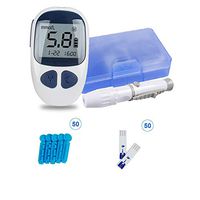
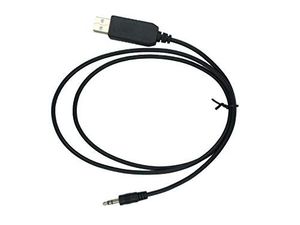
Washinglee USB Data Cable for Arkray and Relion Glucose Diabetes Meter, for Relion Confirm and Arkray Glucocard 01, Glucocard Vital and ReliOn Prime.
Current Price
$26.99
Average
$24.66
Min Price
$21.99
Max Price
$26.99
Price dynamics
9%
Description
Summary: Made by Washinglee. compatible with a variety of ReliOn and Arkray glucose meters: Arkray Glucocard 01 and ReliOn Confirm Arkray Glucocard Vital and ReliOn Prime Important Note: While using ´SiDiary´ to download data from your meter, please select the right meter model to make it work well. 1. Select model ‘Arkray Glucocard 01’ for glucose meter ‘ReliOn Confirm’ and ‘Arkray Glucocard 01’. 2.Select model ‘Arkray Glucocard Vital’ for glucose meter ‘ReliOn Prime’ and ‘Arkray Glucocard Vital’. Troubleshooting: If it doesn’t work normally, please try following steps: Step 1: Unplug the USB cable from PC or laptop, plug it again. Or try another USB port. Step 2: Check ´SiDiary´ to ensure that the selected meter model is correct, complied with ‘Importan Note’ mentioned above. Step 3: Check if the driver installed correctly. Step 4: Restart the computer, and plug the USB cable. Step 5: Try the cable on other computer. Step 6: Contact us for technical support.
Price will be lower
in next 2 weeks
in next 2 weeks
According to the data, price will be lower in next two weeks, so not waste your money and track better price!
Similar products