Description
How to connect to Wi-Fi:
Download the LizaCam app
Make sure your camera is close to your router
The camera will only connect to 2.4gHz and not 5.0gHz Wi-Fi band
1) Plug the camera in and wait 30-60 seconds.
2) There is a light on the side of the plug, wait until that light is solid color, changes colors, and then has a pink for like a second and a small flash of blue. If it is FLASHING back and forth equal, it needs to be reset. Also if the light is straight red it needs to be reset
At this point, the speaker camera is like a router. It is sending out a Wi-Fi signal. You need to connect your phone’s Wi-Fi to the Wi-Fi signal that is being sent out from the camera
3) Go to your phone’s Wi-Fi settings and look for the weird looking Wi-Fi signal, a 16 character signal that should look something like this: CMSxXX-XXXX-XXX
4) Connect to that signal and make sure you see the Wi-Fi connected icon. It may say “no internet”, that’s ok
5) Open the LizaCam app and press + in the corner to add new camera
6) Select the Bluetooth speaker camera
7) Now, select the Wi-Fi from your house/work that you want to connect the camera to. There are three dots (…) to touch, that will give you the list of available networks. Connect to your home network, and enter the Wi-Fi password
8)Right now, the app is pushing that Wi-Fi info into the camera. This process can take from 15 seconds - 2 min. If the counter finishes and it is not connected, then you entered the wrong Wi-Fi password and try again.. Once it connects, the app will take you to the view screen with the list of connected cameras
9)The camera is restarting now and searching for the Wi-Fi that you just pushed to it. Give it 30-60 seconds, then you will see that you can connect and watch live. It may ask you to change your camera password, we strongly suggest that you do that
Download the LizaCam app
Make sure your camera is close to your router
The camera will only connect to 2.4gHz and not 5.0gHz Wi-Fi band
1) Plug the camera in and wait 30-60 seconds.
2) There is a light on the side of the plug, wait until that light is solid color, changes colors, and then has a pink for like a second and a small flash of blue. If it is FLASHING back and forth equal, it needs to be reset. Also if the light is straight red it needs to be reset
At this point, the speaker camera is like a router. It is sending out a Wi-Fi signal. You need to connect your phone’s Wi-Fi to the Wi-Fi signal that is being sent out from the camera
3) Go to your phone’s Wi-Fi settings and look for the weird looking Wi-Fi signal, a 16 character signal that should look something like this: CMSxXX-XXXX-XXX
4) Connect to that signal and make sure you see the Wi-Fi connected icon. It may say “no internet”, that’s ok
5) Open the LizaCam app and press + in the corner to add new camera
6) Select the Bluetooth speaker camera
7) Now, select the Wi-Fi from your house/work that you want to connect the camera to. There are three dots (…) to touch, that will give you the list of available networks. Connect to your home network, and enter the Wi-Fi password
8)Right now, the app is pushing that Wi-Fi info into the camera. This process can take from 15 seconds - 2 min. If the counter finishes and it is not connected, then you entered the wrong Wi-Fi password and try again.. Once it connects, the app will take you to the view screen with the list of connected cameras
9)The camera is restarting now and searching for the Wi-Fi that you just pushed to it. Give it 30-60 seconds, then you will see that you can connect and watch live. It may ask you to change your camera password, we strongly suggest that you do that
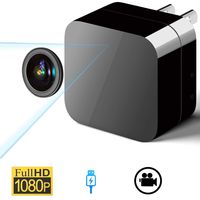
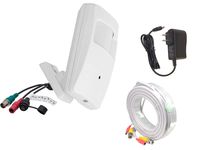
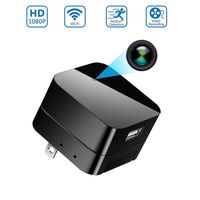
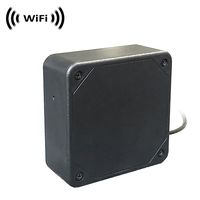
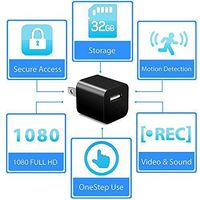
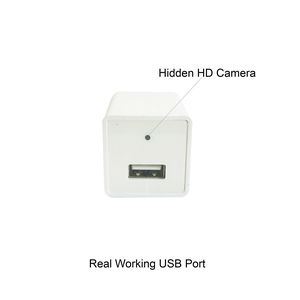
Wi-Fi Camera - Nanny Recording System with USB Wall Charger Design - Mini Security Device for The House & The Office
Price is below average
Current Price
$49.99
Average
$54.99
Min Price
$49.99
Max Price
$99.99
Price dynamics
9%
Description
How to connect to Wi-Fi:
Download the LizaCam app
Make sure your camera is close to your router
The camera will only connect to 2.4gHz and not 5.0gHz Wi-Fi band
1) Plug the camera in and wait 30-60 seconds.
2) There is a light on the side of the plug, wait until that light is solid color, changes colors, and then has a pink for like a second and a small flash of blue. If it is FLASHING back and forth equal, it needs to be reset. Also if the light is straight red it needs to be reset
At this point, the speaker camera is like a router. It is sending out a Wi-Fi signal. You need to connect your phone’s Wi-Fi to the Wi-Fi signal that is being sent out from the camera
3) Go to your phone’s Wi-Fi settings and look for the weird looking Wi-Fi signal, a 16 character signal that should look something like this: CMSxXX-XXXX-XXX
4) Connect to that signal and make sure you see the Wi-Fi connected icon. It may say “no internet”, that’s ok
5) Open the LizaCam app and press + in the corner to add new camera
6) Select the Bluetooth speaker camera
7) Now, select the Wi-Fi from your house/work that you want to connect the camera to. There are three dots (…) to touch, that will give you the list of available networks. Connect to your home network, and enter the Wi-Fi password
8)Right now, the app is pushing that Wi-Fi info into the camera. This process can take from 15 seconds - 2 min. If the counter finishes and it is not connected, then you entered the wrong Wi-Fi password and try again.. Once it connects, the app will take you to the view screen with the list of connected cameras
9)The camera is restarting now and searching for the Wi-Fi that you just pushed to it. Give it 30-60 seconds, then you will see that you can connect and watch live. It may ask you to change your camera password, we strongly suggest that you do that
Download the LizaCam app
Make sure your camera is close to your router
The camera will only connect to 2.4gHz and not 5.0gHz Wi-Fi band
1) Plug the camera in and wait 30-60 seconds.
2) There is a light on the side of the plug, wait until that light is solid color, changes colors, and then has a pink for like a second and a small flash of blue. If it is FLASHING back and forth equal, it needs to be reset. Also if the light is straight red it needs to be reset
At this point, the speaker camera is like a router. It is sending out a Wi-Fi signal. You need to connect your phone’s Wi-Fi to the Wi-Fi signal that is being sent out from the camera
3) Go to your phone’s Wi-Fi settings and look for the weird looking Wi-Fi signal, a 16 character signal that should look something like this: CMSxXX-XXXX-XXX
4) Connect to that signal and make sure you see the Wi-Fi connected icon. It may say “no internet”, that’s ok
5) Open the LizaCam app and press + in the corner to add new camera
6) Select the Bluetooth speaker camera
7) Now, select the Wi-Fi from your house/work that you want to connect the camera to. There are three dots (…) to touch, that will give you the list of available networks. Connect to your home network, and enter the Wi-Fi password
8)Right now, the app is pushing that Wi-Fi info into the camera. This process can take from 15 seconds - 2 min. If the counter finishes and it is not connected, then you entered the wrong Wi-Fi password and try again.. Once it connects, the app will take you to the view screen with the list of connected cameras
9)The camera is restarting now and searching for the Wi-Fi that you just pushed to it. Give it 30-60 seconds, then you will see that you can connect and watch live. It may ask you to change your camera password, we strongly suggest that you do that
Price will be lower
in next 2 weeks
in next 2 weeks
According to the data, price will be lower in next two weeks, so not waste your money and track better price!
Product review & video
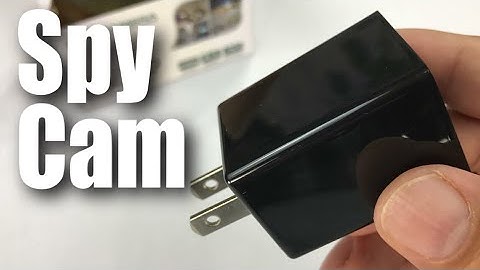
what's up hand ination Peter Vaughn Pandey here hey this is an HD camera but it's kind of interesting because it's kind of a nanny-cam spy camera and it's a hidden in a charger and that's what kind of makes it pretty interesting now you may want this for a variety of different reasons I don't know why you will but let me just brought some reasons that you might maybe you are actually worried about the nanny yeah right you want to see if she's beating your kids or stealing your jewelry well you can you can certainly do that maybe you want to just keep an eye on your pet and see what they're actually doing you know did that obedience school pay off maybe your just creep like me whatever it might be so there could be all sorts of reasons but I was really curious if it worked and how well it works so it does look like it's wrapped up in plastic here pretty nicely does look like generally ma

Similar products