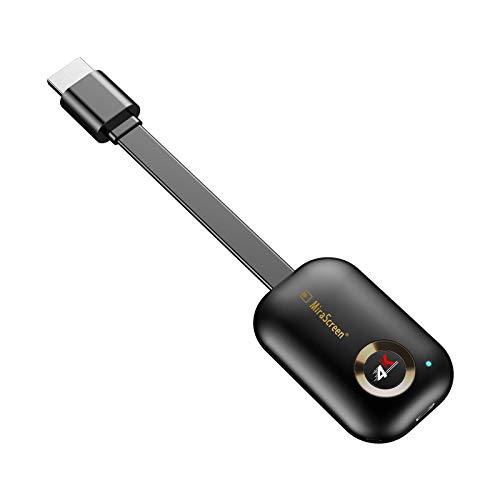
Description
Airplay Miracast Dongle Specification
Chipset: AM8272
DDR: 1Gbit
Flash: 1Gbit
Output: HDMI
Power: 5V 2A
Size: 61x39x14mm
Weight: 23g
Airplay Display Dongle Stallation
1. Connect wifi antenna with receiver dongle, and then onnect another plug of wifi antenna to a USB adapter
2. Connect the tv dongle directly into an HDTV input port on your TV
3. Set your TV's Source/Input selection to HDTV input port connected to the cast dongle
4. The casting dongle now starts up and will display instructions on your TV screen. Follow the instructions to complete setup
Wireless 2.4GHz and 5GHz Network for TV Receiver Adapter
If the hdmi Dongle for tv supports dual WiFi band, please follow below steps to use 5GHz WiFi Band
If MiraScreen Dongle is not connected to wireless home router, then you may switch between 2.4GHz and 5GHz by pressing the button on MiraScreen dongle
An 5G icon will show up once MiraScreen has been switched to 5GHz wireless band
If MiraScreen android wifi dongle is connected to wireless home router, then MiraScreen will operate at the same wireless band as the router
MiraScreen's WiFi SSID and Password are shown on the TV screen. You may connect your mobile phone or laptop to the MiraScreen's WiFi SSID, and then setup MiraScreen accordingly
Screen Mirror Dongle Package List
1 x Display Dongle Receiver
1 x Cable
1 x User Manual
Chipset: AM8272
DDR: 1Gbit
Flash: 1Gbit
Output: HDMI
Power: 5V 2A
Size: 61x39x14mm
Weight: 23g
Airplay Display Dongle Stallation
1. Connect wifi antenna with receiver dongle, and then onnect another plug of wifi antenna to a USB adapter
2. Connect the tv dongle directly into an HDTV input port on your TV
3. Set your TV's Source/Input selection to HDTV input port connected to the cast dongle
4. The casting dongle now starts up and will display instructions on your TV screen. Follow the instructions to complete setup
Wireless 2.4GHz and 5GHz Network for TV Receiver Adapter
If the hdmi Dongle for tv supports dual WiFi band, please follow below steps to use 5GHz WiFi Band
If MiraScreen Dongle is not connected to wireless home router, then you may switch between 2.4GHz and 5GHz by pressing the button on MiraScreen dongle
An 5G icon will show up once MiraScreen has been switched to 5GHz wireless band
If MiraScreen android wifi dongle is connected to wireless home router, then MiraScreen will operate at the same wireless band as the router
MiraScreen's WiFi SSID and Password are shown on the TV screen. You may connect your mobile phone or laptop to the MiraScreen's WiFi SSID, and then setup MiraScreen accordingly
Screen Mirror Dongle Package List
1 x Display Dongle Receiver
1 x Cable
1 x User Manual
Wi-Fi HDMI Display Dongle MiraScreen G9 Plus 2.4/5G Wireless Display Adapter DLNA Airplay Miracast Dongle for TV Projector Display
Price is below average
Current Price
$24.99
Average
$29.79
Min Price
$24.99
Max Price
$34.49
Price dynamics
16%
Description
Airplay Miracast Dongle Specification
Chipset: AM8272
DDR: 1Gbit
Flash: 1Gbit
Output: HDMI
Power: 5V 2A
Size: 61x39x14mm
Weight: 23g
Airplay Display Dongle Stallation
1. Connect wifi antenna with receiver dongle, and then onnect another plug of wifi antenna to a USB adapter
2. Connect the tv dongle directly into an HDTV input port on your TV
3. Set your TV's Source/Input selection to HDTV input port connected to the cast dongle
4. The casting dongle now starts up and will display instructions on your TV screen. Follow the instructions to complete setup
Wireless 2.4GHz and 5GHz Network for TV Receiver Adapter
If the hdmi Dongle for tv supports dual WiFi band, please follow below steps to use 5GHz WiFi Band
If MiraScreen Dongle is not connected to wireless home router, then you may switch between 2.4GHz and 5GHz by pressing the button on MiraScreen dongle
An 5G icon will show up once MiraScreen has been switched to 5GHz wireless band
If MiraScreen android wifi dongle is connected to wireless home router, then MiraScreen will operate at the same wireless band as the router
MiraScreen's WiFi SSID and Password are shown on the TV screen. You may connect your mobile phone or laptop to the MiraScreen's WiFi SSID, and then setup MiraScreen accordingly
Screen Mirror Dongle Package List
1 x Display Dongle Receiver
1 x Cable
1 x User Manual
Chipset: AM8272
DDR: 1Gbit
Flash: 1Gbit
Output: HDMI
Power: 5V 2A
Size: 61x39x14mm
Weight: 23g
Airplay Display Dongle Stallation
1. Connect wifi antenna with receiver dongle, and then onnect another plug of wifi antenna to a USB adapter
2. Connect the tv dongle directly into an HDTV input port on your TV
3. Set your TV's Source/Input selection to HDTV input port connected to the cast dongle
4. The casting dongle now starts up and will display instructions on your TV screen. Follow the instructions to complete setup
Wireless 2.4GHz and 5GHz Network for TV Receiver Adapter
If the hdmi Dongle for tv supports dual WiFi band, please follow below steps to use 5GHz WiFi Band
If MiraScreen Dongle is not connected to wireless home router, then you may switch between 2.4GHz and 5GHz by pressing the button on MiraScreen dongle
An 5G icon will show up once MiraScreen has been switched to 5GHz wireless band
If MiraScreen android wifi dongle is connected to wireless home router, then MiraScreen will operate at the same wireless band as the router
MiraScreen's WiFi SSID and Password are shown on the TV screen. You may connect your mobile phone or laptop to the MiraScreen's WiFi SSID, and then setup MiraScreen accordingly
Screen Mirror Dongle Package List
1 x Display Dongle Receiver
1 x Cable
1 x User Manual
Price will be lower
in next 2 weeks
in next 2 weeks
According to the data, price will be lower in next two weeks, so not waste your money and track better price!
Product review & video
[Music] hello guys uh we are back with one of our new product and today we are going to check this ez chromecast it's a mirror cast device you can easily mirror with your phone to your tv wireless so let's see what we get inside first of all user manual we have main device it's uh actually my phone over here here you can see there is a power port and a reset button and here we can get one wireless receiver power adapter micro usb and usb port you can plug back to your tv or you can use uh adapter 5 volt adapter so it will be easy to get constant 5 for 5.0 volt power you can use this kind of adapter over here just plug it this way it's easy and connect this device to your easier cast and this one goes back to your tv and you can mirror from your phone directly to your tv okay guys so here we have a hdmi cable from back to our tv okay so what we're going to do we just connect it this devi


Similar products