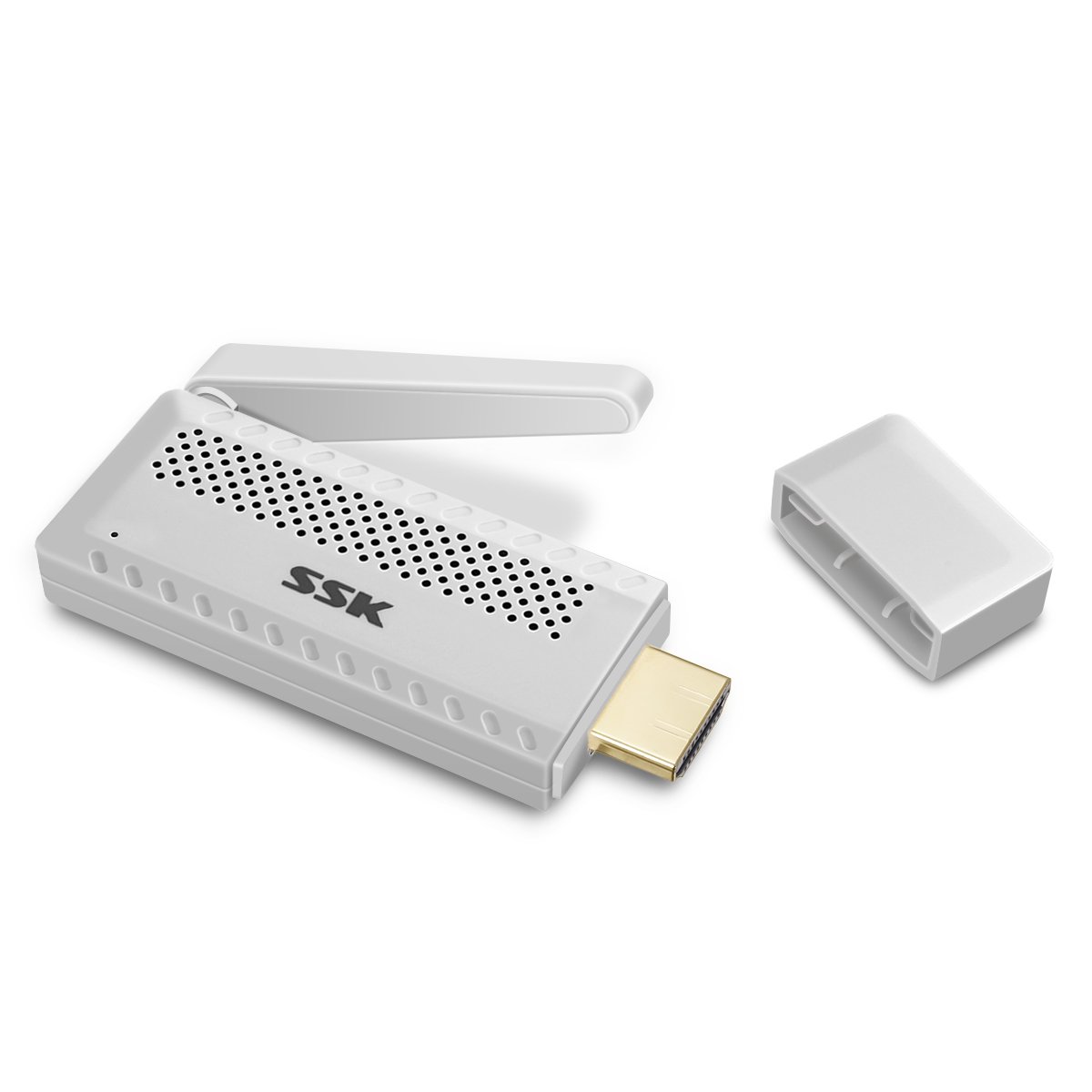
Description
Setting video:
http://en.ssk.cn/Product/Intelligent/wireless-cast/4.html
▶Specification:◀
Dual band transmission: 2.4G/5G
WiFi: IEEE 802.11b/g/n
Maximum Resolution: 1080P
Power Supply: USB5V/1A
Support three mode: MiraCast/AirPlay/DLNA
▶Features:◀
①Easy to set up.No need App or drivers.
②Lightweight and portable pocket size to carry.
③Support 1080P online movies/ videos/audio/ TV/ web browsing.
④Support multi-screen interactive features like DLNA/Miracast/Airplay.
⑤ Built-in hot spots, support 2.4 /5G technology, ensuring no delay or buffer.
⑥Compatible with Android, IOS, MAC OS system with WiFi function.
▶How to Setup:◀
Before setting, please plug the dongle in your TV.(Equipped with an HDMI extension cable for easy switching)
Press the top button of dongle to switch the mode.
☛For iOS devices,before using Airplay function, please connect the dongle to home WiFi first.
Turn on the WiFi of your smartphones or other devices and search the WiFi of dongle (SSID:SSK-Z100-XXX, password: 12345678).
Open the browser,visit 192.168.49.1 > Choose icon "WiFi" > Select your WiFi of router,enter password> Connect.
After the dongle connects to WiFi, please turn on the Airplay function of your device. Connect automatically.
☛For Android devices, please turn on Miracast function directly,also called screen-sharing or screen-mirroring or not.
(Because different brands of smartphone or PC have their customized system,the name of wireless display will be different.)Then find the dongle (SSID:SSK-Z100-XXX).Select and connect.
♥After the first setting,next time when you open the function of wireless display,It will mirror automatically.No need to setup again.
▶Packing included:◀
1 X WiFi Display Receiver
1 X HDMI extension cable
1 X USB cable
1 X Manual
http://en.ssk.cn/Product/Intelligent/wireless-cast/4.html
▶Specification:◀
Dual band transmission: 2.4G/5G
WiFi: IEEE 802.11b/g/n
Maximum Resolution: 1080P
Power Supply: USB5V/1A
Support three mode: MiraCast/AirPlay/DLNA
▶Features:◀
①Easy to set up.No need App or drivers.
②Lightweight and portable pocket size to carry.
③Support 1080P online movies/ videos/audio/ TV/ web browsing.
④Support multi-screen interactive features like DLNA/Miracast/Airplay.
⑤ Built-in hot spots, support 2.4 /5G technology, ensuring no delay or buffer.
⑥Compatible with Android, IOS, MAC OS system with WiFi function.
▶How to Setup:◀
Before setting, please plug the dongle in your TV.(Equipped with an HDMI extension cable for easy switching)
Press the top button of dongle to switch the mode.
☛For iOS devices,before using Airplay function, please connect the dongle to home WiFi first.
Turn on the WiFi of your smartphones or other devices and search the WiFi of dongle (SSID:SSK-Z100-XXX, password: 12345678).
Open the browser,visit 192.168.49.1 > Choose icon "WiFi" > Select your WiFi of router,enter password> Connect.
After the dongle connects to WiFi, please turn on the Airplay function of your device. Connect automatically.
☛For Android devices, please turn on Miracast function directly,also called screen-sharing or screen-mirroring or not.
(Because different brands of smartphone or PC have their customized system,the name of wireless display will be different.)Then find the dongle (SSID:SSK-Z100-XXX).Select and connect.
♥After the first setting,next time when you open the function of wireless display,It will mirror automatically.No need to setup again.
▶Packing included:◀
1 X WiFi Display Receiver
1 X HDMI extension cable
1 X USB cable
1 X Manual
WiFi Display Dongle, Miracast Dongle 2.4G/5G Mini Display Receiver 1080P HDMI Adapter High Speed TV Dongle Support YouTube iTunes Miracast DLNA Airplay for Android/iOS/Mac
Price is below average
Current Price
$24.99
Average
$32.16
Min Price
$15.99
Max Price
$44.99
Price dynamics
22%
Description
Setting video:
http://en.ssk.cn/Product/Intelligent/wireless-cast/4.html
▶Specification:◀
Dual band transmission: 2.4G/5G
WiFi: IEEE 802.11b/g/n
Maximum Resolution: 1080P
Power Supply: USB5V/1A
Support three mode: MiraCast/AirPlay/DLNA
▶Features:◀
①Easy to set up.No need App or drivers.
②Lightweight and portable pocket size to carry.
③Support 1080P online movies/ videos/audio/ TV/ web browsing.
④Support multi-screen interactive features like DLNA/Miracast/Airplay.
⑤ Built-in hot spots, support 2.4 /5G technology, ensuring no delay or buffer.
⑥Compatible with Android, IOS, MAC OS system with WiFi function.
▶How to Setup:◀
Before setting, please plug the dongle in your TV.(Equipped with an HDMI extension cable for easy switching)
Press the top button of dongle to switch the mode.
☛For iOS devices,before using Airplay function, please connect the dongle to home WiFi first.
Turn on the WiFi of your smartphones or other devices and search the WiFi of dongle (SSID:SSK-Z100-XXX, password: 12345678).
Open the browser,visit 192.168.49.1 > Choose icon "WiFi" > Select your WiFi of router,enter password> Connect.
After the dongle connects to WiFi, please turn on the Airplay function of your device. Connect automatically.
☛For Android devices, please turn on Miracast function directly,also called screen-sharing or screen-mirroring or not.
(Because different brands of smartphone or PC have their customized system,the name of wireless display will be different.)Then find the dongle (SSID:SSK-Z100-XXX).Select and connect.
♥After the first setting,next time when you open the function of wireless display,It will mirror automatically.No need to setup again.
▶Packing included:◀
1 X WiFi Display Receiver
1 X HDMI extension cable
1 X USB cable
1 X Manual
http://en.ssk.cn/Product/Intelligent/wireless-cast/4.html
▶Specification:◀
Dual band transmission: 2.4G/5G
WiFi: IEEE 802.11b/g/n
Maximum Resolution: 1080P
Power Supply: USB5V/1A
Support three mode: MiraCast/AirPlay/DLNA
▶Features:◀
①Easy to set up.No need App or drivers.
②Lightweight and portable pocket size to carry.
③Support 1080P online movies/ videos/audio/ TV/ web browsing.
④Support multi-screen interactive features like DLNA/Miracast/Airplay.
⑤ Built-in hot spots, support 2.4 /5G technology, ensuring no delay or buffer.
⑥Compatible with Android, IOS, MAC OS system with WiFi function.
▶How to Setup:◀
Before setting, please plug the dongle in your TV.(Equipped with an HDMI extension cable for easy switching)
Press the top button of dongle to switch the mode.
☛For iOS devices,before using Airplay function, please connect the dongle to home WiFi first.
Turn on the WiFi of your smartphones or other devices and search the WiFi of dongle (SSID:SSK-Z100-XXX, password: 12345678).
Open the browser,visit 192.168.49.1 > Choose icon "WiFi" > Select your WiFi of router,enter password> Connect.
After the dongle connects to WiFi, please turn on the Airplay function of your device. Connect automatically.
☛For Android devices, please turn on Miracast function directly,also called screen-sharing or screen-mirroring or not.
(Because different brands of smartphone or PC have their customized system,the name of wireless display will be different.)Then find the dongle (SSID:SSK-Z100-XXX).Select and connect.
♥After the first setting,next time when you open the function of wireless display,It will mirror automatically.No need to setup again.
▶Packing included:◀
1 X WiFi Display Receiver
1 X HDMI extension cable
1 X USB cable
1 X Manual
Price will be lower
in next 2 weeks
in next 2 weeks
According to the data, price will be lower in next two weeks, so not waste your money and track better price!
Product review & video
[Music] hello guys uh we are back with one of our new product and today we are going to check this ez chromecast it's a mirror cast device you can easily mirror with your phone to your tv wireless so let's see what we get inside first of all user manual we have main device it's uh actually my phone over here here you can see there is a power port and a reset button and here we can get one wireless receiver power adapter micro usb and usb port you can plug back to your tv or you can use uh adapter 5 volt adapter so it will be easy to get constant 5 for 5.0 volt power you can use this kind of adapter over here just plug it this way it's easy and connect this device to your easier cast and this one goes back to your tv and you can mirror from your phone directly to your tv okay guys so here we have a hdmi cable from back to our tv okay so what we're going to do we just connect it this devi


Similar products