Description
♥USE YLFPOWER WIRELESS DISPLAY DONGLE, ENJOY A CLEARER AND MORE COMFORTABLE WATCHING EXPERIENCE ON BIG SCREEN!♥
★Features
High Definition Input
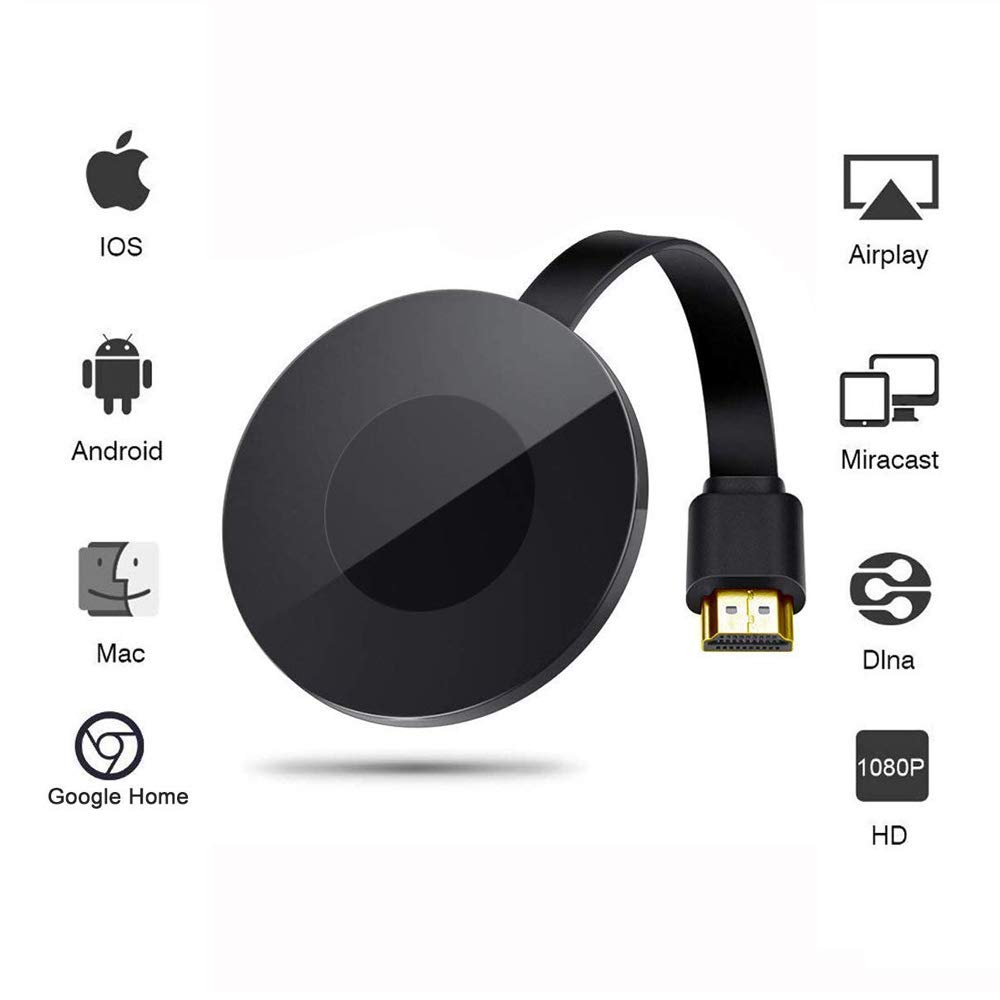
The Wi-Fi display adapter can display the small screen of the phone, tablet PC or laptop to big screen devices such as HDTV or projector, high definition up to 1080P, create your own exclusive cinema, enjoy different audio-visual feast.
Small Size & Widely Application
Mini size,Compact design,You can take it anywhere you go. Perfect for home theater, gaming experience,business meeting, Teaching etc.It is a good companion for you.
★Connect steps
--The ios user, please turn the mode into DLNA/Airplay
--The Android/Windows user,please press the button to switch the mode to Miracast
--iPhone for example (Mirror,casting 2-in-1)
1. Connect the display dongle to the projector and POWER the dongle, turn it into Dlna/Airplay mode. Connect the wifi to "Wecast-1254e4" with iPhone
2.Open a broswer and type: 192.168.49.1, Lollipop Home--WiFi AP--Scan--Scan Result--Choose your home wifi name and enter password--Connect.
3. Once set up, your iPhone can mirror native video, games, audio, pictures, office document etc by airplay or casting online video of YouTube directly to big screen but you can do anything on your phone and will not influence the play.
★Compatible System:
Supports Android :4.2+with 1GB RAM/ (support mirror)
iOS 7.0+, Iphone 4+,Ipad 2+,Ipod 4+/ (Support mirror game,native video etc or casting YouTube)
Mac OS 10.8+ / Windows 8.1+ (support mirror)
Notes:
♥1.Please check whether your smartphone or tablet is support Miracast before you buy the stick.(if not, it not works).
♥2.The wireless display adapter is not compatible with Netflix and Plex on IOS system.
♥3.Please read the user manual first, if there are any problem occur, please contact us first, we will solve well for you.♥
★Features
High Definition Input
The Wi-Fi display adapter can display the small screen of the phone, tablet PC or laptop to big screen devices such as HDTV or projector, high definition up to 1080P, create your own exclusive cinema, enjoy different audio-visual feast.
Small Size & Widely Application
Mini size,Compact design,You can take it anywhere you go. Perfect for home theater, gaming experience,business meeting, Teaching etc.It is a good companion for you.
★Connect steps
--The ios user, please turn the mode into DLNA/Airplay
--The Android/Windows user,please press the button to switch the mode to Miracast
--iPhone for example (Mirror,casting 2-in-1)
1. Connect the display dongle to the projector and POWER the dongle, turn it into Dlna/Airplay mode. Connect the wifi to "Wecast-1254e4" with iPhone
2.Open a broswer and type: 192.168.49.1, Lollipop Home--WiFi AP--Scan--Scan Result--Choose your home wifi name and enter password--Connect.
3. Once set up, your iPhone can mirror native video, games, audio, pictures, office document etc by airplay or casting online video of YouTube directly to big screen but you can do anything on your phone and will not influence the play.
★Compatible System:
Supports Android :4.2+with 1GB RAM/ (support mirror)
iOS 7.0+, Iphone 4+,Ipad 2+,Ipod 4+/ (Support mirror game,native video etc or casting YouTube)
Mac OS 10.8+ / Windows 8.1+ (support mirror)
Notes:
♥1.Please check whether your smartphone or tablet is support Miracast before you buy the stick.(if not, it not works).
♥2.The wireless display adapter is not compatible with Netflix and Plex on IOS system.
♥3.Please read the user manual first, if there are any problem occur, please contact us first, we will solve well for you.♥
WiFi Display Dongle, YLFPOWER 1080P Wireless HDMI Display Dongle Support Airplay DLNA Miracast, Media Streamer Adapter for Smartphone IPad and PC
Price is below average
Current Price
$19.88
Average
$22.25
Min Price
$19.88
Max Price
$26.99
Price dynamics
11%
Description
♥USE YLFPOWER WIRELESS DISPLAY DONGLE, ENJOY A CLEARER AND MORE COMFORTABLE WATCHING EXPERIENCE ON BIG SCREEN!♥
★Features
High Definition Input
The Wi-Fi display adapter can display the small screen of the phone, tablet PC or laptop to big screen devices such as HDTV or projector, high definition up to 1080P, create your own exclusive cinema, enjoy different audio-visual feast.
Small Size & Widely Application
Mini size,Compact design,You can take it anywhere you go. Perfect for home theater, gaming experience,business meeting, Teaching etc.It is a good companion for you.
★Connect steps
--The ios user, please turn the mode into DLNA/Airplay
--The Android/Windows user,please press the button to switch the mode to Miracast
--iPhone for example (Mirror,casting 2-in-1)
1. Connect the display dongle to the projector and POWER the dongle, turn it into Dlna/Airplay mode. Connect the wifi to "Wecast-1254e4" with iPhone
2.Open a broswer and type: 192.168.49.1, Lollipop Home--WiFi AP--Scan--Scan Result--Choose your home wifi name and enter password--Connect.
3. Once set up, your iPhone can mirror native video, games, audio, pictures, office document etc by airplay or casting online video of YouTube directly to big screen but you can do anything on your phone and will not influence the play.
★Compatible System:
Supports Android :4.2+with 1GB RAM/ (support mirror)
iOS 7.0+, Iphone 4+,Ipad 2+,Ipod 4+/ (Support mirror game,native video etc or casting YouTube)
Mac OS 10.8+ / Windows 8.1+ (support mirror)
Notes:
♥1.Please check whether your smartphone or tablet is support Miracast before you buy the stick.(if not, it not works).
♥2.The wireless display adapter is not compatible with Netflix and Plex on IOS system.
♥3.Please read the user manual first, if there are any problem occur, please contact us first, we will solve well for you.♥
★Features
High Definition Input
The Wi-Fi display adapter can display the small screen of the phone, tablet PC or laptop to big screen devices such as HDTV or projector, high definition up to 1080P, create your own exclusive cinema, enjoy different audio-visual feast.
Small Size & Widely Application
Mini size,Compact design,You can take it anywhere you go. Perfect for home theater, gaming experience,business meeting, Teaching etc.It is a good companion for you.
★Connect steps
--The ios user, please turn the mode into DLNA/Airplay
--The Android/Windows user,please press the button to switch the mode to Miracast
--iPhone for example (Mirror,casting 2-in-1)
1. Connect the display dongle to the projector and POWER the dongle, turn it into Dlna/Airplay mode. Connect the wifi to "Wecast-1254e4" with iPhone
2.Open a broswer and type: 192.168.49.1, Lollipop Home--WiFi AP--Scan--Scan Result--Choose your home wifi name and enter password--Connect.
3. Once set up, your iPhone can mirror native video, games, audio, pictures, office document etc by airplay or casting online video of YouTube directly to big screen but you can do anything on your phone and will not influence the play.
★Compatible System:
Supports Android :4.2+with 1GB RAM/ (support mirror)
iOS 7.0+, Iphone 4+,Ipad 2+,Ipod 4+/ (Support mirror game,native video etc or casting YouTube)
Mac OS 10.8+ / Windows 8.1+ (support mirror)
Notes:
♥1.Please check whether your smartphone or tablet is support Miracast before you buy the stick.(if not, it not works).
♥2.The wireless display adapter is not compatible with Netflix and Plex on IOS system.
♥3.Please read the user manual first, if there are any problem occur, please contact us first, we will solve well for you.♥
Price will be lower
in next 2 weeks
in next 2 weeks
According to the data, price will be lower in next two weeks, so not waste your money and track better price!

Similar products