Description
Color-White
Intelligent Compatibility
Support all the devices with Bluetooth function like smart phones, tablets, Laptop. In compatible with all kinds of app, player, Television, chatting and so on.
How to charging?
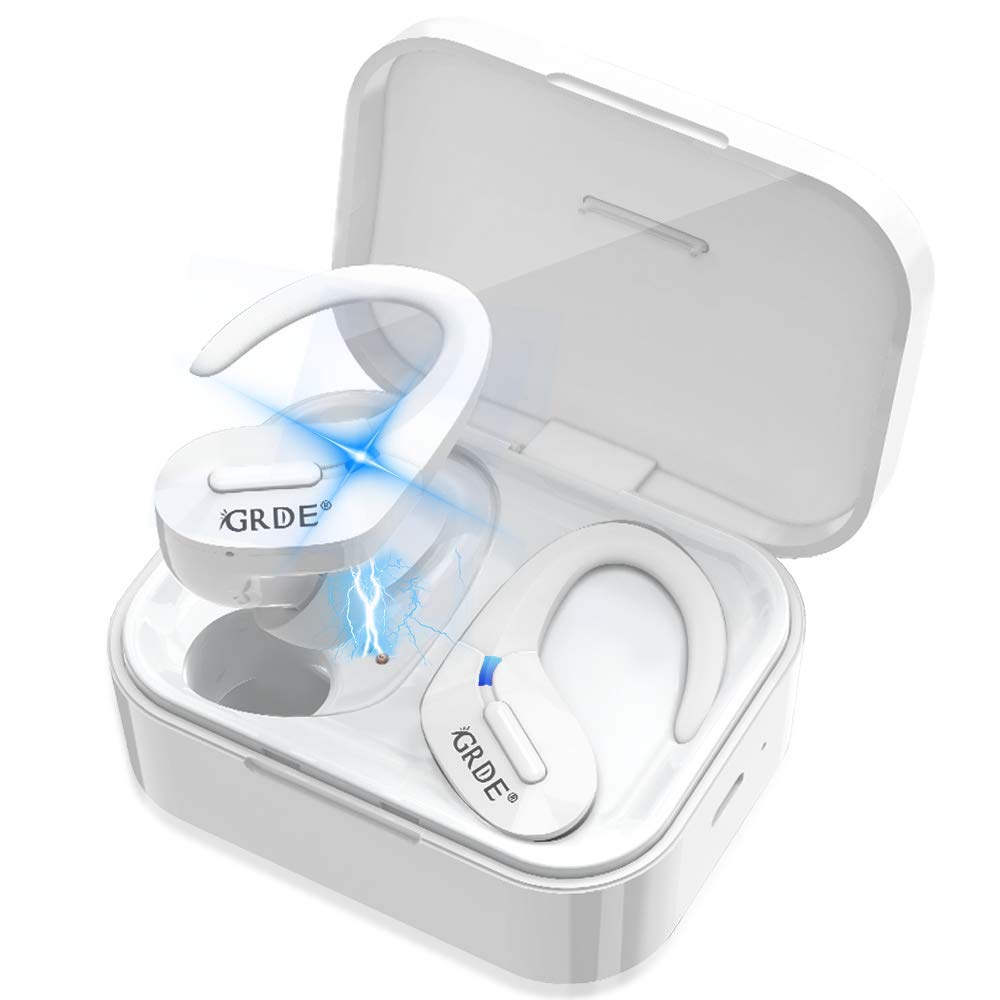
When the earphone prompt"battery low", please put the earphones into the charging box to charge.
*Charge for the earphones: Red light on when charging, light off when fully charged.
*Charging time: appr. 2H
When the charging box run out of battery, please use the standard charger to charge it.
*Charge for the charging box: Green light on when charging, light off when fully charged.
*Charging time: appr. 2H
If the earphones cannot pair each other?
In power off mode, press and hold the two earphones MFB button for about 15 seconds simultaneously (At the same time, the light indicate: blue light on - red and blue lights are alternately flashing- pink light flash 4 times). Then put the earphones to the charging box, they can pair each other when taken out.
Multi-point Connection
Only if using the earphone individually, the earphone can connect to two devices simultaneously.
But under TWS mode, the earphones only can connect to one device, because under TWS mode, the host earphone L is already connecting to two devices(the vice earphone R and one device).
Dual Devices Pairing Steps:
①After paired the 1st device, turn off its bluetooth.
②Reboot the earphone, and connect to the 2nd device.
③After the 2nd device Connected successfully, turn on the 1st device's bluetooth and click #GL019# to connect.
Attention:
♥ Pairing time out of 3 minutes, it will power off automatically.
Intelligent Compatibility
Support all the devices with Bluetooth function like smart phones, tablets, Laptop. In compatible with all kinds of app, player, Television, chatting and so on.
How to charging?
When the earphone prompt"battery low", please put the earphones into the charging box to charge.
*Charge for the earphones: Red light on when charging, light off when fully charged.
*Charging time: appr. 2H
When the charging box run out of battery, please use the standard charger to charge it.
*Charge for the charging box: Green light on when charging, light off when fully charged.
*Charging time: appr. 2H
If the earphones cannot pair each other?
In power off mode, press and hold the two earphones MFB button for about 15 seconds simultaneously (At the same time, the light indicate: blue light on - red and blue lights are alternately flashing- pink light flash 4 times). Then put the earphones to the charging box, they can pair each other when taken out.
Multi-point Connection
Only if using the earphone individually, the earphone can connect to two devices simultaneously.
But under TWS mode, the earphones only can connect to one device, because under TWS mode, the host earphone L is already connecting to two devices(the vice earphone R and one device).
Dual Devices Pairing Steps:
①After paired the 1st device, turn off its bluetooth.
②Reboot the earphone, and connect to the 2nd device.
③After the 2nd device Connected successfully, turn on the 1st device's bluetooth and click #GL019# to connect.
Attention:
♥ Pairing time out of 3 minutes, it will power off automatically.
Wireless Earbuds, Bluetooth 5.0 Headphones True Wireless Earbuds Sports in-Ear TWS Stereo HiFi Sound Bluetooth Earbuds 30H Playtime Wireless Earphones with Charging Case(White)
Current Price
$53.99
Average
$47.37
Min Price
$39
Max Price
$53.99
Price dynamics
12%
Description
Color-White
Intelligent Compatibility
Support all the devices with Bluetooth function like smart phones, tablets, Laptop. In compatible with all kinds of app, player, Television, chatting and so on.
How to charging?
When the earphone prompt"battery low", please put the earphones into the charging box to charge.
*Charge for the earphones: Red light on when charging, light off when fully charged.
*Charging time: appr. 2H
When the charging box run out of battery, please use the standard charger to charge it.
*Charge for the charging box: Green light on when charging, light off when fully charged.
*Charging time: appr. 2H
If the earphones cannot pair each other?
In power off mode, press and hold the two earphones MFB button for about 15 seconds simultaneously (At the same time, the light indicate: blue light on - red and blue lights are alternately flashing- pink light flash 4 times). Then put the earphones to the charging box, they can pair each other when taken out.
Multi-point Connection
Only if using the earphone individually, the earphone can connect to two devices simultaneously.
But under TWS mode, the earphones only can connect to one device, because under TWS mode, the host earphone L is already connecting to two devices(the vice earphone R and one device).
Dual Devices Pairing Steps:
①After paired the 1st device, turn off its bluetooth.
②Reboot the earphone, and connect to the 2nd device.
③After the 2nd device Connected successfully, turn on the 1st device's bluetooth and click #GL019# to connect.
Attention:
♥ Pairing time out of 3 minutes, it will power off automatically.
Intelligent Compatibility
Support all the devices with Bluetooth function like smart phones, tablets, Laptop. In compatible with all kinds of app, player, Television, chatting and so on.
How to charging?
When the earphone prompt"battery low", please put the earphones into the charging box to charge.
*Charge for the earphones: Red light on when charging, light off when fully charged.
*Charging time: appr. 2H
When the charging box run out of battery, please use the standard charger to charge it.
*Charge for the charging box: Green light on when charging, light off when fully charged.
*Charging time: appr. 2H
If the earphones cannot pair each other?
In power off mode, press and hold the two earphones MFB button for about 15 seconds simultaneously (At the same time, the light indicate: blue light on - red and blue lights are alternately flashing- pink light flash 4 times). Then put the earphones to the charging box, they can pair each other when taken out.
Multi-point Connection
Only if using the earphone individually, the earphone can connect to two devices simultaneously.
But under TWS mode, the earphones only can connect to one device, because under TWS mode, the host earphone L is already connecting to two devices(the vice earphone R and one device).
Dual Devices Pairing Steps:
①After paired the 1st device, turn off its bluetooth.
②Reboot the earphone, and connect to the 2nd device.
③After the 2nd device Connected successfully, turn on the 1st device's bluetooth and click #GL019# to connect.
Attention:
♥ Pairing time out of 3 minutes, it will power off automatically.
Price will be lower
in next 2 weeks
in next 2 weeks
According to the data, price will be lower in next two weeks, so not waste your money and track better price!
Product review & video
have you ever found it hard to make a decision because you have too many options well that's exactly what she'll go through if you're trying to buy the best affordable pair of truly wireless earphones honestly I think a lot of people just get overwhelmed and say forget it I'll just pony up the dough for some air pods but that sucks air pods are expensive which is why we bought the top-50 wireless earphones for under $100 from amazon.com and went through the pain staking tedium of trying out every single one of them so stick around and I'll tell you which ones suck and why and which select few are actually worth a closer look but first a closer look at our sponsor Origin PC customized an Origin PC desktop powered by an NVIDIA GeForce r-tx graphics card pair with a GC monitor for a fast refresh rate and an edge on your competition learn more at the link below first we'll eliminate the one



Similar products