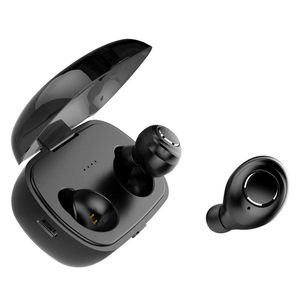
Description
User Instructions
You can use the wireless Bluetooth headset X8 to enable iPhone Siri.
TWS use
Startup
1.The first way to boot: Keep long press of MFB key for about 2 seconds
when the headset is powered off, thenthere is "startup" voice prompt,
and the headset starts and enters the last status, with red light blinking.
2.When the reddish blue LED light of left ear blinks alternately,
the blue indicator light of right ear blinks every 7 seconds,
and the headset enters the mobile phone matching state.
3.Open the mobile phone's bluetooth function, and find out the X8 L and
click the prompt connecting the relevant voice in headset in the bluetooth
search lish of equipment.
Specification
Headset
Bluetooth version: V5.0
Scope:10m/33ft
Inputs:5V
Charging duration:1.2 hours
Battery capacity: 40mAh
Play time(depend on different volumes and contents):3.5 hours(single)
IOS electric quantity display:Support
Double-barrelled function of call:Support
Charging box
Inputs: 5V/1A
Charging duration: 2.5 hours
Battery capacity:500mAh
Charging times of headset:4-6 times
packing accessorise
A pair of headset
Apiece of charging box
One manual
One USB charging line
A pair of medium-sized earmuff
A pair of small-sized earmuff
You can use the wireless Bluetooth headset X8 to enable iPhone Siri.
TWS use
Startup
1.The first way to boot: Keep long press of MFB key for about 2 seconds
when the headset is powered off, thenthere is "startup" voice prompt,
and the headset starts and enters the last status, with red light blinking.
2.When the reddish blue LED light of left ear blinks alternately,
the blue indicator light of right ear blinks every 7 seconds,
and the headset enters the mobile phone matching state.
3.Open the mobile phone's bluetooth function, and find out the X8 L and
click the prompt connecting the relevant voice in headset in the bluetooth
search lish of equipment.
Specification
Headset
Bluetooth version: V5.0
Scope:10m/33ft
Inputs:5V
Charging duration:1.2 hours
Battery capacity: 40mAh
Play time(depend on different volumes and contents):3.5 hours(single)
IOS electric quantity display:Support
Double-barrelled function of call:Support
Charging box
Inputs: 5V/1A
Charging duration: 2.5 hours
Battery capacity:500mAh
Charging times of headset:4-6 times
packing accessorise
A pair of headset
Apiece of charging box
One manual
One USB charging line
A pair of medium-sized earmuff
A pair of small-sized earmuff
Wireless Earbuds, IPX5 Sweatproof X8 Bluetooth 5.0 3D Stereo Sound True Wireless Headphones with Charging Box Built-in Mic and Noise Cancelling Stereo for iPhone and Android
Price is below average
Current Price
$29.99
Average
$40.49
Min Price
$29.99
Max Price
$59.99
Price dynamics
26%
Description
User Instructions
You can use the wireless Bluetooth headset X8 to enable iPhone Siri.
TWS use
Startup
1.The first way to boot: Keep long press of MFB key for about 2 seconds
when the headset is powered off, thenthere is "startup" voice prompt,
and the headset starts and enters the last status, with red light blinking.
2.When the reddish blue LED light of left ear blinks alternately,
the blue indicator light of right ear blinks every 7 seconds,
and the headset enters the mobile phone matching state.
3.Open the mobile phone's bluetooth function, and find out the X8 L and
click the prompt connecting the relevant voice in headset in the bluetooth
search lish of equipment.
Specification
Headset
Bluetooth version: V5.0
Scope:10m/33ft
Inputs:5V
Charging duration:1.2 hours
Battery capacity: 40mAh
Play time(depend on different volumes and contents):3.5 hours(single)
IOS electric quantity display:Support
Double-barrelled function of call:Support
Charging box
Inputs: 5V/1A
Charging duration: 2.5 hours
Battery capacity:500mAh
Charging times of headset:4-6 times
packing accessorise
A pair of headset
Apiece of charging box
One manual
One USB charging line
A pair of medium-sized earmuff
A pair of small-sized earmuff
You can use the wireless Bluetooth headset X8 to enable iPhone Siri.
TWS use
Startup
1.The first way to boot: Keep long press of MFB key for about 2 seconds
when the headset is powered off, thenthere is "startup" voice prompt,
and the headset starts and enters the last status, with red light blinking.
2.When the reddish blue LED light of left ear blinks alternately,
the blue indicator light of right ear blinks every 7 seconds,
and the headset enters the mobile phone matching state.
3.Open the mobile phone's bluetooth function, and find out the X8 L and
click the prompt connecting the relevant voice in headset in the bluetooth
search lish of equipment.
Specification
Headset
Bluetooth version: V5.0
Scope:10m/33ft
Inputs:5V
Charging duration:1.2 hours
Battery capacity: 40mAh
Play time(depend on different volumes and contents):3.5 hours(single)
IOS electric quantity display:Support
Double-barrelled function of call:Support
Charging box
Inputs: 5V/1A
Charging duration: 2.5 hours
Battery capacity:500mAh
Charging times of headset:4-6 times
packing accessorise
A pair of headset
Apiece of charging box
One manual
One USB charging line
A pair of medium-sized earmuff
A pair of small-sized earmuff
Price will be lower
in next 2 weeks
in next 2 weeks
According to the data, price will be lower in next two weeks, so not waste your money and track better price!

Similar products



































