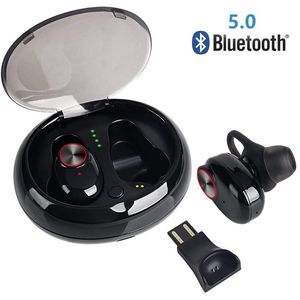
Description
☞ Product advantages:
Stereo voice technology with in-ear noise reduction gives you clear calls and high-quality music, so you can immerse yourself in the music world no matter where you are
One-touch control: answer/end/reject incoming calls; play/pause songs; skip to next track/play previous track, volume increase/volume down
How to match:
1. Two simultaneous use: Turn on the power and press the two earbud buttons simultaneously for about 6-8 seconds until the two earbuds alternately flash red and blue to establish a wireless pairing connection between the left and right ears. When the left and right ears are successfully paired (the indicator light is red and one of them is blue), the mobile device will only display one Bluetooth device name (if two device names appear, the left and right ear pairing is unsuccessful, please re-operate) You can connect to a Bluetooth device name using your mobile device.
2. Use alone: Simply connect one of the earbuds to the mobile device. If you want to connect a Bluetooth headset to each of the two mobile devices, keep the distance between the two headphones after 20 meters (because the two earbuds will default to the automatic connection within the receiving distance).
3. Select the main button (for example, the right earbud): Press the right earbud button twice, about 6-8 seconds, the left earbud indicator disappears, only the right earbud indicator flashes red and blue (the two earbuds are successfully aligned).
4. After successfully connecting the device, press the left ear twice to increase the volume. Press the right ear twice to lower the volume. Press the left ear three times to switch to the previous track. Press the right ear three times to switch to the next track.
☞Packaging includes:
2 *Bluetooth earbuds
1 * charger housing
1 * User Manual
1 * USB charging cable
1 * single ear plug charging cable
3 * earrings (3 pairs)
Stereo voice technology with in-ear noise reduction gives you clear calls and high-quality music, so you can immerse yourself in the music world no matter where you are
One-touch control: answer/end/reject incoming calls; play/pause songs; skip to next track/play previous track, volume increase/volume down
How to match:
1. Two simultaneous use: Turn on the power and press the two earbud buttons simultaneously for about 6-8 seconds until the two earbuds alternately flash red and blue to establish a wireless pairing connection between the left and right ears. When the left and right ears are successfully paired (the indicator light is red and one of them is blue), the mobile device will only display one Bluetooth device name (if two device names appear, the left and right ear pairing is unsuccessful, please re-operate) You can connect to a Bluetooth device name using your mobile device.
2. Use alone: Simply connect one of the earbuds to the mobile device. If you want to connect a Bluetooth headset to each of the two mobile devices, keep the distance between the two headphones after 20 meters (because the two earbuds will default to the automatic connection within the receiving distance).
3. Select the main button (for example, the right earbud): Press the right earbud button twice, about 6-8 seconds, the left earbud indicator disappears, only the right earbud indicator flashes red and blue (the two earbuds are successfully aligned).
4. After successfully connecting the device, press the left ear twice to increase the volume. Press the right ear twice to lower the volume. Press the left ear three times to switch to the previous track. Press the right ear three times to switch to the next track.
☞Packaging includes:
2 *Bluetooth earbuds
1 * charger housing
1 * User Manual
1 * USB charging cable
1 * single ear plug charging cable
3 * earrings (3 pairs)
Wireless Earbuds, IPX5 Waterproof and sweatproof, Version 5.0 Charging Box True Stereo Wireless Bluetooth Headset 20 Hours Playback time, DSP Noise Reduction Technology, Built-in Microphone(Black)
Price is below average
Current Price
$32.99
Average
$36.01
Min Price
$29.99
Max Price
$49.99
Price dynamics
8%
Description
☞ Product advantages:
Stereo voice technology with in-ear noise reduction gives you clear calls and high-quality music, so you can immerse yourself in the music world no matter where you are
One-touch control: answer/end/reject incoming calls; play/pause songs; skip to next track/play previous track, volume increase/volume down
How to match:
1. Two simultaneous use: Turn on the power and press the two earbud buttons simultaneously for about 6-8 seconds until the two earbuds alternately flash red and blue to establish a wireless pairing connection between the left and right ears. When the left and right ears are successfully paired (the indicator light is red and one of them is blue), the mobile device will only display one Bluetooth device name (if two device names appear, the left and right ear pairing is unsuccessful, please re-operate) You can connect to a Bluetooth device name using your mobile device.
2. Use alone: Simply connect one of the earbuds to the mobile device. If you want to connect a Bluetooth headset to each of the two mobile devices, keep the distance between the two headphones after 20 meters (because the two earbuds will default to the automatic connection within the receiving distance).
3. Select the main button (for example, the right earbud): Press the right earbud button twice, about 6-8 seconds, the left earbud indicator disappears, only the right earbud indicator flashes red and blue (the two earbuds are successfully aligned).
4. After successfully connecting the device, press the left ear twice to increase the volume. Press the right ear twice to lower the volume. Press the left ear three times to switch to the previous track. Press the right ear three times to switch to the next track.
☞Packaging includes:
2 *Bluetooth earbuds
1 * charger housing
1 * User Manual
1 * USB charging cable
1 * single ear plug charging cable
3 * earrings (3 pairs)
Stereo voice technology with in-ear noise reduction gives you clear calls and high-quality music, so you can immerse yourself in the music world no matter where you are
One-touch control: answer/end/reject incoming calls; play/pause songs; skip to next track/play previous track, volume increase/volume down
How to match:
1. Two simultaneous use: Turn on the power and press the two earbud buttons simultaneously for about 6-8 seconds until the two earbuds alternately flash red and blue to establish a wireless pairing connection between the left and right ears. When the left and right ears are successfully paired (the indicator light is red and one of them is blue), the mobile device will only display one Bluetooth device name (if two device names appear, the left and right ear pairing is unsuccessful, please re-operate) You can connect to a Bluetooth device name using your mobile device.
2. Use alone: Simply connect one of the earbuds to the mobile device. If you want to connect a Bluetooth headset to each of the two mobile devices, keep the distance between the two headphones after 20 meters (because the two earbuds will default to the automatic connection within the receiving distance).
3. Select the main button (for example, the right earbud): Press the right earbud button twice, about 6-8 seconds, the left earbud indicator disappears, only the right earbud indicator flashes red and blue (the two earbuds are successfully aligned).
4. After successfully connecting the device, press the left ear twice to increase the volume. Press the right ear twice to lower the volume. Press the left ear three times to switch to the previous track. Press the right ear three times to switch to the next track.
☞Packaging includes:
2 *Bluetooth earbuds
1 * charger housing
1 * User Manual
1 * USB charging cable
1 * single ear plug charging cable
3 * earrings (3 pairs)
Price will be lower
in next 2 weeks
in next 2 weeks
According to the data, price will be lower in next two weeks, so not waste your money and track better price!

Similar products



































