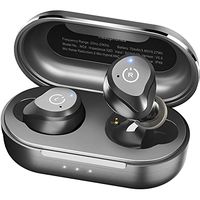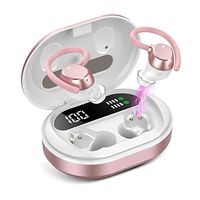
Description
Features:
1.Bluetooth version: Realtek V5.0+EDR
2.Working range: up to 33 feets on open air
4.Playing time: 4-6 hours
5.Standby time: 100 hours
6.Charging Time: about 1-2 hour
8.Working temperature: -10 - 55 C
9.Compatible with Most bluetooth enabled Smartphones and devices
Multi-function Button:
Double click -- play / pause music,answer a call,hang up
Three click the left headset -- play the previous song
Three click the right headset -- play the next song
Long press the touch key -- reject call,activating Siri
Box Content:
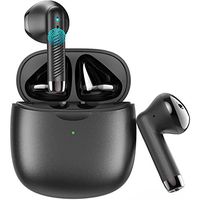
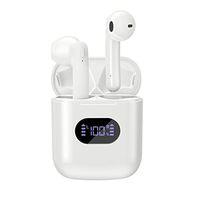
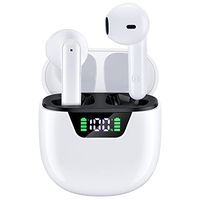
2 x TWS Bluetooth Stereo Earphones(Left&Right)
1 x Charging Case
1 x Micro USB Charge Cable
1 x User Manual
Reset Steps:
1. Long press the touch key on both sides 5 seconds to turn off the earphone first,then keep to press 10 more seconds then release, the reset operation is completed.
2. Please put them into the charging case and take them out again(or long press the touch key about 5seconds you will hear a voice say power on.)
3. The headsets are entering paring mode, wait for a while and you will hear a voice say "tws connected". Then you can connect your device. If you device shows two earphones in the Bluetooth menu you will need to repeat the steps above as they are not paired with each other.
Twins Pairing:
1. Take out the earbuds,they will auto power on and pairing.
2. When one earbuds flash red and blue light,another not flash light,both earbuds pair successfully.
3. Turn on the Bluetooth on your device and search "TWS" to connect.When the led flash not flash,they pair successfully.
Single Pairing:
1. If you need pair with two phones,please take out and pair right earbud first.
2. After right earbuds paired successfully,then pair your left earbud.
Helose team the best customer services,if you have any questions about the product,please be free to ask,would be glad to help.
1.Bluetooth version: Realtek V5.0+EDR
2.Working range: up to 33 feets on open air
4.Playing time: 4-6 hours
5.Standby time: 100 hours
6.Charging Time: about 1-2 hour
8.Working temperature: -10 - 55 C
9.Compatible with Most bluetooth enabled Smartphones and devices
Multi-function Button:
Double click -- play / pause music,answer a call,hang up
Three click the left headset -- play the previous song
Three click the right headset -- play the next song
Long press the touch key -- reject call,activating Siri
Box Content:
2 x TWS Bluetooth Stereo Earphones(Left&Right)
1 x Charging Case
1 x Micro USB Charge Cable
1 x User Manual
Reset Steps:
1. Long press the touch key on both sides 5 seconds to turn off the earphone first,then keep to press 10 more seconds then release, the reset operation is completed.
2. Please put them into the charging case and take them out again(or long press the touch key about 5seconds you will hear a voice say power on.)
3. The headsets are entering paring mode, wait for a while and you will hear a voice say "tws connected". Then you can connect your device. If you device shows two earphones in the Bluetooth menu you will need to repeat the steps above as they are not paired with each other.
Twins Pairing:
1. Take out the earbuds,they will auto power on and pairing.
2. When one earbuds flash red and blue light,another not flash light,both earbuds pair successfully.
3. Turn on the Bluetooth on your device and search "TWS" to connect.When the led flash not flash,they pair successfully.
Single Pairing:
1. If you need pair with two phones,please take out and pair right earbud first.
2. After right earbuds paired successfully,then pair your left earbud.
Helose team the best customer services,if you have any questions about the product,please be free to ask,would be glad to help.
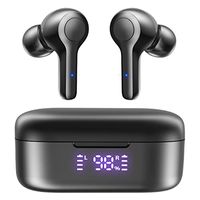
Wireless Earbuds, Touch Control Portable Bluetooth 5.0 True Wireless Earphones Hands Free Mini in-Ear Headphones with Mic and Charging Case, Binaural Calls, One-Step Pairing (Black1)
Price is below average
Current Price
$39.9
Average
$41.4
Min Price
$39.9
Max Price
$42.9
Price dynamics
4%
Description
Features:
1.Bluetooth version: Realtek V5.0+EDR
2.Working range: up to 33 feets on open air
4.Playing time: 4-6 hours
5.Standby time: 100 hours
6.Charging Time: about 1-2 hour
8.Working temperature: -10 - 55 C
9.Compatible with Most bluetooth enabled Smartphones and devices
Multi-function Button:
Double click -- play / pause music,answer a call,hang up
Three click the left headset -- play the previous song
Three click the right headset -- play the next song
Long press the touch key -- reject call,activating Siri
Box Content:
2 x TWS Bluetooth Stereo Earphones(Left&Right)
1 x Charging Case
1 x Micro USB Charge Cable
1 x User Manual
Reset Steps:
1. Long press the touch key on both sides 5 seconds to turn off the earphone first,then keep to press 10 more seconds then release, the reset operation is completed.
2. Please put them into the charging case and take them out again(or long press the touch key about 5seconds you will hear a voice say power on.)
3. The headsets are entering paring mode, wait for a while and you will hear a voice say "tws connected". Then you can connect your device. If you device shows two earphones in the Bluetooth menu you will need to repeat the steps above as they are not paired with each other.
Twins Pairing:
1. Take out the earbuds,they will auto power on and pairing.
2. When one earbuds flash red and blue light,another not flash light,both earbuds pair successfully.
3. Turn on the Bluetooth on your device and search "TWS" to connect.When the led flash not flash,they pair successfully.
Single Pairing:
1. If you need pair with two phones,please take out and pair right earbud first.
2. After right earbuds paired successfully,then pair your left earbud.
Helose team the best customer services,if you have any questions about the product,please be free to ask,would be glad to help.
1.Bluetooth version: Realtek V5.0+EDR
2.Working range: up to 33 feets on open air
4.Playing time: 4-6 hours
5.Standby time: 100 hours
6.Charging Time: about 1-2 hour
8.Working temperature: -10 - 55 C
9.Compatible with Most bluetooth enabled Smartphones and devices
Multi-function Button:
Double click -- play / pause music,answer a call,hang up
Three click the left headset -- play the previous song
Three click the right headset -- play the next song
Long press the touch key -- reject call,activating Siri
Box Content:
2 x TWS Bluetooth Stereo Earphones(Left&Right)
1 x Charging Case
1 x Micro USB Charge Cable
1 x User Manual
Reset Steps:
1. Long press the touch key on both sides 5 seconds to turn off the earphone first,then keep to press 10 more seconds then release, the reset operation is completed.
2. Please put them into the charging case and take them out again(or long press the touch key about 5seconds you will hear a voice say power on.)
3. The headsets are entering paring mode, wait for a while and you will hear a voice say "tws connected". Then you can connect your device. If you device shows two earphones in the Bluetooth menu you will need to repeat the steps above as they are not paired with each other.
Twins Pairing:
1. Take out the earbuds,they will auto power on and pairing.
2. When one earbuds flash red and blue light,another not flash light,both earbuds pair successfully.
3. Turn on the Bluetooth on your device and search "TWS" to connect.When the led flash not flash,they pair successfully.
Single Pairing:
1. If you need pair with two phones,please take out and pair right earbud first.
2. After right earbuds paired successfully,then pair your left earbud.
Helose team the best customer services,if you have any questions about the product,please be free to ask,would be glad to help.
Price will be lower
in next 2 weeks
in next 2 weeks
According to the data, price will be lower in next two weeks, so not waste your money and track better price!
Product review & video
kkeok your OS reviews you're watching our hands-on review of the i-12 tws earbuds these are another pair of Apple earpods two clones which gets pretty close to being a one-to-one replica now that we just saw the i-5 hundreds which are pretty much the best air pod to clones that I've seen yet this one is a sight step below in terms of they're coming out a little bit earlier and also being a bit cheaper but I'm not quite as detailed in terms of getting all of the features completely right but it solves for about forty five dollars sometimes goes on sale for even less so it's about ten to fifteen dollars cheaper than the i5 hundreds the i-12 also come in a few more color options including a matte black edition which is the one we're taking a look at today looks a pretty distinctive now there are two variants of the i-12 there is an updated version that also supports qi wireless charging so


Similar products