Description
PLEASE NOTE: YOUR TV HAD NEITHER BLUETOOTH NOR 3.5MM AUDIO INTERFACE YOU WILL CAN'T USE THIS PRODUCT!
CONNECT WAYS:
First Way: TV That Have Bluetooth
Because this headphone have bluetooth function, you can turn on the headphone and connect your bluetooth TV via bluetooth function directly.
Second Way: TV That Don't Have Bluetooth
1. Via 3.5mm Audio Cable
(1) Connect TV and the dock Via 3.5mm audio cable;
(2) Turn on the headphone and the dock,then connect headphone to the dock.
2. Via Audio Adapter And 3.5mm Audio Cable.
(1) Connect audio adapter cable and 3.5mm audio cable;
(2) Connect DVD/VCD player... to the dock Via audio adapter cable and 3.5mm audio cable;
(3) Turn on the headphone and the dock, then connect headphone to the dock.
Please Note:
1. If use the first way, only the headphone have sound but TV will have no sound.
2. If use the second way, both the TV and the headphone will have sound.
3. Long press the power button on the headphone 3~5 seconds to turn on the headphone(When you hear the sound"Power On" from the headphone, means the headphone has turned on, then the headphone will connect the TV/Dock automatically; when you hear the sound "Pairing Completed" from the headphone, means the headphone have connect TV/Dock successfully).
4. When use the dock to charge for the headphone,the red light on the dock will be on;after the headphone fully charged,the red light on the dock will be turn to blue.
Packing Included:
1 × Wireless headphone
1 × Charging dock
1 × AC power adapter
1 × Standard plug US
1 × 3.5mm cable
1 × Audio adapter cable
CONNECT WAYS:
First Way: TV That Have Bluetooth
Because this headphone have bluetooth function, you can turn on the headphone and connect your bluetooth TV via bluetooth function directly.
Second Way: TV That Don't Have Bluetooth
1. Via 3.5mm Audio Cable
(1) Connect TV and the dock Via 3.5mm audio cable;
(2) Turn on the headphone and the dock,then connect headphone to the dock.
2. Via Audio Adapter And 3.5mm Audio Cable.
(1) Connect audio adapter cable and 3.5mm audio cable;
(2) Connect DVD/VCD player... to the dock Via audio adapter cable and 3.5mm audio cable;
(3) Turn on the headphone and the dock, then connect headphone to the dock.
Please Note:
1. If use the first way, only the headphone have sound but TV will have no sound.
2. If use the second way, both the TV and the headphone will have sound.
3. Long press the power button on the headphone 3~5 seconds to turn on the headphone(When you hear the sound"Power On" from the headphone, means the headphone has turned on, then the headphone will connect the TV/Dock automatically; when you hear the sound "Pairing Completed" from the headphone, means the headphone have connect TV/Dock successfully).
4. When use the dock to charge for the headphone,the red light on the dock will be on;after the headphone fully charged,the red light on the dock will be turn to blue.
Packing Included:
1 × Wireless headphone
1 × Charging dock
1 × AC power adapter
1 × Standard plug US
1 × 3.5mm cable
1 × Audio adapter cable
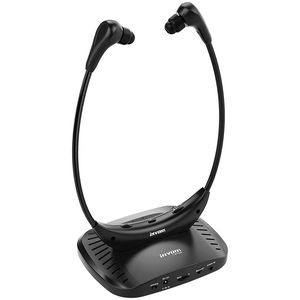
Wireless TV Headphones, iNVONS Bluetooth & Non-Bluetooth TV Hearing Aid Devices Works Best with Analog TV's, Hearing Assistance, TV Listening Headphones for Seniors and Hard of Hearing - Black
Price is below average
Current Price
$66.98
Average
$68.04
Min Price
$65.98
Max Price
$69.99
Price dynamics
2%
Description
PLEASE NOTE: YOUR TV HAD NEITHER BLUETOOTH NOR 3.5MM AUDIO INTERFACE YOU WILL CAN'T USE THIS PRODUCT!
CONNECT WAYS:
First Way: TV That Have Bluetooth
Because this headphone have bluetooth function, you can turn on the headphone and connect your bluetooth TV via bluetooth function directly.
Second Way: TV That Don't Have Bluetooth
1. Via 3.5mm Audio Cable
(1) Connect TV and the dock Via 3.5mm audio cable;
(2) Turn on the headphone and the dock,then connect headphone to the dock.
2. Via Audio Adapter And 3.5mm Audio Cable.
(1) Connect audio adapter cable and 3.5mm audio cable;
(2) Connect DVD/VCD player... to the dock Via audio adapter cable and 3.5mm audio cable;
(3) Turn on the headphone and the dock, then connect headphone to the dock.
Please Note:
1. If use the first way, only the headphone have sound but TV will have no sound.
2. If use the second way, both the TV and the headphone will have sound.
3. Long press the power button on the headphone 3~5 seconds to turn on the headphone(When you hear the sound"Power On" from the headphone, means the headphone has turned on, then the headphone will connect the TV/Dock automatically; when you hear the sound "Pairing Completed" from the headphone, means the headphone have connect TV/Dock successfully).
4. When use the dock to charge for the headphone,the red light on the dock will be on;after the headphone fully charged,the red light on the dock will be turn to blue.
Packing Included:
1 × Wireless headphone
1 × Charging dock
1 × AC power adapter
1 × Standard plug US
1 × 3.5mm cable
1 × Audio adapter cable
CONNECT WAYS:
First Way: TV That Have Bluetooth
Because this headphone have bluetooth function, you can turn on the headphone and connect your bluetooth TV via bluetooth function directly.
Second Way: TV That Don't Have Bluetooth
1. Via 3.5mm Audio Cable
(1) Connect TV and the dock Via 3.5mm audio cable;
(2) Turn on the headphone and the dock,then connect headphone to the dock.
2. Via Audio Adapter And 3.5mm Audio Cable.
(1) Connect audio adapter cable and 3.5mm audio cable;
(2) Connect DVD/VCD player... to the dock Via audio adapter cable and 3.5mm audio cable;
(3) Turn on the headphone and the dock, then connect headphone to the dock.
Please Note:
1. If use the first way, only the headphone have sound but TV will have no sound.
2. If use the second way, both the TV and the headphone will have sound.
3. Long press the power button on the headphone 3~5 seconds to turn on the headphone(When you hear the sound"Power On" from the headphone, means the headphone has turned on, then the headphone will connect the TV/Dock automatically; when you hear the sound "Pairing Completed" from the headphone, means the headphone have connect TV/Dock successfully).
4. When use the dock to charge for the headphone,the red light on the dock will be on;after the headphone fully charged,the red light on the dock will be turn to blue.
Packing Included:
1 × Wireless headphone
1 × Charging dock
1 × AC power adapter
1 × Standard plug US
1 × 3.5mm cable
1 × Audio adapter cable
Price will be lower
in next 2 weeks
in next 2 weeks
According to the data, price will be lower in next two weeks, so not waste your money and track better price!
Similar products