Description
Too many devices while less of ports?
It is time to try this 4 in 1 USB-C Hub.
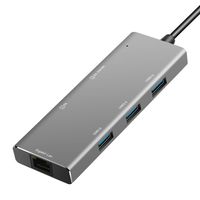
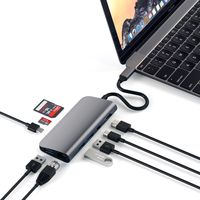
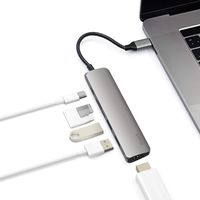
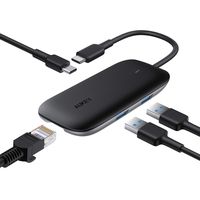
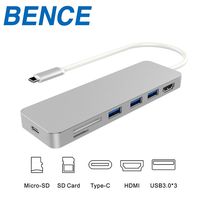
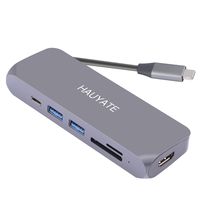
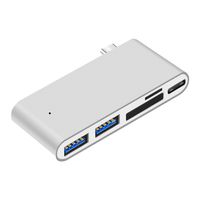
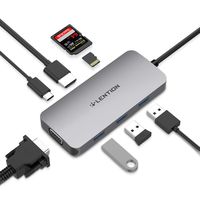
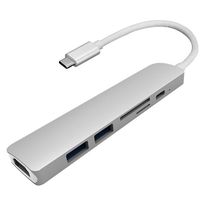
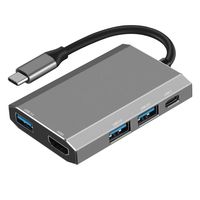
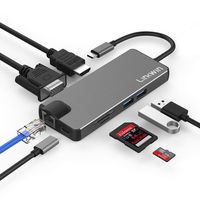
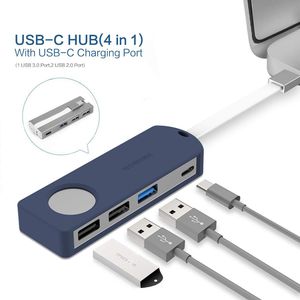
Buy 1 Type-C adapter, you will get 1 USB 3.0 Port, 2 USB 2.0 Port,and 1 USB-C Charging Port. What a great deal!
The intelligent temperature control chip system maintains a uniform temperature throughout the hub, to provide a safe use environment.
Built-in current-limiting protection to keep your devices and data safe from damage.
OTG Support
PD Support 5V/3A; 9V/2A; 14.5V/2A, 20V/3A
Compatible Devices: Not a full list
MacBook Air 2019/2018
MacBook Pro 2019/2018/2017
Google Chromebook Pixel
HUAWEI Mete Book
Other laptop with Type-c ports
Product Dimensions: 3.3 x 1.1 x 0.4 inches
Item Weight: 1.28 ounces
Package Content: 1 × 4 in 1 USB C Hub ; 1 × Silicone case
NOTE:
1. Make sure that the host USB-C port on your device complies with the USB 3.0/USB 3.1 specification. Not compatible with USB 2.0 Type-C devices.
2. To use the Power Delivery function to power and charge a connected USB-C laptop, the host USB-C port from your device must support USB Power Delivery. The USB-C input charging port can't be used for data transmission.
3. Please do not rely on the USB-A ports for charging your phones, tablets or other devices. The USB 3.0 Type-A port on the hub support a total output of up to 5V 900mA,The USB 2.0 Type-A port on the multiport adapter support a total output of up to 5V 500mA.
4. For a stable connection, do not use this hub with high-power devices. It supports ONE hard drive max.
It is time to try this 4 in 1 USB-C Hub.
Buy 1 Type-C adapter, you will get 1 USB 3.0 Port, 2 USB 2.0 Port,and 1 USB-C Charging Port. What a great deal!
The intelligent temperature control chip system maintains a uniform temperature throughout the hub, to provide a safe use environment.
Built-in current-limiting protection to keep your devices and data safe from damage.
OTG Support
PD Support 5V/3A; 9V/2A; 14.5V/2A, 20V/3A
Compatible Devices: Not a full list
MacBook Air 2019/2018
MacBook Pro 2019/2018/2017
Google Chromebook Pixel
HUAWEI Mete Book
Other laptop with Type-c ports
Product Dimensions: 3.3 x 1.1 x 0.4 inches
Item Weight: 1.28 ounces
Package Content: 1 × 4 in 1 USB C Hub ; 1 × Silicone case
NOTE:
1. Make sure that the host USB-C port on your device complies with the USB 3.0/USB 3.1 specification. Not compatible with USB 2.0 Type-C devices.
2. To use the Power Delivery function to power and charge a connected USB-C laptop, the host USB-C port from your device must support USB Power Delivery. The USB-C input charging port can't be used for data transmission.
3. Please do not rely on the USB-A ports for charging your phones, tablets or other devices. The USB 3.0 Type-A port on the hub support a total output of up to 5V 900mA,The USB 2.0 Type-A port on the multiport adapter support a total output of up to 5V 500mA.
4. For a stable connection, do not use this hub with high-power devices. It supports ONE hard drive max.
WORDIMA USB C Adapter, 4-in-1 USB C Hub Adapter with Type C Charger USB 3.0 USB 2.0 Ports for Mac Pro 2019 adapters Mac Air 2019/2018 ChromeBook and More Aluminum dongle (Blue)
Current Price
$16.99
Average
$13.85
Min Price
$9.99
Max Price
$19.99
Price dynamics
18%
Description
Too many devices while less of ports?
It is time to try this 4 in 1 USB-C Hub.
Buy 1 Type-C adapter, you will get 1 USB 3.0 Port, 2 USB 2.0 Port,and 1 USB-C Charging Port. What a great deal!
The intelligent temperature control chip system maintains a uniform temperature throughout the hub, to provide a safe use environment.
Built-in current-limiting protection to keep your devices and data safe from damage.
OTG Support
PD Support 5V/3A; 9V/2A; 14.5V/2A, 20V/3A
Compatible Devices: Not a full list
MacBook Air 2019/2018
MacBook Pro 2019/2018/2017
Google Chromebook Pixel
HUAWEI Mete Book
Other laptop with Type-c ports
Product Dimensions: 3.3 x 1.1 x 0.4 inches
Item Weight: 1.28 ounces
Package Content: 1 × 4 in 1 USB C Hub ; 1 × Silicone case
NOTE:
1. Make sure that the host USB-C port on your device complies with the USB 3.0/USB 3.1 specification. Not compatible with USB 2.0 Type-C devices.
2. To use the Power Delivery function to power and charge a connected USB-C laptop, the host USB-C port from your device must support USB Power Delivery. The USB-C input charging port can't be used for data transmission.
3. Please do not rely on the USB-A ports for charging your phones, tablets or other devices. The USB 3.0 Type-A port on the hub support a total output of up to 5V 900mA,The USB 2.0 Type-A port on the multiport adapter support a total output of up to 5V 500mA.
4. For a stable connection, do not use this hub with high-power devices. It supports ONE hard drive max.
It is time to try this 4 in 1 USB-C Hub.
Buy 1 Type-C adapter, you will get 1 USB 3.0 Port, 2 USB 2.0 Port,and 1 USB-C Charging Port. What a great deal!
The intelligent temperature control chip system maintains a uniform temperature throughout the hub, to provide a safe use environment.
Built-in current-limiting protection to keep your devices and data safe from damage.
OTG Support
PD Support 5V/3A; 9V/2A; 14.5V/2A, 20V/3A
Compatible Devices: Not a full list
MacBook Air 2019/2018
MacBook Pro 2019/2018/2017
Google Chromebook Pixel
HUAWEI Mete Book
Other laptop with Type-c ports
Product Dimensions: 3.3 x 1.1 x 0.4 inches
Item Weight: 1.28 ounces
Package Content: 1 × 4 in 1 USB C Hub ; 1 × Silicone case
NOTE:
1. Make sure that the host USB-C port on your device complies with the USB 3.0/USB 3.1 specification. Not compatible with USB 2.0 Type-C devices.
2. To use the Power Delivery function to power and charge a connected USB-C laptop, the host USB-C port from your device must support USB Power Delivery. The USB-C input charging port can't be used for data transmission.
3. Please do not rely on the USB-A ports for charging your phones, tablets or other devices. The USB 3.0 Type-A port on the hub support a total output of up to 5V 900mA,The USB 2.0 Type-A port on the multiport adapter support a total output of up to 5V 500mA.
4. For a stable connection, do not use this hub with high-power devices. It supports ONE hard drive max.
Price will be lower
in next 2 weeks
in next 2 weeks
According to the data, price will be lower in next two weeks, so not waste your money and track better price!
Product review & video
hey there what's up I hope you're staying safe in this video I'm gonna be showing you how you can get your MacBook Pro or MacBook Air to read HDMI ports SD cards micro SD cards and regular USB cables let's go as you are very well aware of especially if you own a MacBook Air or MacBook Pro one of the newer ones from the previous years I believe from like 2016 or 2017 till today all Mac books come with only USB type-c slot so as you can see here these are the new USB C slots that all of the Mac books come with so they don't come with regular USB ports anymore you know making it difficult to be able to connect the cables to connect your iPhone to charge or simply connect other devices that you want to either transfer data into or out to and also they don't come with HDMI ports in case you want to connect it to maybe your TV or a bigger display but in this video I'm gonna be showing you how


Similar products