Description
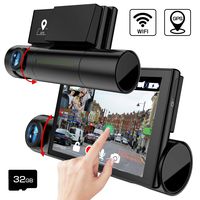
Dash cam with Wifi and APP
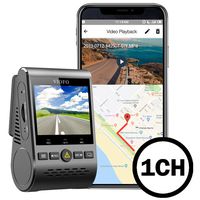
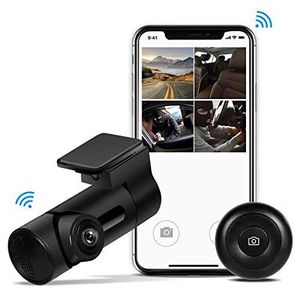
The dash cam connects to the app using its own WiFi signal. You'll still be able to use your data plan (only for ios Devices).
When paired with the"Car.DVR360"app, the videos are live-streamed to the app and important events, like hard brakes, are automatically saved to your phone.
Then you can trim a driving clip and share it with your friends and family.
270° Swivel Angel&230°Wide view Angel
Swivel the camera up to 270° to capture footage inside and outside of the car; But the 270° Swivel is not automatically;
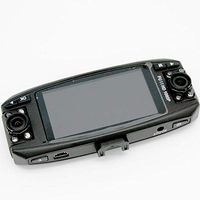
While 230° lens covers car front,(cabin) inside, left, right (about 5 lanes) and easily records in-car conversations or carpool karaoke singing moments;
Dash cam with Snapshot Button
Sits on the steering wheel and allows you to quickly capture the unexpected as it literally crosses your path; shoot a 20 second short video with a longer press of the button.
Kind reminder
1- The wifi connection is support Smart phone, Pad,DVR(but big Screen is not advised)
2- Our APP the lowest support Android 4.4.4 system.
3- Please format SD card on the app directly.
4- If view real-time the footage on Smartphone, the resolution is Only 640x640@60fps;
As we suggested download the video into your Smartphone, thus the resolution up to 1920*1080P@60fps.
5- When preview video on the APP, Video can be enlarged, or full screen.
6- We don't advise you to close fisheye modes. It will affect the vidoe quality
7- Please open Parking Monitor function in setting options first, if you use it.
Wifi Connection:
-When connecting to Dashcam Wi-Fi with an Android phone, it's recommended to turn off the Cellular Data.
-The voice prompts start when connecting to Dashcam Wi-Fi.Don't want to record voice? Just close the audio in the APP.
The dash cam connects to the app using its own WiFi signal. You'll still be able to use your data plan (only for ios Devices).
When paired with the"Car.DVR360"app, the videos are live-streamed to the app and important events, like hard brakes, are automatically saved to your phone.
Then you can trim a driving clip and share it with your friends and family.
270° Swivel Angel&230°Wide view Angel
Swivel the camera up to 270° to capture footage inside and outside of the car; But the 270° Swivel is not automatically;
While 230° lens covers car front,(cabin) inside, left, right (about 5 lanes) and easily records in-car conversations or carpool karaoke singing moments;
Dash cam with Snapshot Button
Sits on the steering wheel and allows you to quickly capture the unexpected as it literally crosses your path; shoot a 20 second short video with a longer press of the button.
Kind reminder
1- The wifi connection is support Smart phone, Pad,DVR(but big Screen is not advised)
2- Our APP the lowest support Android 4.4.4 system.
3- Please format SD card on the app directly.
4- If view real-time the footage on Smartphone, the resolution is Only 640x640@60fps;
As we suggested download the video into your Smartphone, thus the resolution up to 1920*1080P@60fps.
5- When preview video on the APP, Video can be enlarged, or full screen.
6- We don't advise you to close fisheye modes. It will affect the vidoe quality
7- Please open Parking Monitor function in setting options first, if you use it.
Wifi Connection:
-When connecting to Dashcam Wi-Fi with an Android phone, it's recommended to turn off the Cellular Data.
-The voice prompts start when connecting to Dashcam Wi-Fi.Don't want to record voice? Just close the audio in the APP.
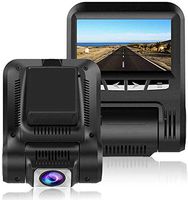
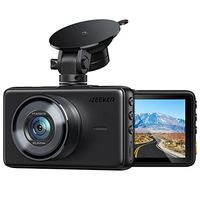
Yakola Y6 WiFi Dash Cam, Mini Car Camera, 360°Fisheye Panoramic Lens, 230°wide view angle, 1080P HD Dash Camera,24H Parking Monitor, Dashboard Camera Recorder,G-Sensor Loop Recording,HDR
Price is below average
Current Price
$98.99
Average
$100.99
Min Price
$96.99
Max Price
$106.99
Price dynamics
2%
Description
Dash cam with Wifi and APP
The dash cam connects to the app using its own WiFi signal. You'll still be able to use your data plan (only for ios Devices).
When paired with the"Car.DVR360"app, the videos are live-streamed to the app and important events, like hard brakes, are automatically saved to your phone.
Then you can trim a driving clip and share it with your friends and family.
270° Swivel Angel&230°Wide view Angel
Swivel the camera up to 270° to capture footage inside and outside of the car; But the 270° Swivel is not automatically;
While 230° lens covers car front,(cabin) inside, left, right (about 5 lanes) and easily records in-car conversations or carpool karaoke singing moments;
Dash cam with Snapshot Button
Sits on the steering wheel and allows you to quickly capture the unexpected as it literally crosses your path; shoot a 20 second short video with a longer press of the button.
Kind reminder
1- The wifi connection is support Smart phone, Pad,DVR(but big Screen is not advised)
2- Our APP the lowest support Android 4.4.4 system.
3- Please format SD card on the app directly.
4- If view real-time the footage on Smartphone, the resolution is Only 640x640@60fps;
As we suggested download the video into your Smartphone, thus the resolution up to 1920*1080P@60fps.
5- When preview video on the APP, Video can be enlarged, or full screen.
6- We don't advise you to close fisheye modes. It will affect the vidoe quality
7- Please open Parking Monitor function in setting options first, if you use it.
Wifi Connection:
-When connecting to Dashcam Wi-Fi with an Android phone, it's recommended to turn off the Cellular Data.
-The voice prompts start when connecting to Dashcam Wi-Fi.Don't want to record voice? Just close the audio in the APP.
The dash cam connects to the app using its own WiFi signal. You'll still be able to use your data plan (only for ios Devices).
When paired with the"Car.DVR360"app, the videos are live-streamed to the app and important events, like hard brakes, are automatically saved to your phone.
Then you can trim a driving clip and share it with your friends and family.
270° Swivel Angel&230°Wide view Angel
Swivel the camera up to 270° to capture footage inside and outside of the car; But the 270° Swivel is not automatically;
While 230° lens covers car front,(cabin) inside, left, right (about 5 lanes) and easily records in-car conversations or carpool karaoke singing moments;
Dash cam with Snapshot Button
Sits on the steering wheel and allows you to quickly capture the unexpected as it literally crosses your path; shoot a 20 second short video with a longer press of the button.
Kind reminder
1- The wifi connection is support Smart phone, Pad,DVR(but big Screen is not advised)
2- Our APP the lowest support Android 4.4.4 system.
3- Please format SD card on the app directly.
4- If view real-time the footage on Smartphone, the resolution is Only 640x640@60fps;
As we suggested download the video into your Smartphone, thus the resolution up to 1920*1080P@60fps.
5- When preview video on the APP, Video can be enlarged, or full screen.
6- We don't advise you to close fisheye modes. It will affect the vidoe quality
7- Please open Parking Monitor function in setting options first, if you use it.
Wifi Connection:
-When connecting to Dashcam Wi-Fi with an Android phone, it's recommended to turn off the Cellular Data.
-The voice prompts start when connecting to Dashcam Wi-Fi.Don't want to record voice? Just close the audio in the APP.
Price will be lower
in next 2 weeks
in next 2 weeks
According to the data, price will be lower in next two weeks, so not waste your money and track better price!
Similar products