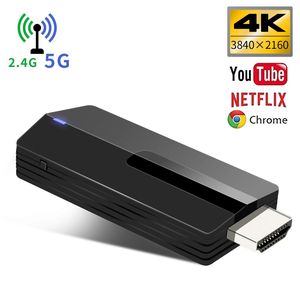
Description
Please change the mode from Mirroring+streaming to Mirroring only in setting page. Youtube video will be better and smooth.
The YEHUA miracast dongle wireless display stick and multimedia display receiver (Airplay, WLAN, DLNA) can transfer your pictures, audio files and videos from your iPhone, Android Smartphone / Tablet to a HD TV, monitor or beamer via a WLAN connection. WIFI dongle is perfect for office and stions (Powerpoint, Excel, Word, PDF and images from the smartchool presentaphone, tablet to HD TV or beamer).
How To use:
three parts : connect signal SSID in network control→input IP address in browser,make dongle connect wifi→and then make your phone connect same wifi.
step 1:Connect dongle signal(SSID) in your phone network control.
step 2:Input IP address (setting page address) in phone browser(Safri running too slow change to other browser),make dongle connect wifi.
step 3:Make sure your phone at same wifi with dongle(important).Open Airplay/miracast(android phone may different name,such as smart-view,mirroring,all-share) and display your phone.
If you watch Youtube meet some question ,no picture or other question ,change IOS10 to IOS11 at setting page and restart dongle.
If your question not be solved ,contact us please,we will help you forever. (support@lemorele.com)
Main features:
1. Supports 3 different transmission paths (Miracast, DLNA, Airplay) Airplay for iOS 6.0 and later Miracast for Android 5.0 and later
2. Supports the streaming of movies, videos, audio, TV, webcast and web browsing
3. Mirror your smartphone / tablet screen (photo, video, music, Word, Excel, Powerpoint, PDF, WebTV, Internet) to a large HDTV (up to 1080p)
4. Easy setup: simply plug the stick into your HD TV and connect it to your WLAN.
★Please read the operating instructions carefully. If there is any question about the use of the pro
The YEHUA miracast dongle wireless display stick and multimedia display receiver (Airplay, WLAN, DLNA) can transfer your pictures, audio files and videos from your iPhone, Android Smartphone / Tablet to a HD TV, monitor or beamer via a WLAN connection. WIFI dongle is perfect for office and stions (Powerpoint, Excel, Word, PDF and images from the smartchool presentaphone, tablet to HD TV or beamer).
How To use:
three parts : connect signal SSID in network control→input IP address in browser,make dongle connect wifi→and then make your phone connect same wifi.
step 1:Connect dongle signal(SSID) in your phone network control.
step 2:Input IP address (setting page address) in phone browser(Safri running too slow change to other browser),make dongle connect wifi.
step 3:Make sure your phone at same wifi with dongle(important).Open Airplay/miracast(android phone may different name,such as smart-view,mirroring,all-share) and display your phone.
If you watch Youtube meet some question ,no picture or other question ,change IOS10 to IOS11 at setting page and restart dongle.
If your question not be solved ,contact us please,we will help you forever. (support@lemorele.com)
Main features:
1. Supports 3 different transmission paths (Miracast, DLNA, Airplay) Airplay for iOS 6.0 and later Miracast for Android 5.0 and later
2. Supports the streaming of movies, videos, audio, TV, webcast and web browsing
3. Mirror your smartphone / tablet screen (photo, video, music, Word, Excel, Powerpoint, PDF, WebTV, Internet) to a large HDTV (up to 1080p)
4. Easy setup: simply plug the stick into your HD TV and connect it to your WLAN.
★Please read the operating instructions carefully. If there is any question about the use of the pro
YEHUA HDMI Display Dongle Adapter 4K, 5G WiFi Wireless HDMI Display Receiver TV for Projector/iOS/Android/Windows/Mac Support DLNA Airplay Mirror
Price is below average
Current Price
$23.99
Average
$27.49
Min Price
$23.99
Max Price
$33.99
Price dynamics
13%
Description
Please change the mode from Mirroring+streaming to Mirroring only in setting page. Youtube video will be better and smooth.
The YEHUA miracast dongle wireless display stick and multimedia display receiver (Airplay, WLAN, DLNA) can transfer your pictures, audio files and videos from your iPhone, Android Smartphone / Tablet to a HD TV, monitor or beamer via a WLAN connection. WIFI dongle is perfect for office and stions (Powerpoint, Excel, Word, PDF and images from the smartchool presentaphone, tablet to HD TV or beamer).
How To use:
three parts : connect signal SSID in network control→input IP address in browser,make dongle connect wifi→and then make your phone connect same wifi.
step 1:Connect dongle signal(SSID) in your phone network control.
step 2:Input IP address (setting page address) in phone browser(Safri running too slow change to other browser),make dongle connect wifi.
step 3:Make sure your phone at same wifi with dongle(important).Open Airplay/miracast(android phone may different name,such as smart-view,mirroring,all-share) and display your phone.
If you watch Youtube meet some question ,no picture or other question ,change IOS10 to IOS11 at setting page and restart dongle.
If your question not be solved ,contact us please,we will help you forever. (support@lemorele.com)
Main features:
1. Supports 3 different transmission paths (Miracast, DLNA, Airplay) Airplay for iOS 6.0 and later Miracast for Android 5.0 and later
2. Supports the streaming of movies, videos, audio, TV, webcast and web browsing
3. Mirror your smartphone / tablet screen (photo, video, music, Word, Excel, Powerpoint, PDF, WebTV, Internet) to a large HDTV (up to 1080p)
4. Easy setup: simply plug the stick into your HD TV and connect it to your WLAN.
★Please read the operating instructions carefully. If there is any question about the use of the pro
The YEHUA miracast dongle wireless display stick and multimedia display receiver (Airplay, WLAN, DLNA) can transfer your pictures, audio files and videos from your iPhone, Android Smartphone / Tablet to a HD TV, monitor or beamer via a WLAN connection. WIFI dongle is perfect for office and stions (Powerpoint, Excel, Word, PDF and images from the smartchool presentaphone, tablet to HD TV or beamer).
How To use:
three parts : connect signal SSID in network control→input IP address in browser,make dongle connect wifi→and then make your phone connect same wifi.
step 1:Connect dongle signal(SSID) in your phone network control.
step 2:Input IP address (setting page address) in phone browser(Safri running too slow change to other browser),make dongle connect wifi.
step 3:Make sure your phone at same wifi with dongle(important).Open Airplay/miracast(android phone may different name,such as smart-view,mirroring,all-share) and display your phone.
If you watch Youtube meet some question ,no picture or other question ,change IOS10 to IOS11 at setting page and restart dongle.
If your question not be solved ,contact us please,we will help you forever. (support@lemorele.com)
Main features:
1. Supports 3 different transmission paths (Miracast, DLNA, Airplay) Airplay for iOS 6.0 and later Miracast for Android 5.0 and later
2. Supports the streaming of movies, videos, audio, TV, webcast and web browsing
3. Mirror your smartphone / tablet screen (photo, video, music, Word, Excel, Powerpoint, PDF, WebTV, Internet) to a large HDTV (up to 1080p)
4. Easy setup: simply plug the stick into your HD TV and connect it to your WLAN.
★Please read the operating instructions carefully. If there is any question about the use of the pro
Price will be lower
in next 2 weeks
in next 2 weeks
According to the data, price will be lower in next two weeks, so not waste your money and track better price!
Product review & video
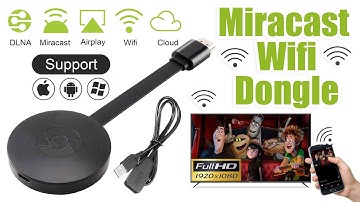
[Music] hello guys uh we are back with one of our new product and today we are going to check this ez chromecast it's a mirror cast device you can easily mirror with your phone to your tv wireless so let's see what we get inside first of all user manual we have main device it's uh actually my phone over here here you can see there is a power port and a reset button and here we can get one wireless receiver power adapter micro usb and usb port you can plug back to your tv or you can use uh adapter 5 volt adapter so it will be easy to get constant 5 for 5.0 volt power you can use this kind of adapter over here just plug it this way it's easy and connect this device to your easier cast and this one goes back to your tv and you can mirror from your phone directly to your tv okay guys so here we have a hdmi cable from back to our tv okay so what we're going to do we just connect it this devi


Similar products





































