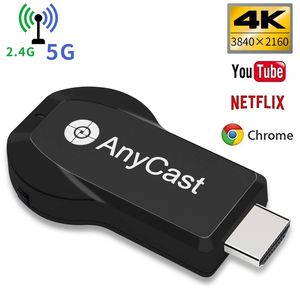
Description
Please update firmware in setting page, if you want to watch Netflix. (android phone could use google home app to watch encryption app)
YEHUA Wifi Display Dongle Wireless HDMI 4k 5G / 2.4G für Miracast Airplay DLNA TV Stick für Android/Mac / IOS / Windows
Do you have trouble with small screen?
★ Want to protect your family eyesight
★ Want to share screen with people,enjoy HD movies just stay at home
★ Want to put it in any place even in your small pocket when travelling or working ❤❤❤❤❤Order now and enjoy more!!!❤❤❤❤❤
[More Features]
1.Wifi display dongle, NO NEED MODE SWITCHING.
(Remark: Please be sure it supports MiraCast when using Windows system).
2.Easy Setup: Only 3 steps to enjoy media files on the large screen:
Plug>MiraCast>Mirroring.
Mirror your iOS device onto the TV screen keeping internet surfing.
Keep your iOS device connected to your home router Wifi, and your Anycast dongle connected to the same WIFI. Your iOS device surfing through the router wifi directly.
[Connection for Android device]
How to use:
For ios: https://www.youtube.com/watch?v=0xxQpNGTZc4
For Android: https://www.youtube.com/watch?v=rkah5JuDIyc
Step 1: Enable WIFI on your mobile device, and find the "wireless display" in the "setting"menu, touch and your will see the Dongle' SSID;
Step 2: Touch AnyCast SSID and start the connection mobile device with the Anycast dongle. And then your mobile device is mirrored to big screen;
Step 3: Your device can connect to the WIFI router to keep internet surfing.
[PACKAGE INCLUDED]
1 x AnyCast wifi display dongle
1 x WiFi antenna cable
1 x user manual
Worry-free Warranty:
-12 months worry-free product guarantee.
-Professional technical support and always satisfied customer service.【support@lemorele.com】
YEHUA Wifi Display Dongle Wireless HDMI 4k 5G / 2.4G für Miracast Airplay DLNA TV Stick für Android/Mac / IOS / Windows
Do you have trouble with small screen?
★ Want to protect your family eyesight
★ Want to share screen with people,enjoy HD movies just stay at home
★ Want to put it in any place even in your small pocket when travelling or working ❤❤❤❤❤Order now and enjoy more!!!❤❤❤❤❤
[More Features]
1.Wifi display dongle, NO NEED MODE SWITCHING.
(Remark: Please be sure it supports MiraCast when using Windows system).
2.Easy Setup: Only 3 steps to enjoy media files on the large screen:
Plug>MiraCast>Mirroring.
Mirror your iOS device onto the TV screen keeping internet surfing.
Keep your iOS device connected to your home router Wifi, and your Anycast dongle connected to the same WIFI. Your iOS device surfing through the router wifi directly.
[Connection for Android device]
How to use:
For ios: https://www.youtube.com/watch?v=0xxQpNGTZc4
For Android: https://www.youtube.com/watch?v=rkah5JuDIyc
Step 1: Enable WIFI on your mobile device, and find the "wireless display" in the "setting"menu, touch and your will see the Dongle' SSID;
Step 2: Touch AnyCast SSID and start the connection mobile device with the Anycast dongle. And then your mobile device is mirrored to big screen;
Step 3: Your device can connect to the WIFI router to keep internet surfing.
[PACKAGE INCLUDED]
1 x AnyCast wifi display dongle
1 x WiFi antenna cable
1 x user manual
Worry-free Warranty:
-12 months worry-free product guarantee.
-Professional technical support and always satisfied customer service.【support@lemorele.com】
YEHUA Wifi Display Dongle Wireless HDMI 4k 5G / 2.4G for Phone/Pad Miracast Airplay DLNA TV Stick for Android/Mac/IOS/Windows
Price is below average
Current Price
$25.99
Average
$26.49
Min Price
$24.99
Max Price
$28.99
Price dynamics
2%
Description
Please update firmware in setting page, if you want to watch Netflix. (android phone could use google home app to watch encryption app)
YEHUA Wifi Display Dongle Wireless HDMI 4k 5G / 2.4G für Miracast Airplay DLNA TV Stick für Android/Mac / IOS / Windows
Do you have trouble with small screen?
★ Want to protect your family eyesight
★ Want to share screen with people,enjoy HD movies just stay at home
★ Want to put it in any place even in your small pocket when travelling or working ❤❤❤❤❤Order now and enjoy more!!!❤❤❤❤❤
[More Features]
1.Wifi display dongle, NO NEED MODE SWITCHING.
(Remark: Please be sure it supports MiraCast when using Windows system).
2.Easy Setup: Only 3 steps to enjoy media files on the large screen:
Plug>MiraCast>Mirroring.
Mirror your iOS device onto the TV screen keeping internet surfing.
Keep your iOS device connected to your home router Wifi, and your Anycast dongle connected to the same WIFI. Your iOS device surfing through the router wifi directly.
[Connection for Android device]
How to use:
For ios: https://www.youtube.com/watch?v=0xxQpNGTZc4
For Android: https://www.youtube.com/watch?v=rkah5JuDIyc
Step 1: Enable WIFI on your mobile device, and find the "wireless display" in the "setting"menu, touch and your will see the Dongle' SSID;
Step 2: Touch AnyCast SSID and start the connection mobile device with the Anycast dongle. And then your mobile device is mirrored to big screen;
Step 3: Your device can connect to the WIFI router to keep internet surfing.
[PACKAGE INCLUDED]
1 x AnyCast wifi display dongle
1 x WiFi antenna cable
1 x user manual
Worry-free Warranty:
-12 months worry-free product guarantee.
-Professional technical support and always satisfied customer service.【support@lemorele.com】
YEHUA Wifi Display Dongle Wireless HDMI 4k 5G / 2.4G für Miracast Airplay DLNA TV Stick für Android/Mac / IOS / Windows
Do you have trouble with small screen?
★ Want to protect your family eyesight
★ Want to share screen with people,enjoy HD movies just stay at home
★ Want to put it in any place even in your small pocket when travelling or working ❤❤❤❤❤Order now and enjoy more!!!❤❤❤❤❤
[More Features]
1.Wifi display dongle, NO NEED MODE SWITCHING.
(Remark: Please be sure it supports MiraCast when using Windows system).
2.Easy Setup: Only 3 steps to enjoy media files on the large screen:
Plug>MiraCast>Mirroring.
Mirror your iOS device onto the TV screen keeping internet surfing.
Keep your iOS device connected to your home router Wifi, and your Anycast dongle connected to the same WIFI. Your iOS device surfing through the router wifi directly.
[Connection for Android device]
How to use:
For ios: https://www.youtube.com/watch?v=0xxQpNGTZc4
For Android: https://www.youtube.com/watch?v=rkah5JuDIyc
Step 1: Enable WIFI on your mobile device, and find the "wireless display" in the "setting"menu, touch and your will see the Dongle' SSID;
Step 2: Touch AnyCast SSID and start the connection mobile device with the Anycast dongle. And then your mobile device is mirrored to big screen;
Step 3: Your device can connect to the WIFI router to keep internet surfing.
[PACKAGE INCLUDED]
1 x AnyCast wifi display dongle
1 x WiFi antenna cable
1 x user manual
Worry-free Warranty:
-12 months worry-free product guarantee.
-Professional technical support and always satisfied customer service.【support@lemorele.com】
Price will be lower
in next 2 weeks
in next 2 weeks
According to the data, price will be lower in next two weeks, so not waste your money and track better price!
Product review & video
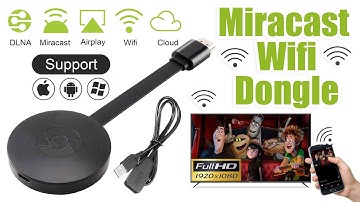
[Music] hello guys uh we are back with one of our new product and today we are going to check this ez chromecast it's a mirror cast device you can easily mirror with your phone to your tv wireless so let's see what we get inside first of all user manual we have main device it's uh actually my phone over here here you can see there is a power port and a reset button and here we can get one wireless receiver power adapter micro usb and usb port you can plug back to your tv or you can use uh adapter 5 volt adapter so it will be easy to get constant 5 for 5.0 volt power you can use this kind of adapter over here just plug it this way it's easy and connect this device to your easier cast and this one goes back to your tv and you can mirror from your phone directly to your tv okay guys so here we have a hdmi cable from back to our tv okay so what we're going to do we just connect it this devi


Similar products





































