Description
Product Specification:
Weight of the product: 70g
Size: 12 x 6.7 x 5.7cm / 4.72 x 2.64 x 2.24 inch
Package:
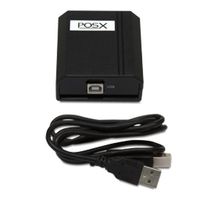
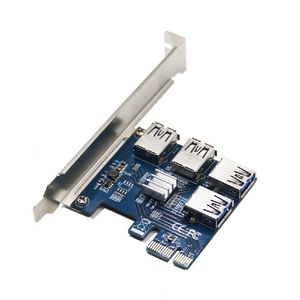
1 x 4 in 1 Adapter board
How to use it:
1. The first step, first of PCIe USB card plugged into the motherboard's PCIe slot.
2. Use USB3.0 data cable adapter to connect the ends of the two USB port. Plug in the power supply.
3.The third step: After completion of the above two steps, first in no hurry to insert your PCI-E card, start the computer to see if your computer has been identified to the riser card, if you did not find the card, repeat the above operation (Note: The first time to insert card to start the computer, into the system in general will be prompted to install new hardware, such as "PCI standard PCI-to-PCI bridge" , you need to wait for it to automatically install the complete, individual anti-virus software will prevent these files installation, note skipped), when your computer has been recognized the card,blue LED PCI slot on normal light, computer equipment manager in the system device will show an increase of several "PCI standard PCI-to-PCI bridge.
4. After completing the above three steps, turn off the computer, plug in your PCI-E card, to be careful not to insert the contrary.
5. then boot into the system, install PCI-E Card Driver.
Weight of the product: 70g
Size: 12 x 6.7 x 5.7cm / 4.72 x 2.64 x 2.24 inch
Package:
1 x 4 in 1 Adapter board
How to use it:
1. The first step, first of PCIe USB card plugged into the motherboard's PCIe slot.
2. Use USB3.0 data cable adapter to connect the ends of the two USB port. Plug in the power supply.
3.The third step: After completion of the above two steps, first in no hurry to insert your PCI-E card, start the computer to see if your computer has been identified to the riser card, if you did not find the card, repeat the above operation (Note: The first time to insert card to start the computer, into the system in general will be prompted to install new hardware, such as "PCI standard PCI-to-PCI bridge" , you need to wait for it to automatically install the complete, individual anti-virus software will prevent these files installation, note skipped), when your computer has been recognized the card,blue LED PCI slot on normal light, computer equipment manager in the system device will show an increase of several "PCI standard PCI-to-PCI bridge.
4. After completing the above three steps, turn off the computer, plug in your PCI-E card, to be careful not to insert the contrary.
5. then boot into the system, install PCI-E Card Driver.
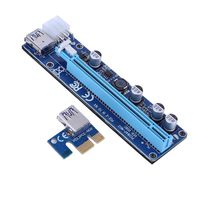
YiFeng Exquisite Design USB 3.0 PCI-E Riser Adapter Board Card PCIE Rabbet Ethereum Mining ETH (4 in 1)
Price is below average
Current Price
$19.99
Average
$22.86
Min Price
$10.35
Max Price
$33.98
Price dynamics
13%
Description
Product Specification:
Weight of the product: 70g
Size: 12 x 6.7 x 5.7cm / 4.72 x 2.64 x 2.24 inch
Package:
1 x 4 in 1 Adapter board
How to use it:
1. The first step, first of PCIe USB card plugged into the motherboard's PCIe slot.
2. Use USB3.0 data cable adapter to connect the ends of the two USB port. Plug in the power supply.
3.The third step: After completion of the above two steps, first in no hurry to insert your PCI-E card, start the computer to see if your computer has been identified to the riser card, if you did not find the card, repeat the above operation (Note: The first time to insert card to start the computer, into the system in general will be prompted to install new hardware, such as "PCI standard PCI-to-PCI bridge" , you need to wait for it to automatically install the complete, individual anti-virus software will prevent these files installation, note skipped), when your computer has been recognized the card,blue LED PCI slot on normal light, computer equipment manager in the system device will show an increase of several "PCI standard PCI-to-PCI bridge.
4. After completing the above three steps, turn off the computer, plug in your PCI-E card, to be careful not to insert the contrary.
5. then boot into the system, install PCI-E Card Driver.
Weight of the product: 70g
Size: 12 x 6.7 x 5.7cm / 4.72 x 2.64 x 2.24 inch
Package:
1 x 4 in 1 Adapter board
How to use it:
1. The first step, first of PCIe USB card plugged into the motherboard's PCIe slot.
2. Use USB3.0 data cable adapter to connect the ends of the two USB port. Plug in the power supply.
3.The third step: After completion of the above two steps, first in no hurry to insert your PCI-E card, start the computer to see if your computer has been identified to the riser card, if you did not find the card, repeat the above operation (Note: The first time to insert card to start the computer, into the system in general will be prompted to install new hardware, such as "PCI standard PCI-to-PCI bridge" , you need to wait for it to automatically install the complete, individual anti-virus software will prevent these files installation, note skipped), when your computer has been recognized the card,blue LED PCI slot on normal light, computer equipment manager in the system device will show an increase of several "PCI standard PCI-to-PCI bridge.
4. After completing the above three steps, turn off the computer, plug in your PCI-E card, to be careful not to insert the contrary.
5. then boot into the system, install PCI-E Card Driver.
Price will be lower
in next 2 weeks
in next 2 weeks
According to the data, price will be lower in next two weeks, so not waste your money and track better price!
Product review & video
so this is my mining rig here I'm currently mining if you're in classic I've got one XFX and 3 different gigabyte video cards they're all mining from this one single motherboard down here it's got one x16 slot and three x1 slots I'm getting about twenty nine point eight mega hashes per second on each card and this is running great but I'd like to add a few more GPUs and this motherboard only has four slots now I could go out and buy a motherboard with seven eight I've seen some even with ten slots but the thing is is I already have this motherboard from a previous project and by the time I go and buy a new CPU new Ram a new motherboard I'm talking probably a few hundred dollars at minimum so the other day when I was on Amazon I came across this card that's called a PCIe riser extender for a Bitcoin litecoin eth basically it goes in an x1 slot and it provides inputs for up to four additi


Similar products