Description
Specifications:
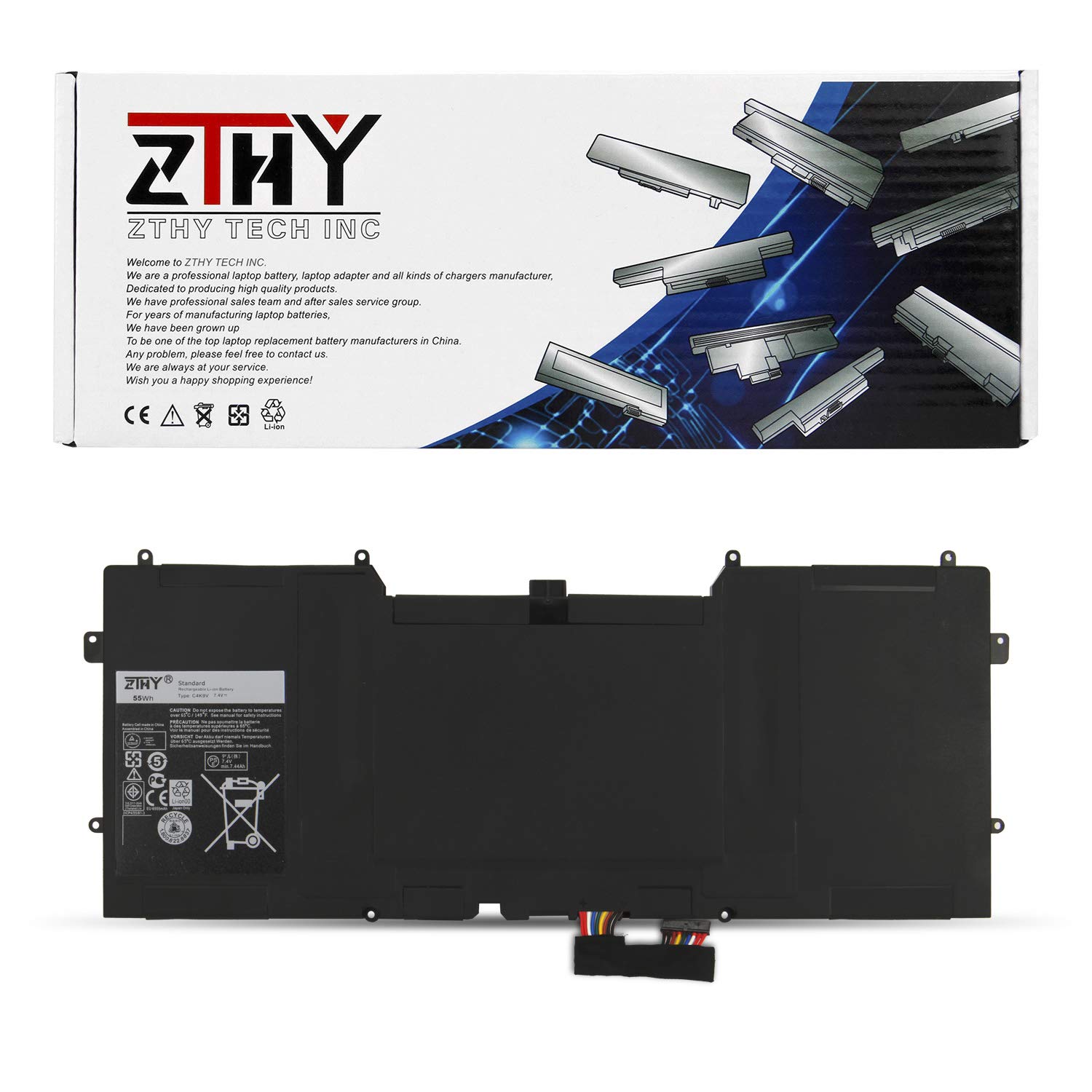
Battery Type: Lithium-Polymer
Voltage: 7.4V
Capacity: 55WH
Certificate: CE,RoHS,FCC
Condition: 100% New from Manufacturer, Grade A Cell, 12 Months Replacement
Replace Part Number:
C4K9V 3H76R 489XN PKH18
Fit Machine Models:
DELL XPS 12 Ultrabook Series
DELL XPS 12 9Q33 Series
DELL XPS 13 9333 Series
DELL XPS 12-L221x Series
DELL XPS 12D-1708 Series
NOTE:
Please make sure if this battery suit for your laptop or not before place an order./""Ctrl/"" + /""F/"" to find your models
If you're getting the ""plugged in but not charging"" battery message on your Dell laptop, it's going to be one of the following problems:
1) sometimes just removing and reinstalling the battery will resolve this message (try this first)
2) failed AC adapter plug (get a new one)
3) failed battery (get a new one)
4) failed or shorting out AC adapter receptacle (can be replaced on the motherboard for about a $10 part but somewhat technical repair)
If you need to help,please feel free to contact us on this link:https://www.amazon.com/sp?_encoding=UTF8&asin=&isAmazonFulfilled=1&isCBA=&marketplaceID=ATVPDKIKX0DER&orderID=&seller=A293JIRZKDO4SV&tab=&vasStoreID="
ZTHY laptop battery instruction manual:
1. The new ZTHY battery need to charge and discharge 3-4 cycles before, takes about 7-8 hours in order to activate lithium ion fully to maximun space.
2. Please don't discharge to the computer power off, otherwise it may be damaged easily and may not be charged fully.
3. If you connect external power to use for a long time, please remove the battery.
4. If you do not use battery for a long time, make sure to charge more than 80% electricity every month.
Battery Type: Lithium-Polymer
Voltage: 7.4V
Capacity: 55WH
Certificate: CE,RoHS,FCC
Condition: 100% New from Manufacturer, Grade A Cell, 12 Months Replacement
Replace Part Number:
C4K9V 3H76R 489XN PKH18
Fit Machine Models:
DELL XPS 12 Ultrabook Series
DELL XPS 12 9Q33 Series
DELL XPS 13 9333 Series
DELL XPS 12-L221x Series
DELL XPS 12D-1708 Series
NOTE:
Please make sure if this battery suit for your laptop or not before place an order./""Ctrl/"" + /""F/"" to find your models
If you're getting the ""plugged in but not charging"" battery message on your Dell laptop, it's going to be one of the following problems:
1) sometimes just removing and reinstalling the battery will resolve this message (try this first)
2) failed AC adapter plug (get a new one)
3) failed battery (get a new one)
4) failed or shorting out AC adapter receptacle (can be replaced on the motherboard for about a $10 part but somewhat technical repair)
If you need to help,please feel free to contact us on this link:https://www.amazon.com/sp?_encoding=UTF8&asin=&isAmazonFulfilled=1&isCBA=&marketplaceID=ATVPDKIKX0DER&orderID=&seller=A293JIRZKDO4SV&tab=&vasStoreID="
ZTHY laptop battery instruction manual:
1. The new ZTHY battery need to charge and discharge 3-4 cycles before, takes about 7-8 hours in order to activate lithium ion fully to maximun space.
2. Please don't discharge to the computer power off, otherwise it may be damaged easily and may not be charged fully.
3. If you connect external power to use for a long time, please remove the battery.
4. If you do not use battery for a long time, make sure to charge more than 80% electricity every month.
ZTHY 55Wh C4K9V Laptop Battery Replacement for Dell XPS 12 9Q33 12-L221X XPS 13 9333 Ultrabook 13 XPS13 13-L321X 13-L322X XPS L321X L322X Series 489XN PKH18 3H76R 7.4V
Current Price
$45.99
Average
$43.22
Min Price
$39.99
Max Price
$45.99
Price dynamics
6%
Description
Specifications:
Battery Type: Lithium-Polymer
Voltage: 7.4V
Capacity: 55WH
Certificate: CE,RoHS,FCC
Condition: 100% New from Manufacturer, Grade A Cell, 12 Months Replacement
Replace Part Number:
C4K9V 3H76R 489XN PKH18
Fit Machine Models:
DELL XPS 12 Ultrabook Series
DELL XPS 12 9Q33 Series
DELL XPS 13 9333 Series
DELL XPS 12-L221x Series
DELL XPS 12D-1708 Series
NOTE:
Please make sure if this battery suit for your laptop or not before place an order./""Ctrl/"" + /""F/"" to find your models
If you're getting the ""plugged in but not charging"" battery message on your Dell laptop, it's going to be one of the following problems:
1) sometimes just removing and reinstalling the battery will resolve this message (try this first)
2) failed AC adapter plug (get a new one)
3) failed battery (get a new one)
4) failed or shorting out AC adapter receptacle (can be replaced on the motherboard for about a $10 part but somewhat technical repair)
If you need to help,please feel free to contact us on this link:https://www.amazon.com/sp?_encoding=UTF8&asin=&isAmazonFulfilled=1&isCBA=&marketplaceID=ATVPDKIKX0DER&orderID=&seller=A293JIRZKDO4SV&tab=&vasStoreID="
ZTHY laptop battery instruction manual:
1. The new ZTHY battery need to charge and discharge 3-4 cycles before, takes about 7-8 hours in order to activate lithium ion fully to maximun space.
2. Please don't discharge to the computer power off, otherwise it may be damaged easily and may not be charged fully.
3. If you connect external power to use for a long time, please remove the battery.
4. If you do not use battery for a long time, make sure to charge more than 80% electricity every month.
Battery Type: Lithium-Polymer
Voltage: 7.4V
Capacity: 55WH
Certificate: CE,RoHS,FCC
Condition: 100% New from Manufacturer, Grade A Cell, 12 Months Replacement
Replace Part Number:
C4K9V 3H76R 489XN PKH18
Fit Machine Models:
DELL XPS 12 Ultrabook Series
DELL XPS 12 9Q33 Series
DELL XPS 13 9333 Series
DELL XPS 12-L221x Series
DELL XPS 12D-1708 Series
NOTE:
Please make sure if this battery suit for your laptop or not before place an order./""Ctrl/"" + /""F/"" to find your models
If you're getting the ""plugged in but not charging"" battery message on your Dell laptop, it's going to be one of the following problems:
1) sometimes just removing and reinstalling the battery will resolve this message (try this first)
2) failed AC adapter plug (get a new one)
3) failed battery (get a new one)
4) failed or shorting out AC adapter receptacle (can be replaced on the motherboard for about a $10 part but somewhat technical repair)
If you need to help,please feel free to contact us on this link:https://www.amazon.com/sp?_encoding=UTF8&asin=&isAmazonFulfilled=1&isCBA=&marketplaceID=ATVPDKIKX0DER&orderID=&seller=A293JIRZKDO4SV&tab=&vasStoreID="
ZTHY laptop battery instruction manual:
1. The new ZTHY battery need to charge and discharge 3-4 cycles before, takes about 7-8 hours in order to activate lithium ion fully to maximun space.
2. Please don't discharge to the computer power off, otherwise it may be damaged easily and may not be charged fully.
3. If you connect external power to use for a long time, please remove the battery.
4. If you do not use battery for a long time, make sure to charge more than 80% electricity every month.
Price will be lower
in next 2 weeks
in next 2 weeks
According to the data, price will be lower in next two weeks, so not waste your money and track better price!

Similar products