Description
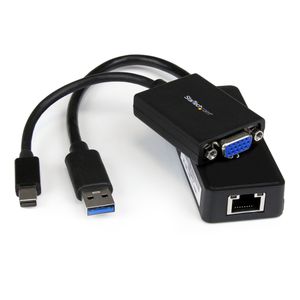
The LENX1MDPUGBK Accessory Kit for the new Lenovo ThinkPad X1 Carbon 2 is an add-on accessory bundle containing two StarTech.com adapter products that let you extend the display and network capabilities of your port-limited Ultrabook.
The kit contains a Mini DisplayPort to VGA Adapter, which lets you connect your Lenovo X1 Carbon 2 (or similarly configured Ultrabook / laptop) to an external VGA display or projector through Mini DisplayPort.
Also included is a USB 3.0 to Gigabit Ethernet Adapter with an integrated USB pass-through port, which can be used as an upgraded alternative to the adapter that’s now included with new X1 Carbon 2 systems, or as a replacement for a lost adapter. The pass-through port lets you use a wired Gigabit Ethernet connection without sacrificing your USB 3.0 port, leaving it available for other peripherals.
Though extremely portable, Ultrabook systems sometimes lack the necessary ports to connect to various desktop displays/projectors and wired networks when traveling between boardrooms, home / remote offices, trade-shows, hotels and conference centers. We designed this bundle of Ultrabook accessories to provide the missing connections most commonly needed among mobile users, to prepare you for almost anything.
Package Contents:
- Mini DisplayPort to VGA Adapter (MDP2VGA)
- USB 3.0 to Gigabit Ethernet Network Adapter w/ USB Port (USB31000SPTB)
Backed by a StarTech.com 2-year warranty and free lifetime technical support.
The kit contains a Mini DisplayPort to VGA Adapter, which lets you connect your Lenovo X1 Carbon 2 (or similarly configured Ultrabook / laptop) to an external VGA display or projector through Mini DisplayPort.
Also included is a USB 3.0 to Gigabit Ethernet Adapter with an integrated USB pass-through port, which can be used as an upgraded alternative to the adapter that’s now included with new X1 Carbon 2 systems, or as a replacement for a lost adapter. The pass-through port lets you use a wired Gigabit Ethernet connection without sacrificing your USB 3.0 port, leaving it available for other peripherals.
Though extremely portable, Ultrabook systems sometimes lack the necessary ports to connect to various desktop displays/projectors and wired networks when traveling between boardrooms, home / remote offices, trade-shows, hotels and conference centers. We designed this bundle of Ultrabook accessories to provide the missing connections most commonly needed among mobile users, to prepare you for almost anything.
Package Contents:
- Mini DisplayPort to VGA Adapter (MDP2VGA)
- USB 3.0 to Gigabit Ethernet Network Adapter w/ USB Port (USB31000SPTB)
Backed by a StarTech.com 2-year warranty and free lifetime technical support.
StarTech.com Lenovo ThinkPad X1 Carbon VGA and Gigabit Ethernet Adapter Kit - MDP to VGA - USB 3.0 to GbE (LENX1MDPUGBK)
Price is below average
Current Price
$43.15
Average
$48.39
Min Price
$35.22
Max Price
$59.19
Price dynamics
11%
Description
The LENX1MDPUGBK Accessory Kit for the new Lenovo ThinkPad X1 Carbon 2 is an add-on accessory bundle containing two StarTech.com adapter products that let you extend the display and network capabilities of your port-limited Ultrabook.
The kit contains a Mini DisplayPort to VGA Adapter, which lets you connect your Lenovo X1 Carbon 2 (or similarly configured Ultrabook / laptop) to an external VGA display or projector through Mini DisplayPort.
Also included is a USB 3.0 to Gigabit Ethernet Adapter with an integrated USB pass-through port, which can be used as an upgraded alternative to the adapter that’s now included with new X1 Carbon 2 systems, or as a replacement for a lost adapter. The pass-through port lets you use a wired Gigabit Ethernet connection without sacrificing your USB 3.0 port, leaving it available for other peripherals.
Though extremely portable, Ultrabook systems sometimes lack the necessary ports to connect to various desktop displays/projectors and wired networks when traveling between boardrooms, home / remote offices, trade-shows, hotels and conference centers. We designed this bundle of Ultrabook accessories to provide the missing connections most commonly needed among mobile users, to prepare you for almost anything.
Package Contents:
- Mini DisplayPort to VGA Adapter (MDP2VGA)
- USB 3.0 to Gigabit Ethernet Network Adapter w/ USB Port (USB31000SPTB)
Backed by a StarTech.com 2-year warranty and free lifetime technical support.
The kit contains a Mini DisplayPort to VGA Adapter, which lets you connect your Lenovo X1 Carbon 2 (or similarly configured Ultrabook / laptop) to an external VGA display or projector through Mini DisplayPort.
Also included is a USB 3.0 to Gigabit Ethernet Adapter with an integrated USB pass-through port, which can be used as an upgraded alternative to the adapter that’s now included with new X1 Carbon 2 systems, or as a replacement for a lost adapter. The pass-through port lets you use a wired Gigabit Ethernet connection without sacrificing your USB 3.0 port, leaving it available for other peripherals.
Though extremely portable, Ultrabook systems sometimes lack the necessary ports to connect to various desktop displays/projectors and wired networks when traveling between boardrooms, home / remote offices, trade-shows, hotels and conference centers. We designed this bundle of Ultrabook accessories to provide the missing connections most commonly needed among mobile users, to prepare you for almost anything.
Package Contents:
- Mini DisplayPort to VGA Adapter (MDP2VGA)
- USB 3.0 to Gigabit Ethernet Network Adapter w/ USB Port (USB31000SPTB)
Backed by a StarTech.com 2-year warranty and free lifetime technical support.
Price will be lower
in next 2 weeks
in next 2 weeks
According to the data, price will be lower in next two weeks, so not waste your money and track better price!
Product review & video
I got something cool to show you here today we want to show you six monitors running on a single USB 3 laptop and these are running a hundred percent of our products from pluggable technologies and so I want to give you a walkthrough of what we've done here so first let me show you what this looks like to windows so here's the Windows 7 screen resolution control panel and you can see we've got total of seven monitors here at counting the laptop and if you oriented to kind of a portrait orientation so what I'm going to do now is I'm going to hit the identify button on this dialog and and that'll bring up numbers on each monitor to kind of show you know which monitor number Windows thinks each one is so when you first plug in all of these USB graphics adapters that's how you you know can kind of tell which ones which and configure windows properly so how are we doing this how are we conne


Similar products