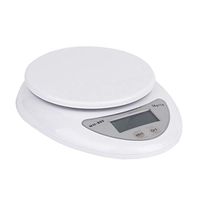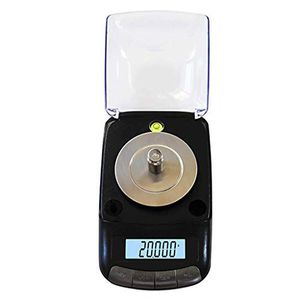
Description
First, the operating instructions:
Place the battery correctly as indicated in the battery compartment and place the scale on a smooth, windless countertop.
Key Description:
ON/OFF: switch button
PCS: Count button
TARE: Tare button
UNTS/MODE: unit conversion key
1. Power on/off switch, wait for three seconds to display 0 or 0.0 or 0.00 or 0.000
2. Place the desired scale on the weighing pan and wait for the value to stabilize.
3. Press the unit conversion button to change the weighing unit.
4. Press the power button to turn off the power on.
Second, the unit conversion button UNTS / MODE
Press this button to select the unit of weight you need. There are multiple units available for conversion.
Weight unit conversion value:
1ct/carat=0.19997g 1oz/oz = 28.3495g
1dwt / English = 1.5552g 1ozt / Troy ounce = 31.1034g
1gn/grain=0.0648g 1tl/set two=37.4999g
Third, deduction / peeling TARE
1, boot to zero;
2. Place the weight on the weighing pan;
3. Press the TARE key (TARE key or T key) to display 0.0 or 0.00, indicating that the weight has been deducted.
4, then put the items to be weighed, the reading at this time is the net weight of the item
Fourth, the correction: the correction must have a corresponding weight
Kitchen scale, jewelry scale school scale method:
School scale mode:
1. In the shutdown mode, press and hold the [TARE] or [T] button and press the [ON/OFF] button for 2 seconds to enter the internal code test state. At this time, press [MODE] or [UNIT] or The [M] key enters the calibration mode. "CAL" is displayed
2. In the weighing mode, press and hold the [MODE] or [UNIT] or [M] key to enter the calibration mode. At this time, display "CAL".
School scale method:
After using one of the above two modes to enter the calibration mode display "CAL", press [MODE] or [UNIT] or [M] again to display the word "CAL&quo
Place the battery correctly as indicated in the battery compartment and place the scale on a smooth, windless countertop.
Key Description:
ON/OFF: switch button
PCS: Count button
TARE: Tare button
UNTS/MODE: unit conversion key
1. Power on/off switch, wait for three seconds to display 0 or 0.0 or 0.00 or 0.000
2. Place the desired scale on the weighing pan and wait for the value to stabilize.
3. Press the unit conversion button to change the weighing unit.
4. Press the power button to turn off the power on.
Second, the unit conversion button UNTS / MODE
Press this button to select the unit of weight you need. There are multiple units available for conversion.
Weight unit conversion value:
1ct/carat=0.19997g 1oz/oz = 28.3495g
1dwt / English = 1.5552g 1ozt / Troy ounce = 31.1034g
1gn/grain=0.0648g 1tl/set two=37.4999g
Third, deduction / peeling TARE
1, boot to zero;
2. Place the weight on the weighing pan;
3. Press the TARE key (TARE key or T key) to display 0.0 or 0.00, indicating that the weight has been deducted.
4, then put the items to be weighed, the reading at this time is the net weight of the item
Fourth, the correction: the correction must have a corresponding weight
Kitchen scale, jewelry scale school scale method:
School scale mode:
1. In the shutdown mode, press and hold the [TARE] or [T] button and press the [ON/OFF] button for 2 seconds to enter the internal code test state. At this time, press [MODE] or [UNIT] or The [M] key enters the calibration mode. "CAL" is displayed
2. In the weighing mode, press and hold the [MODE] or [UNIT] or [M] key to enter the calibration mode. At this time, display "CAL".
School scale method:
After using one of the above two modes to enter the calibration mode display "CAL", press [MODE] or [UNIT] or [M] again to display the word "CAL&quo
ZYY Electronic Scale Jewelry Carat 0.001g High Precision Manual Lipstick Laboratory Balance Stainless Steel
Current Price
$82.84
Average
$73.37
Min Price
$68.63
Max Price
$82.84
Price dynamics
11%
Description
First, the operating instructions:
Place the battery correctly as indicated in the battery compartment and place the scale on a smooth, windless countertop.
Key Description:
ON/OFF: switch button
PCS: Count button
TARE: Tare button
UNTS/MODE: unit conversion key
1. Power on/off switch, wait for three seconds to display 0 or 0.0 or 0.00 or 0.000
2. Place the desired scale on the weighing pan and wait for the value to stabilize.
3. Press the unit conversion button to change the weighing unit.
4. Press the power button to turn off the power on.
Second, the unit conversion button UNTS / MODE
Press this button to select the unit of weight you need. There are multiple units available for conversion.
Weight unit conversion value:
1ct/carat=0.19997g 1oz/oz = 28.3495g
1dwt / English = 1.5552g 1ozt / Troy ounce = 31.1034g
1gn/grain=0.0648g 1tl/set two=37.4999g
Third, deduction / peeling TARE
1, boot to zero;
2. Place the weight on the weighing pan;
3. Press the TARE key (TARE key or T key) to display 0.0 or 0.00, indicating that the weight has been deducted.
4, then put the items to be weighed, the reading at this time is the net weight of the item
Fourth, the correction: the correction must have a corresponding weight
Kitchen scale, jewelry scale school scale method:
School scale mode:
1. In the shutdown mode, press and hold the [TARE] or [T] button and press the [ON/OFF] button for 2 seconds to enter the internal code test state. At this time, press [MODE] or [UNIT] or The [M] key enters the calibration mode. "CAL" is displayed
2. In the weighing mode, press and hold the [MODE] or [UNIT] or [M] key to enter the calibration mode. At this time, display "CAL".
School scale method:
After using one of the above two modes to enter the calibration mode display "CAL", press [MODE] or [UNIT] or [M] again to display the word "CAL&quo
Place the battery correctly as indicated in the battery compartment and place the scale on a smooth, windless countertop.
Key Description:
ON/OFF: switch button
PCS: Count button
TARE: Tare button
UNTS/MODE: unit conversion key
1. Power on/off switch, wait for three seconds to display 0 or 0.0 or 0.00 or 0.000
2. Place the desired scale on the weighing pan and wait for the value to stabilize.
3. Press the unit conversion button to change the weighing unit.
4. Press the power button to turn off the power on.
Second, the unit conversion button UNTS / MODE
Press this button to select the unit of weight you need. There are multiple units available for conversion.
Weight unit conversion value:
1ct/carat=0.19997g 1oz/oz = 28.3495g
1dwt / English = 1.5552g 1ozt / Troy ounce = 31.1034g
1gn/grain=0.0648g 1tl/set two=37.4999g
Third, deduction / peeling TARE
1, boot to zero;
2. Place the weight on the weighing pan;
3. Press the TARE key (TARE key or T key) to display 0.0 or 0.00, indicating that the weight has been deducted.
4, then put the items to be weighed, the reading at this time is the net weight of the item
Fourth, the correction: the correction must have a corresponding weight
Kitchen scale, jewelry scale school scale method:
School scale mode:
1. In the shutdown mode, press and hold the [TARE] or [T] button and press the [ON/OFF] button for 2 seconds to enter the internal code test state. At this time, press [MODE] or [UNIT] or The [M] key enters the calibration mode. "CAL" is displayed
2. In the weighing mode, press and hold the [MODE] or [UNIT] or [M] key to enter the calibration mode. At this time, display "CAL".
School scale method:
After using one of the above two modes to enter the calibration mode display "CAL", press [MODE] or [UNIT] or [M] again to display the word "CAL&quo
Price will be lower
in next 2 weeks
in next 2 weeks
According to the data, price will be lower in next two weeks, so not waste your money and track better price!
Similar products