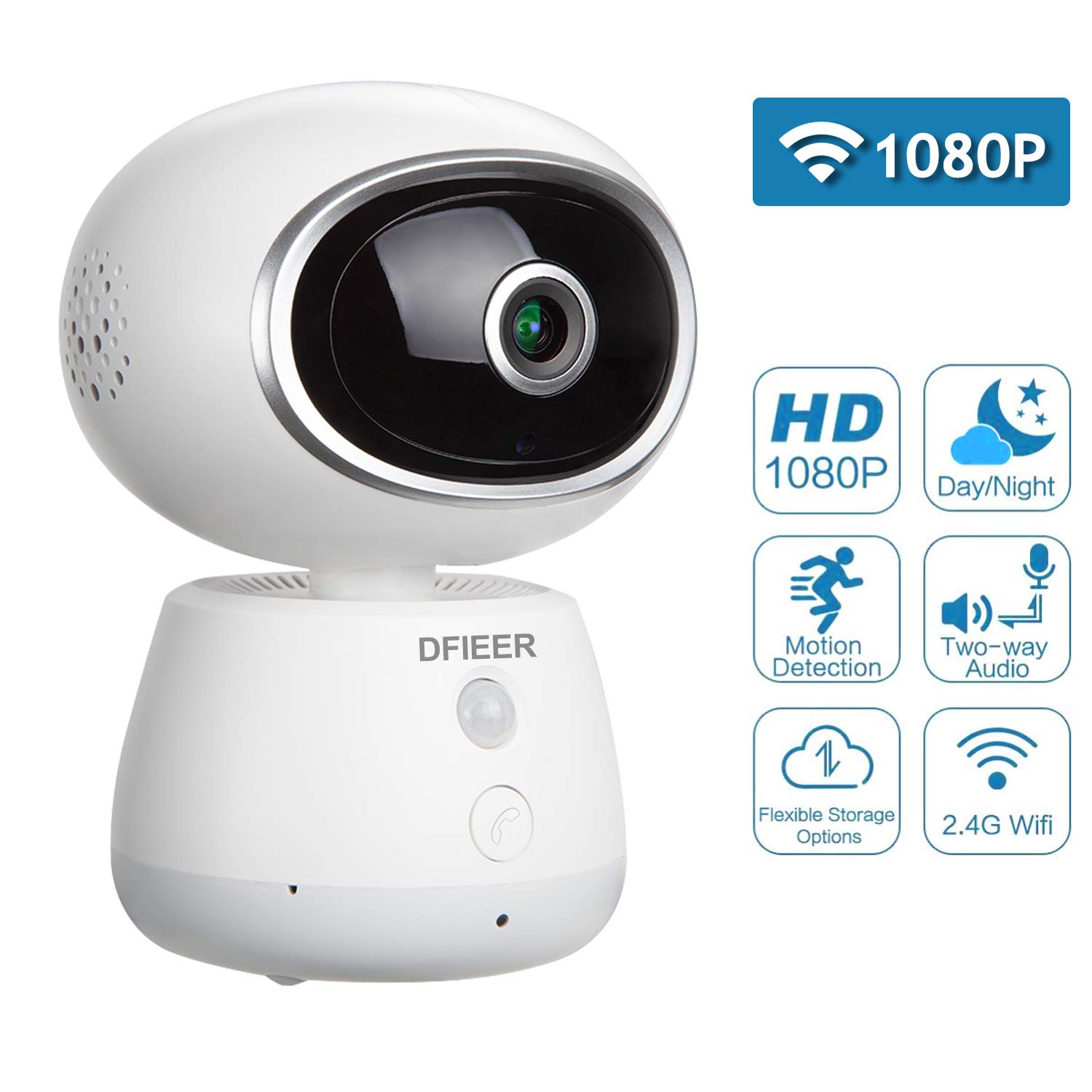
Description
Tips to connect WiFi easier:
1). This home security camera supports 2.4GHz network (Incompatible with 5GHz) SD TF card should be 16GB-128GB
2).Please wait 30 seconds after plugging in the camera to allow it to initialize.The camera will begin rotating as a part of its start up sequence and the red LED light on the front will blink when ready.
3).If the red LED light keeps on and does not blink for a long time,hold for 3 seconds to perform a factory reset.
Warmth Tip:
1).Make sure your WiFi password with numbers and letters only (eg:hg182201) No special characters (eg: ! @ & *)
2).The router is too far away, which will lead to poor WIFI. The best is within 5 meters, and the farthest is no more than 10 meters. It is determined by the performance of the WIFI router. It is recommended to connect wifi within 5 meters.
3).Please insert the SD card at first and then turn power on.Do not insert and remove the SD card after the power is turned on, because it is easy to cause the memory card to be damaged and the memory card cannot be detected.
4). Following conditions please reset the camera:
A)change the Wi-Fi name or password ;
B)replace the router ;
C)change the user
5). If you have entered the Wi-Fi password and no voice prompt, please ensure the DHCP of the router is ON.
Technical specification:
Resolution: 1280X1080P
Power supply: AC100-240V
Lens:3.6mm,360 degrees fisheye lens
N.G: 256g
View angle: Horizontal 355°/Vertical 65°
Operating Temperature: -10℃~+50℃@humidity 10%~ 95% no condensation
Video frame rate: 25 FPS at maximum
Night Vision:Ir leds:6pcs ir leds,power consumption <5w
PIR:0-5M
Power port: DC
Product Size: φ94*129mm
Support Micro SD Card(class 10 MicroSD Card), min 16G, max 128G(card not included).
1). This home security camera supports 2.4GHz network (Incompatible with 5GHz) SD TF card should be 16GB-128GB
2).Please wait 30 seconds after plugging in the camera to allow it to initialize.The camera will begin rotating as a part of its start up sequence and the red LED light on the front will blink when ready.
3).If the red LED light keeps on and does not blink for a long time,hold for 3 seconds to perform a factory reset.
Warmth Tip:
1).Make sure your WiFi password with numbers and letters only (eg:hg182201) No special characters (eg: ! @ & *)
2).The router is too far away, which will lead to poor WIFI. The best is within 5 meters, and the farthest is no more than 10 meters. It is determined by the performance of the WIFI router. It is recommended to connect wifi within 5 meters.
3).Please insert the SD card at first and then turn power on.Do not insert and remove the SD card after the power is turned on, because it is easy to cause the memory card to be damaged and the memory card cannot be detected.
4). Following conditions please reset the camera:
A)change the Wi-Fi name or password ;
B)replace the router ;
C)change the user
5). If you have entered the Wi-Fi password and no voice prompt, please ensure the DHCP of the router is ON.
Technical specification:
Resolution: 1280X1080P
Power supply: AC100-240V
Lens:3.6mm,360 degrees fisheye lens
N.G: 256g
View angle: Horizontal 355°/Vertical 65°
Operating Temperature: -10℃~+50℃@humidity 10%~ 95% no condensation
Video frame rate: 25 FPS at maximum
Night Vision:Ir leds:6pcs ir leds,power consumption <5w
PIR:0-5M
Power port: DC
Product Size: φ94*129mm
Support Micro SD Card(class 10 MicroSD Card), min 16G, max 128G(card not included).
1080P HD Baby Pet Nanny Monitor, 360 Eyes Panoramic Remote Monitor Wireless WiFi IP Camera with Pan/Tilt, Night Vision Indoor Home Security Cam with Motion Detection,Two-Way Audio, Cloud Storage
Price is below average
Current Price
$59.99
Average
$60.57
Min Price
$39.99
Max Price
$119.99
Price dynamics
1%
Description
Tips to connect WiFi easier:
1). This home security camera supports 2.4GHz network (Incompatible with 5GHz) SD TF card should be 16GB-128GB
2).Please wait 30 seconds after plugging in the camera to allow it to initialize.The camera will begin rotating as a part of its start up sequence and the red LED light on the front will blink when ready.
3).If the red LED light keeps on and does not blink for a long time,hold for 3 seconds to perform a factory reset.
Warmth Tip:
1).Make sure your WiFi password with numbers and letters only (eg:hg182201) No special characters (eg: ! @ & *)
2).The router is too far away, which will lead to poor WIFI. The best is within 5 meters, and the farthest is no more than 10 meters. It is determined by the performance of the WIFI router. It is recommended to connect wifi within 5 meters.
3).Please insert the SD card at first and then turn power on.Do not insert and remove the SD card after the power is turned on, because it is easy to cause the memory card to be damaged and the memory card cannot be detected.
4). Following conditions please reset the camera:
A)change the Wi-Fi name or password ;
B)replace the router ;
C)change the user
5). If you have entered the Wi-Fi password and no voice prompt, please ensure the DHCP of the router is ON.
Technical specification:
Resolution: 1280X1080P
Power supply: AC100-240V
Lens:3.6mm,360 degrees fisheye lens
N.G: 256g
View angle: Horizontal 355°/Vertical 65°
Operating Temperature: -10℃~+50℃@humidity 10%~ 95% no condensation
Video frame rate: 25 FPS at maximum
Night Vision:Ir leds:6pcs ir leds,power consumption <5w
PIR:0-5M
Power port: DC
Product Size: φ94*129mm
Support Micro SD Card(class 10 MicroSD Card), min 16G, max 128G(card not included).
1). This home security camera supports 2.4GHz network (Incompatible with 5GHz) SD TF card should be 16GB-128GB
2).Please wait 30 seconds after plugging in the camera to allow it to initialize.The camera will begin rotating as a part of its start up sequence and the red LED light on the front will blink when ready.
3).If the red LED light keeps on and does not blink for a long time,hold for 3 seconds to perform a factory reset.
Warmth Tip:
1).Make sure your WiFi password with numbers and letters only (eg:hg182201) No special characters (eg: ! @ & *)
2).The router is too far away, which will lead to poor WIFI. The best is within 5 meters, and the farthest is no more than 10 meters. It is determined by the performance of the WIFI router. It is recommended to connect wifi within 5 meters.
3).Please insert the SD card at first and then turn power on.Do not insert and remove the SD card after the power is turned on, because it is easy to cause the memory card to be damaged and the memory card cannot be detected.
4). Following conditions please reset the camera:
A)change the Wi-Fi name or password ;
B)replace the router ;
C)change the user
5). If you have entered the Wi-Fi password and no voice prompt, please ensure the DHCP of the router is ON.
Technical specification:
Resolution: 1280X1080P
Power supply: AC100-240V
Lens:3.6mm,360 degrees fisheye lens
N.G: 256g
View angle: Horizontal 355°/Vertical 65°
Operating Temperature: -10℃~+50℃@humidity 10%~ 95% no condensation
Video frame rate: 25 FPS at maximum
Night Vision:Ir leds:6pcs ir leds,power consumption <5w
PIR:0-5M
Power port: DC
Product Size: φ94*129mm
Support Micro SD Card(class 10 MicroSD Card), min 16G, max 128G(card not included).
Price will be lower
in next 2 weeks
in next 2 weeks
According to the data, price will be lower in next two weeks, so not waste your money and track better price!

Similar products