Description
If you have any further questions, please contact us and we will serve you sincerely. Our Email: support@xinanx-security.com. We will reply you within 24 hours.
Please confirm that your connected WiFi is 2.4GHz, otherwise you cannot connect successfully
Reasons to Like XinAnX Camera!
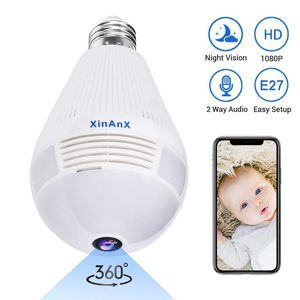
✔ REASON #1: 360-degree No Blind Spots! Our wifi panoramic camera built in 1.44mm Fish-Eye Lens, this camera will provide you with 360 degree panoramic viewing angle without blind area!
✔ REASON #2: Easy Install! You only need to install it on the E27 lamp holder. You can use it on the E27 lamp holder at home, or you can use the E27 lamp holder that we give you, and it can meet the voltage of 110V-220V.
How to reset the panoramic camera?
You can use the fixing pin to press and hold the fixing hole for 6-8 seconds until you hear the sound of successful reset.
How to connect the wifi camera?
Download the APP "iCSee" from iOS App Store and Google Play, and follow the user manual to use.
WHAT YOU GET
WiFi Panoramic Camera ( Not include SD card )
E27 Base
User Manual
Mounting Screw bag
Please confirm that your connected WiFi is 2.4GHz, otherwise you cannot connect successfully
Reasons to Like XinAnX Camera!
✔ REASON #1: 360-degree No Blind Spots! Our wifi panoramic camera built in 1.44mm Fish-Eye Lens, this camera will provide you with 360 degree panoramic viewing angle without blind area!
✔ REASON #2: Easy Install! You only need to install it on the E27 lamp holder. You can use it on the E27 lamp holder at home, or you can use the E27 lamp holder that we give you, and it can meet the voltage of 110V-220V.
How to reset the panoramic camera?
You can use the fixing pin to press and hold the fixing hole for 6-8 seconds until you hear the sound of successful reset.
How to connect the wifi camera?
Download the APP "iCSee" from iOS App Store and Google Play, and follow the user manual to use.
WHAT YOU GET
WiFi Panoramic Camera ( Not include SD card )
E27 Base
User Manual
Mounting Screw bag
1080P Smart Bulb Security Camera, 360 Degree Panoramic 2.4G WiFi Camera Indoor/Outdoor Wireless Video Surveillance IP Camera for Baby/Pet Monitor with Night Vision, Two Way Audio, Montion Detection
Price is below average
Current Price
$33.89
Average
$34.48
Min Price
$29.99
Max Price
$39.99
Price dynamics
2%
Description
If you have any further questions, please contact us and we will serve you sincerely. Our Email: support@xinanx-security.com. We will reply you within 24 hours.
Please confirm that your connected WiFi is 2.4GHz, otherwise you cannot connect successfully
Reasons to Like XinAnX Camera!
✔ REASON #1: 360-degree No Blind Spots! Our wifi panoramic camera built in 1.44mm Fish-Eye Lens, this camera will provide you with 360 degree panoramic viewing angle without blind area!
✔ REASON #2: Easy Install! You only need to install it on the E27 lamp holder. You can use it on the E27 lamp holder at home, or you can use the E27 lamp holder that we give you, and it can meet the voltage of 110V-220V.
How to reset the panoramic camera?
You can use the fixing pin to press and hold the fixing hole for 6-8 seconds until you hear the sound of successful reset.
How to connect the wifi camera?
Download the APP "iCSee" from iOS App Store and Google Play, and follow the user manual to use.
WHAT YOU GET
WiFi Panoramic Camera ( Not include SD card )
E27 Base
User Manual
Mounting Screw bag
Please confirm that your connected WiFi is 2.4GHz, otherwise you cannot connect successfully
Reasons to Like XinAnX Camera!
✔ REASON #1: 360-degree No Blind Spots! Our wifi panoramic camera built in 1.44mm Fish-Eye Lens, this camera will provide you with 360 degree panoramic viewing angle without blind area!
✔ REASON #2: Easy Install! You only need to install it on the E27 lamp holder. You can use it on the E27 lamp holder at home, or you can use the E27 lamp holder that we give you, and it can meet the voltage of 110V-220V.
How to reset the panoramic camera?
You can use the fixing pin to press and hold the fixing hole for 6-8 seconds until you hear the sound of successful reset.
How to connect the wifi camera?
Download the APP "iCSee" from iOS App Store and Google Play, and follow the user manual to use.
WHAT YOU GET
WiFi Panoramic Camera ( Not include SD card )
E27 Base
User Manual
Mounting Screw bag
Price will be lower
in next 2 weeks
in next 2 weeks
According to the data, price will be lower in next two weeks, so not waste your money and track better price!

Similar products







































