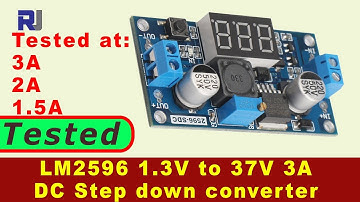
Description
Parameters:
Input voltage: 5-32.0V (we suggest you to leave margin)
Output voltage: 0-30.0V
Output current: 1.5A Max (please enhance cooling when > 1.5A)
Output power: 30W Max
Output voltage preset resolution: 0.1V
Voltage testing accuracy: +/-(1%+2 digits)
Wiring connection:
IN+: connect IN+ to your Input +
IN-: connect IN- to your Input -
Out+: connect OUT+ to your output +
Out-: connect OUT- to your output -
How to use:
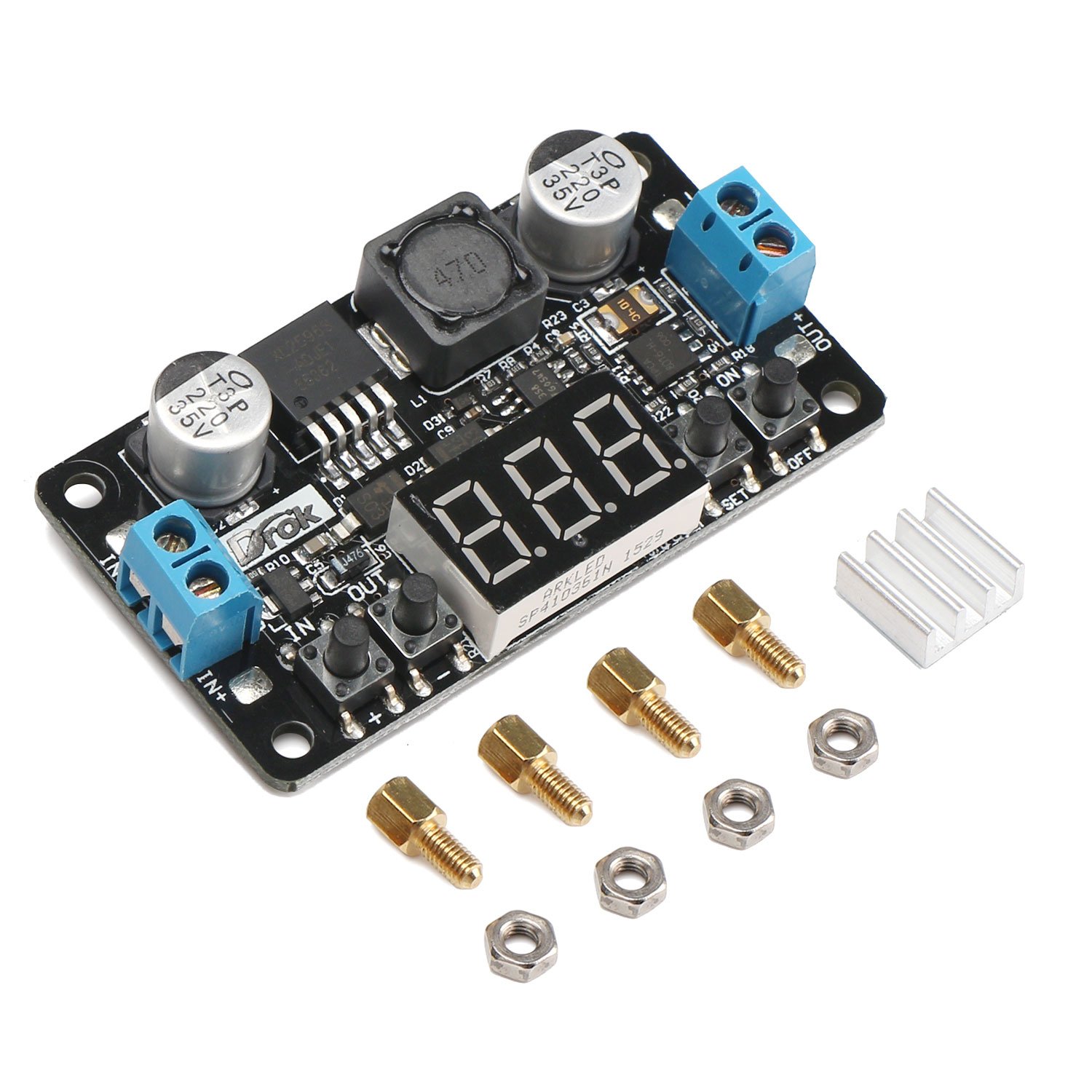
1. ON/OFF is the output voltage control button. when connect the power supply, the default option is to turn on the output voltage. press the button will turn off the output voltage. then press it again can turn on the output voltage again, followed by recycling.
2. The two buttons named IN & OUT (which are on the left of the digital display) can switch between current input voltage and output voltage.
3. SET key is to set the output voltage. Press SET shortly, the decimal place of output voltage flashes. press the two buttons named + & - to increase or decrease the value, thereby setting the decimal place of output voltage. after select the required value of decimal place, press SET again and the integral place of output voltage starts flashing. with the same two buttons can set the required value by using the same method. when the required value is set, press the SET to quit setting. if you don't press the SET key, the setting will be automatically quitted after 6 seconds and the item will store the current setting value.
Note:
1. Please make sure that you use this module within its working range; do not output short-circuit or charge the battery, otherwise the board would burn.
2. When you set the parameter, please use the module after you make sure output voltage is stable to avoid any possible damage.
Input voltage: 5-32.0V (we suggest you to leave margin)
Output voltage: 0-30.0V
Output current: 1.5A Max (please enhance cooling when > 1.5A)
Output power: 30W Max
Output voltage preset resolution: 0.1V
Voltage testing accuracy: +/-(1%+2 digits)
Wiring connection:
IN+: connect IN+ to your Input +
IN-: connect IN- to your Input -
Out+: connect OUT+ to your output +
Out-: connect OUT- to your output -
How to use:
1. ON/OFF is the output voltage control button. when connect the power supply, the default option is to turn on the output voltage. press the button will turn off the output voltage. then press it again can turn on the output voltage again, followed by recycling.
2. The two buttons named IN & OUT (which are on the left of the digital display) can switch between current input voltage and output voltage.
3. SET key is to set the output voltage. Press SET shortly, the decimal place of output voltage flashes. press the two buttons named + & - to increase or decrease the value, thereby setting the decimal place of output voltage. after select the required value of decimal place, press SET again and the integral place of output voltage starts flashing. with the same two buttons can set the required value by using the same method. when the required value is set, press the SET to quit setting. if you don't press the SET key, the setting will be automatically quitted after 6 seconds and the item will store the current setting value.
Note:
1. Please make sure that you use this module within its working range; do not output short-circuit or charge the battery, otherwise the board would burn.
2. When you set the parameter, please use the module after you make sure output voltage is stable to avoid any possible damage.
24V to 12V 5V DC Converter, DROK LM2596 Buck Power Converter 5-32V to 0-30V Step Down Adjustable Output Voltage Regulator Board Power Supply Module with LED Display Voltmeter Screw & Heatsink
Current Price
$9.98
Average
$8.99
Min Price
$6.48
Max Price
$13.58
Price dynamics
10%
Description
Parameters:
Input voltage: 5-32.0V (we suggest you to leave margin)
Output voltage: 0-30.0V
Output current: 1.5A Max (please enhance cooling when > 1.5A)
Output power: 30W Max
Output voltage preset resolution: 0.1V
Voltage testing accuracy: +/-(1%+2 digits)
Wiring connection:
IN+: connect IN+ to your Input +
IN-: connect IN- to your Input -
Out+: connect OUT+ to your output +
Out-: connect OUT- to your output -
How to use:
1. ON/OFF is the output voltage control button. when connect the power supply, the default option is to turn on the output voltage. press the button will turn off the output voltage. then press it again can turn on the output voltage again, followed by recycling.
2. The two buttons named IN & OUT (which are on the left of the digital display) can switch between current input voltage and output voltage.
3. SET key is to set the output voltage. Press SET shortly, the decimal place of output voltage flashes. press the two buttons named + & - to increase or decrease the value, thereby setting the decimal place of output voltage. after select the required value of decimal place, press SET again and the integral place of output voltage starts flashing. with the same two buttons can set the required value by using the same method. when the required value is set, press the SET to quit setting. if you don't press the SET key, the setting will be automatically quitted after 6 seconds and the item will store the current setting value.
Note:
1. Please make sure that you use this module within its working range; do not output short-circuit or charge the battery, otherwise the board would burn.
2. When you set the parameter, please use the module after you make sure output voltage is stable to avoid any possible damage.
Input voltage: 5-32.0V (we suggest you to leave margin)
Output voltage: 0-30.0V
Output current: 1.5A Max (please enhance cooling when > 1.5A)
Output power: 30W Max
Output voltage preset resolution: 0.1V
Voltage testing accuracy: +/-(1%+2 digits)
Wiring connection:
IN+: connect IN+ to your Input +
IN-: connect IN- to your Input -
Out+: connect OUT+ to your output +
Out-: connect OUT- to your output -
How to use:
1. ON/OFF is the output voltage control button. when connect the power supply, the default option is to turn on the output voltage. press the button will turn off the output voltage. then press it again can turn on the output voltage again, followed by recycling.
2. The two buttons named IN & OUT (which are on the left of the digital display) can switch between current input voltage and output voltage.
3. SET key is to set the output voltage. Press SET shortly, the decimal place of output voltage flashes. press the two buttons named + & - to increase or decrease the value, thereby setting the decimal place of output voltage. after select the required value of decimal place, press SET again and the integral place of output voltage starts flashing. with the same two buttons can set the required value by using the same method. when the required value is set, press the SET to quit setting. if you don't press the SET key, the setting will be automatically quitted after 6 seconds and the item will store the current setting value.
Note:
1. Please make sure that you use this module within its working range; do not output short-circuit or charge the battery, otherwise the board would burn.
2. When you set the parameter, please use the module after you make sure output voltage is stable to avoid any possible damage.
Price will be lower
in next 2 weeks
in next 2 weeks
According to the data, price will be lower in next two weeks, so not waste your money and track better price!
Product review & video
hi welcome to Robo jack in this video we are going to do a test review of this LM two five nine six regulator with the input of four 240 volts and the output of regulated 1.25 to thirty seven volts with the display we are going to test this this can handle up to 3 ampere we are going to see if it can handle 3 ampere Adam under different voltage conditions so let's get started as a step-down converter using the LM two five nine six regulators so this has an LED display that shows the voltage input and output depending on selecting this switch so now it shows the light is on here it shows that the input voltage is 12 point 5 volts if I want to see the output just press this and the light will be on so this shows that the output is now 3 point 7 volts so the first thing I've connected my power supply has 2.3 volts and as you can see here it shows 12.5 so death 12 point 3 is the same as my