Description
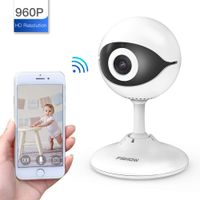
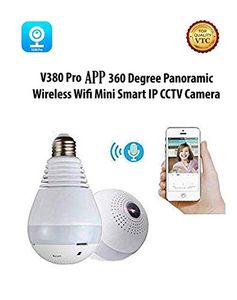
Material: ABS (Acrylonitrile Butadiene Styrene) Interface: E27 screw connector Lens: 1.29mm / PUWELL fisheye lens Perspective angle: Horizontal 185 °/ vertical 185 ° Frame rate: 25fps Lighting: 3 x LED Network Protocol: TCP / IP, UDP / IP, HTTP, SMTP, FTP, DHCP, DDNS, NTP, PPPOE Two-way voice: Support Wi-Fi: Support Warning: E-mail/ FTP/ TF card/ Send a message to the server Power Supply: AC 100-240V, 50/ 60Hz 360 degrees panoramic view. Support motion detection. Plug & Play without IP setting via routers. Support paging browsing, automatic round tour. You can always log APP "V380" watch monitor playback. You can manually control the lights for Android phone. Package Included: 1 x Wi-Fi Bulb Camera 1 x Lamp holder Instructions: 1-Open google play store or Apple app store and search about V380 app Then install. 2-after install open app and select Quick registration 3-enter your email address then click the Next step. 4-Check your email box and confirm app registration 5- Write a password and confirm then click REGISTER. 6- Now you can start V380 enter your email and password then click Login. 7-Electrify the Camera and Connect the power to camera. 8- Open WLAN (Wi-Fi) settings On your Smart phone and select the wireless AP (select MV********) Camera HOTSPOT without password. 9-Return to V380 app and In the top right corner press the +. 10- Select Add Networked Device. 11-Select LAN Search. 12-Select Play Camera Then write New Password and press confirm. 13-Now you can start Camera local after putting password. 14- Click Device configuration and then click Network settings to enter select Station mode. 15- Then Select WIFI signal in the WLAN list and put password then click Save. The Latest Mobile App You Can Use Is V380 Pro.
360° Panoramic Fisheye IP Wireless WiFi Security Light Bulb Camera LED Baby &Pet Camera with Motion Detection, Two Way Audio, Night Vision
Price is below average
Current Price
$25.99
Average
$32.84
Min Price
$25.99
Max Price
$82.76
Price dynamics
21%
Description
Material: ABS (Acrylonitrile Butadiene Styrene) Interface: E27 screw connector Lens: 1.29mm / PUWELL fisheye lens Perspective angle: Horizontal 185 °/ vertical 185 ° Frame rate: 25fps Lighting: 3 x LED Network Protocol: TCP / IP, UDP / IP, HTTP, SMTP, FTP, DHCP, DDNS, NTP, PPPOE Two-way voice: Support Wi-Fi: Support Warning: E-mail/ FTP/ TF card/ Send a message to the server Power Supply: AC 100-240V, 50/ 60Hz 360 degrees panoramic view. Support motion detection. Plug & Play without IP setting via routers. Support paging browsing, automatic round tour. You can always log APP "V380" watch monitor playback. You can manually control the lights for Android phone. Package Included: 1 x Wi-Fi Bulb Camera 1 x Lamp holder Instructions: 1-Open google play store or Apple app store and search about V380 app Then install. 2-after install open app and select Quick registration 3-enter your email address then click the Next step. 4-Check your email box and confirm app registration 5- Write a password and confirm then click REGISTER. 6- Now you can start V380 enter your email and password then click Login. 7-Electrify the Camera and Connect the power to camera. 8- Open WLAN (Wi-Fi) settings On your Smart phone and select the wireless AP (select MV********) Camera HOTSPOT without password. 9-Return to V380 app and In the top right corner press the +. 10- Select Add Networked Device. 11-Select LAN Search. 12-Select Play Camera Then write New Password and press confirm. 13-Now you can start Camera local after putting password. 14- Click Device configuration and then click Network settings to enter select Station mode. 15- Then Select WIFI signal in the WLAN list and put password then click Save. The Latest Mobile App You Can Use Is V380 Pro.
Price will be lower
in next 2 weeks
in next 2 weeks
According to the data, price will be lower in next two weeks, so not waste your money and track better price!
Similar products