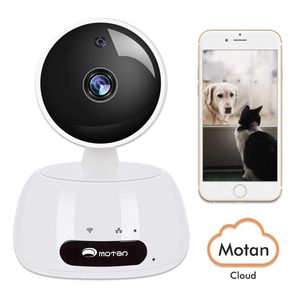
Description
Security Camera, IP Camera, WiFi 1080P Wireless Indoor Home Security Camera System Pet/Dog/Elder/Baby HD Camera with Night Vision, Motion Detection, Cloud Storage, Vedio, 2-Way Audio, Ethernet, Alexa
Smart PTZ cloud IP camera
Support 1MP/2MP resolution
Support 2 way audio and smart WI-FI connection
Support Android, IOS, devices monitoring, Word with Alexa
Support multi-user access, multi device management
Support Motion Detection, alarm, snapshot, vidio
Support radio frequency smart sensors Support SD card, cloud box, cloud storage
Support super long time recording Support 350°horizontal & 100°vertically rotation
Support background alarm push Support all sorts of networks as 3G, 4G, WIFI and more
Support smart phone, tablet, PC, smart TV, pad, and more
Smart devices Quick Installation Guide
1. "MIPC" Client Installation(Supported for IOS and Android): Download "MIPC" client from App store and Install the App
2. Connect the WI-FI camera with power
3. Open the MIPC client, register an account and log in
4. Click the "+" on the top left corner, choose your device type, scan to add the device id(at the bottom of the machine), then enter the networking page.
5. Choose a network(supports WI-FI and wired Ethernet Connection) WI-FI connection: click the WI-FI icon, long press the reset key 1-2 seconds into WI-FI configuration mode, enter your WI-FI passwords and waiting for connecting. Wired Ethernet connection: click the wired Ethernet icon, connect the network cable to the machine, reset your passwords and set a WI-FI, then finished.
Smart PTZ cloud IP camera
Support 1MP/2MP resolution
Support 2 way audio and smart WI-FI connection
Support Android, IOS, devices monitoring, Word with Alexa
Support multi-user access, multi device management
Support Motion Detection, alarm, snapshot, vidio
Support radio frequency smart sensors Support SD card, cloud box, cloud storage
Support super long time recording Support 350°horizontal & 100°vertically rotation
Support background alarm push Support all sorts of networks as 3G, 4G, WIFI and more
Support smart phone, tablet, PC, smart TV, pad, and more
Smart devices Quick Installation Guide
1. "MIPC" Client Installation(Supported for IOS and Android): Download "MIPC" client from App store and Install the App
2. Connect the WI-FI camera with power
3. Open the MIPC client, register an account and log in
4. Click the "+" on the top left corner, choose your device type, scan to add the device id(at the bottom of the machine), then enter the networking page.
5. Choose a network(supports WI-FI and wired Ethernet Connection) WI-FI connection: click the WI-FI icon, long press the reset key 1-2 seconds into WI-FI configuration mode, enter your WI-FI passwords and waiting for connecting. Wired Ethernet connection: click the wired Ethernet icon, connect the network cable to the machine, reset your passwords and set a WI-FI, then finished.
Home Security Camera, Baby Camera, Dog Camera,1080P Indoor Camera with Phone App, Smart Home Camera for Pet, Pan Tilt Zoom Night Vision, Motion Detect, 2-Way Audio, Cloud, Home WiFi Camera with Alexa
Price is below average
Current Price
$39.99
Average
$43.55
Min Price
$39.29
Max Price
$49.99
Price dynamics
8%
Description
Security Camera, IP Camera, WiFi 1080P Wireless Indoor Home Security Camera System Pet/Dog/Elder/Baby HD Camera with Night Vision, Motion Detection, Cloud Storage, Vedio, 2-Way Audio, Ethernet, Alexa
Smart PTZ cloud IP camera
Support 1MP/2MP resolution
Support 2 way audio and smart WI-FI connection
Support Android, IOS, devices monitoring, Word with Alexa
Support multi-user access, multi device management
Support Motion Detection, alarm, snapshot, vidio
Support radio frequency smart sensors Support SD card, cloud box, cloud storage
Support super long time recording Support 350°horizontal & 100°vertically rotation
Support background alarm push Support all sorts of networks as 3G, 4G, WIFI and more
Support smart phone, tablet, PC, smart TV, pad, and more
Smart devices Quick Installation Guide
1. "MIPC" Client Installation(Supported for IOS and Android): Download "MIPC" client from App store and Install the App
2. Connect the WI-FI camera with power
3. Open the MIPC client, register an account and log in
4. Click the "+" on the top left corner, choose your device type, scan to add the device id(at the bottom of the machine), then enter the networking page.
5. Choose a network(supports WI-FI and wired Ethernet Connection) WI-FI connection: click the WI-FI icon, long press the reset key 1-2 seconds into WI-FI configuration mode, enter your WI-FI passwords and waiting for connecting. Wired Ethernet connection: click the wired Ethernet icon, connect the network cable to the machine, reset your passwords and set a WI-FI, then finished.
Smart PTZ cloud IP camera
Support 1MP/2MP resolution
Support 2 way audio and smart WI-FI connection
Support Android, IOS, devices monitoring, Word with Alexa
Support multi-user access, multi device management
Support Motion Detection, alarm, snapshot, vidio
Support radio frequency smart sensors Support SD card, cloud box, cloud storage
Support super long time recording Support 350°horizontal & 100°vertically rotation
Support background alarm push Support all sorts of networks as 3G, 4G, WIFI and more
Support smart phone, tablet, PC, smart TV, pad, and more
Smart devices Quick Installation Guide
1. "MIPC" Client Installation(Supported for IOS and Android): Download "MIPC" client from App store and Install the App
2. Connect the WI-FI camera with power
3. Open the MIPC client, register an account and log in
4. Click the "+" on the top left corner, choose your device type, scan to add the device id(at the bottom of the machine), then enter the networking page.
5. Choose a network(supports WI-FI and wired Ethernet Connection) WI-FI connection: click the WI-FI icon, long press the reset key 1-2 seconds into WI-FI configuration mode, enter your WI-FI passwords and waiting for connecting. Wired Ethernet connection: click the wired Ethernet icon, connect the network cable to the machine, reset your passwords and set a WI-FI, then finished.
Price will be lower
in next 2 weeks
in next 2 weeks
According to the data, price will be lower in next two weeks, so not waste your money and track better price!
Product review & video
so I got a new security camera for my home this secure camera is by Cup and called E and comes with four camera package it's going to take this out so I decided go with a security camera because it's got everything that I was looking for first of all it supports multiple camera and it's wireless walks on Wi-Fi he uses a micro SD for storage the camera runs an USB power supply and then supports motion detection and night vision and others good stuff and you can find for camera package for under 120 and Amazon see description below for doing first here's quick unboxing setting up the camera is very easy first thing you gotta do is download the app just go to app store and defer II home and download app next insert your micro SD card it doesn't come with one so I have to fly separately if you don't have one though is still work and then the X going plug in your power so as you see a yellow



Similar products







































