5 EASY STEPS TO START YOUR DRILLTOP CAMERA
1.Make sure your Wi-Fi router is on and running; it need to support 2.4 GHz network. 2.Install 163eye application to your device (scan the QR code from the Manual inserted into the package or search for "163eye" application on AppStore for iOS, Play Market for Android). 3.Start 163eye application and have your account registered with an e-mail. 4.Connect camera to the power with USB cable (and plug, if necessary); wait for "bip" sound. 5.Press "+" on the 163eye application interface and choose one of the camera connection options: "AP connect" or "Smartlink". Follow the instructions on your screen. If one option does not work switch to another. Now hopefully the camera is connected to your device and you can use all of its functions via the App.

KEEP AN EYE ON WHAT YOU LOVE
Supports the following: AP Hot Spot setup (Using the camera without internet connection); Motion Detection - camera will send a snapshot with alarm to your phone app when a motion is detected; Multiple Recording Modes - manual recording, alarm triggered recording and timer recording; Storage up to 128GB - can record 1080p quality video continuously for around 528hrs /22days. Loop recording will be initiated automatically once the SD card is full. Package Content: 1x Camera, 1x Power cord, 1x Power adapter, 1x Mounting, 1x User Manual, 3x Screws.
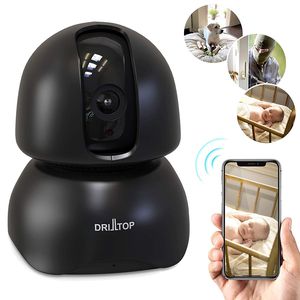
[Newest 2019] Wireless IP Surveillance Camera w/Night Vision - Baby Monitor or Security Camera - 1080p, Activity Detection - 2 Way Audio - Remote Monitor with iOS, Android App - Cloud Service Avail
5 EASY STEPS TO START YOUR DRILLTOP CAMERA
1.Make sure your Wi-Fi router is on and running; it need to support 2.4 GHz network. 2.Install 163eye application to your device (scan the QR code from the Manual inserted into the package or search for "163eye" application on AppStore for iOS, Play Market for Android). 3.Start 163eye application and have your account registered with an e-mail. 4.Connect camera to the power with USB cable (and plug, if necessary); wait for "bip" sound. 5.Press "+" on the 163eye application interface and choose one of the camera connection options: "AP connect" or "Smartlink". Follow the instructions on your screen. If one option does not work switch to another. Now hopefully the camera is connected to your device and you can use all of its functions via the App.


KEEP AN EYE ON WHAT YOU LOVE
Supports the following: AP Hot Spot setup (Using the camera without internet connection); Motion Detection - camera will send a snapshot with alarm to your phone app when a motion is detected; Multiple Recording Modes - manual recording, alarm triggered recording and timer recording; Storage up to 128GB - can record 1080p quality video continuously for around 528hrs /22days. Loop recording will be initiated automatically once the SD card is full. Package Content: 1x Camera, 1x Power cord, 1x Power adapter, 1x Mounting, 1x User Manual, 3x Screws.
in next 2 weeks








































