Description
Simplicity at your fingertips.
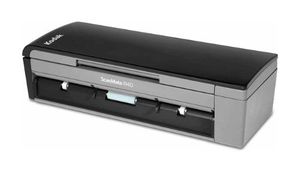
The only thing worse than data trapped on paper is information trapped in your computer. With the KODAK SCANMATE i940 Scanner, collecting, managing, and distributing information is simple. Kodak's Smart Touch functionality replaces complicated multi-step scanning processes with one-touch simplicity. So, you get compact with a huge impact. Create email attachments, picture files, and searchable PDFs-and get your documents to the cloud, so they can be accessed wherever you are. And, the USB-powered capability lets you bring all this functionality with you, wherever you go. Capture, process, and send information effortlessly. Free your information and your base of operations with the KODAK SCANMATE i940 Scanner.
9 great things you can do with the KODAK SCANMATE i940 Scanner to get ahead:
1. Save time-Kodak's Smart Touch performs multiple-step scanning and organizing operations automatically.
2. Save space-compact, highly portable design takes up less desk space.
3. USB-powered-the power of a desktop scanner meets the flexibility of a mobile scanner.
4. Office friendly -compatible with most scanning software.
5. Make great images-Kodak's Perfect Page document imaging is built in-just press the button and get great images with bright colors and crisp text.
6. Scan it all-20-sheet automatic document feeder handles business cards, ID cards, and embossed hard cards.
7. Stay in contact-easily edit and synchronize business card information with your contact applications.
8. Get peace of mind-our three-year limited warranty supports Kodak's commitment to superior workmanship.
9. Remotely manage -available KODAK Asset Management Software allows for remote management of select KODAK Scanners on your network (visit kodak.com/go/AssetManagement).
The only thing worse than data trapped on paper is information trapped in your computer. With the KODAK SCANMATE i940 Scanner, collecting, managing, and distributing information is simple. Kodak's Smart Touch functionality replaces complicated multi-step scanning processes with one-touch simplicity. So, you get compact with a huge impact. Create email attachments, picture files, and searchable PDFs-and get your documents to the cloud, so they can be accessed wherever you are. And, the USB-powered capability lets you bring all this functionality with you, wherever you go. Capture, process, and send information effortlessly. Free your information and your base of operations with the KODAK SCANMATE i940 Scanner.
9 great things you can do with the KODAK SCANMATE i940 Scanner to get ahead:
1. Save time-Kodak's Smart Touch performs multiple-step scanning and organizing operations automatically.
2. Save space-compact, highly portable design takes up less desk space.
3. USB-powered-the power of a desktop scanner meets the flexibility of a mobile scanner.
4. Office friendly -compatible with most scanning software.
5. Make great images-Kodak's Perfect Page document imaging is built in-just press the button and get great images with bright colors and crisp text.
6. Scan it all-20-sheet automatic document feeder handles business cards, ID cards, and embossed hard cards.
7. Stay in contact-easily edit and synchronize business card information with your contact applications.
8. Get peace of mind-our three-year limited warranty supports Kodak's commitment to superior workmanship.
9. Remotely manage -available KODAK Asset Management Software allows for remote management of select KODAK Scanners on your network (visit kodak.com/go/AssetManagement).
KODAK 1960988 / SCANMATE I940 SCANNER
Current Price
$330
Average
$274.79
Min Price
$227.15
Max Price
$395
Price dynamics
17%
Description
Simplicity at your fingertips.
The only thing worse than data trapped on paper is information trapped in your computer. With the KODAK SCANMATE i940 Scanner, collecting, managing, and distributing information is simple. Kodak's Smart Touch functionality replaces complicated multi-step scanning processes with one-touch simplicity. So, you get compact with a huge impact. Create email attachments, picture files, and searchable PDFs-and get your documents to the cloud, so they can be accessed wherever you are. And, the USB-powered capability lets you bring all this functionality with you, wherever you go. Capture, process, and send information effortlessly. Free your information and your base of operations with the KODAK SCANMATE i940 Scanner.
9 great things you can do with the KODAK SCANMATE i940 Scanner to get ahead:
1. Save time-Kodak's Smart Touch performs multiple-step scanning and organizing operations automatically.
2. Save space-compact, highly portable design takes up less desk space.
3. USB-powered-the power of a desktop scanner meets the flexibility of a mobile scanner.
4. Office friendly -compatible with most scanning software.
5. Make great images-Kodak's Perfect Page document imaging is built in-just press the button and get great images with bright colors and crisp text.
6. Scan it all-20-sheet automatic document feeder handles business cards, ID cards, and embossed hard cards.
7. Stay in contact-easily edit and synchronize business card information with your contact applications.
8. Get peace of mind-our three-year limited warranty supports Kodak's commitment to superior workmanship.
9. Remotely manage -available KODAK Asset Management Software allows for remote management of select KODAK Scanners on your network (visit kodak.com/go/AssetManagement).
The only thing worse than data trapped on paper is information trapped in your computer. With the KODAK SCANMATE i940 Scanner, collecting, managing, and distributing information is simple. Kodak's Smart Touch functionality replaces complicated multi-step scanning processes with one-touch simplicity. So, you get compact with a huge impact. Create email attachments, picture files, and searchable PDFs-and get your documents to the cloud, so they can be accessed wherever you are. And, the USB-powered capability lets you bring all this functionality with you, wherever you go. Capture, process, and send information effortlessly. Free your information and your base of operations with the KODAK SCANMATE i940 Scanner.
9 great things you can do with the KODAK SCANMATE i940 Scanner to get ahead:
1. Save time-Kodak's Smart Touch performs multiple-step scanning and organizing operations automatically.
2. Save space-compact, highly portable design takes up less desk space.
3. USB-powered-the power of a desktop scanner meets the flexibility of a mobile scanner.
4. Office friendly -compatible with most scanning software.
5. Make great images-Kodak's Perfect Page document imaging is built in-just press the button and get great images with bright colors and crisp text.
6. Scan it all-20-sheet automatic document feeder handles business cards, ID cards, and embossed hard cards.
7. Stay in contact-easily edit and synchronize business card information with your contact applications.
8. Get peace of mind-our three-year limited warranty supports Kodak's commitment to superior workmanship.
9. Remotely manage -available KODAK Asset Management Software allows for remote management of select KODAK Scanners on your network (visit kodak.com/go/AssetManagement).
Price will be lower
in next 2 weeks
in next 2 weeks
According to the data, price will be lower in next two weeks, so not waste your money and track better price!
Product review & video
all right we're going to go through the demo of the scanner now as you can see it sets up adding powder fruit and power supplies going to the usb of my laptop one of the feature the good features about the the nine 409 40 is it's got perfect page built in which as where you clean up your rotation hole-punch removal blank page removal also the the iron 40 is Twain and Isis driven which means that you can use this scanner even though the small size with any document management software that's out there pretty much so I'm just going to put a mixed batch of documents in some smaller ones there with a larger a4 and I'm using a smart touch and I'm just going to select them seven which is scan to email which finders that firing up the scanner it's taking the documents prove the scanning like I said both sides in color in this case it also allows you to view the images on the screen in case you


Similar products