Description
Overview
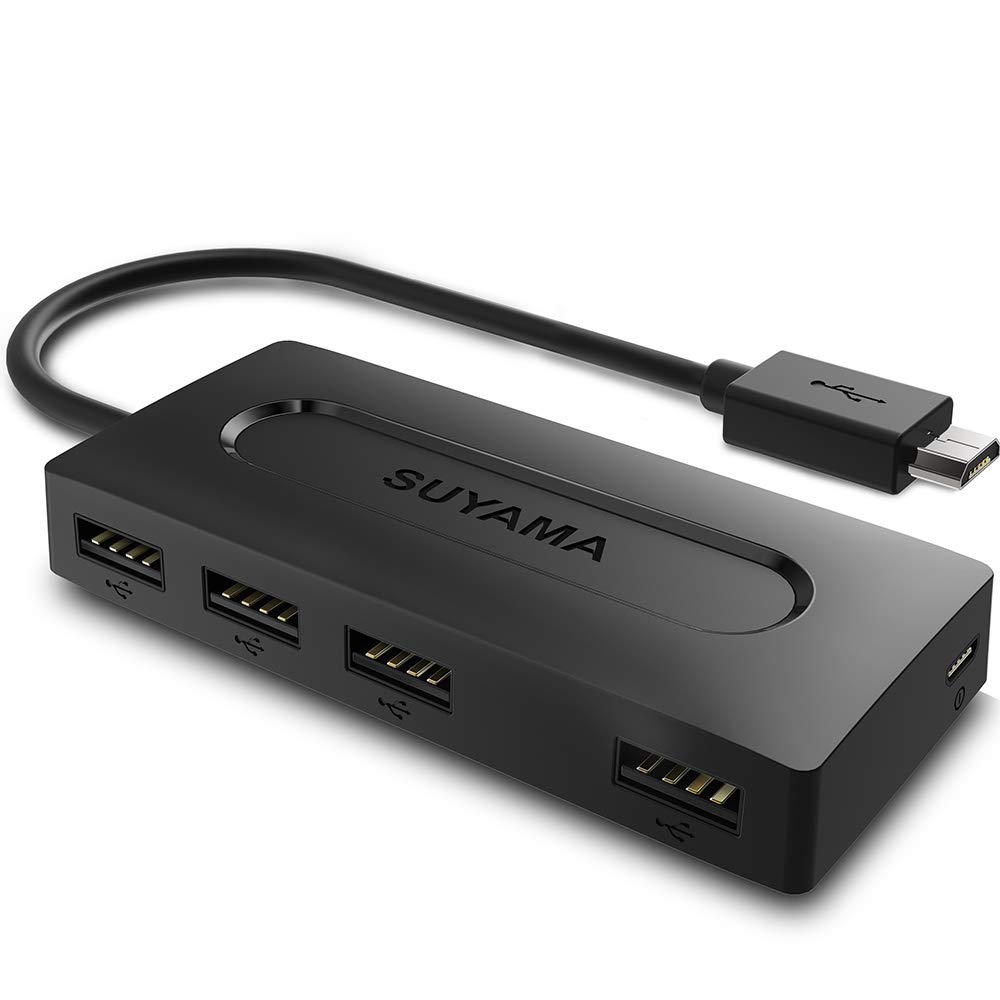
Designed by SUYAMA to support more spacing and connectors for Fire TV Stick & Fire TV Stick 4K wIth 4-Port USB 2.0 Hub. Support OTG function, works with keyboards, mouse, flash drives, external hard drives, USB card readers, USB ethernet adapter, game controllers,other host devices etc,.
Highlights
Micro USB to USB 2.0 Hub with power supply,it can be used to charge battery and transfer data.
Stable and enhanced connection for durable to use. it was passed pulling tension test.
Easy to Set Up - Driver-free, no need to install any driver program for the ethernet adapter, simply plug and play.
Slim & Portable - With slim portable size, the OTG Hub adapter is a good solution for more plug ports whenever you need.
NOTE
**This OTG HUB Adapter does not support "Fast Charger"(Voltage>5V or Current>2A),otherwise the OTG HUB Adapter will heat up and burn out.**
Compatible Device
Amazon Fire TV Stick
Amazon Fire TV Stick 4K
**Do NOT support fire stick gen 1(FCCID: 2ABDU-0509), Roku Stick/Express, Fire HD 10 or any other tablet or cellphone**
How to Use the USB Host OTG Hub?
●Step 1: Plug in Fire TV Stick to your TV with HDMI input.
●Step 2: Plug in the Micro USB Cable to the Fire TV Stick.
●Step 3: Plug in the keyboard/mouse into the usb port.
●Step 4: Plug in the usb cable into 5V AC power adaper(The micro usb cable and AC power adapter need to be purchased separately).
What's in the Box
SUYAMA Micro USB Host OTG HUB *1
About Us:
45 DAYS Money-Back ; 18-Month warranty. Please don't hesitate to contact us if any questions you have. We will get you back within 24 hours.
Designed by SUYAMA to support more spacing and connectors for Fire TV Stick & Fire TV Stick 4K wIth 4-Port USB 2.0 Hub. Support OTG function, works with keyboards, mouse, flash drives, external hard drives, USB card readers, USB ethernet adapter, game controllers,other host devices etc,.
Highlights
Micro USB to USB 2.0 Hub with power supply,it can be used to charge battery and transfer data.
Stable and enhanced connection for durable to use. it was passed pulling tension test.
Easy to Set Up - Driver-free, no need to install any driver program for the ethernet adapter, simply plug and play.
Slim & Portable - With slim portable size, the OTG Hub adapter is a good solution for more plug ports whenever you need.
NOTE
**This OTG HUB Adapter does not support "Fast Charger"(Voltage>5V or Current>2A),otherwise the OTG HUB Adapter will heat up and burn out.**
Compatible Device
Amazon Fire TV Stick
Amazon Fire TV Stick 4K
**Do NOT support fire stick gen 1(FCCID: 2ABDU-0509), Roku Stick/Express, Fire HD 10 or any other tablet or cellphone**
How to Use the USB Host OTG Hub?
●Step 1: Plug in Fire TV Stick to your TV with HDMI input.
●Step 2: Plug in the Micro USB Cable to the Fire TV Stick.
●Step 3: Plug in the keyboard/mouse into the usb port.
●Step 4: Plug in the usb cable into 5V AC power adaper(The micro usb cable and AC power adapter need to be purchased separately).
What's in the Box
SUYAMA Micro USB Host OTG HUB *1
About Us:
45 DAYS Money-Back ; 18-Month warranty. Please don't hesitate to contact us if any questions you have. We will get you back within 24 hours.
SUYAMA USB OTG Adapter for Fire TV Stick 4K,All-New Fire TV (2017) - Micro USB HUB Adaptor with Power Supply
Price is below average
Current Price
$9.9
Average
$12.23
Min Price
$9.9
Max Price
$14.9
Price dynamics
19%
Description
Overview
Designed by SUYAMA to support more spacing and connectors for Fire TV Stick & Fire TV Stick 4K wIth 4-Port USB 2.0 Hub. Support OTG function, works with keyboards, mouse, flash drives, external hard drives, USB card readers, USB ethernet adapter, game controllers,other host devices etc,.
Highlights
Micro USB to USB 2.0 Hub with power supply,it can be used to charge battery and transfer data.
Stable and enhanced connection for durable to use. it was passed pulling tension test.
Easy to Set Up - Driver-free, no need to install any driver program for the ethernet adapter, simply plug and play.
Slim & Portable - With slim portable size, the OTG Hub adapter is a good solution for more plug ports whenever you need.
NOTE
**This OTG HUB Adapter does not support "Fast Charger"(Voltage>5V or Current>2A),otherwise the OTG HUB Adapter will heat up and burn out.**
Compatible Device
Amazon Fire TV Stick
Amazon Fire TV Stick 4K
**Do NOT support fire stick gen 1(FCCID: 2ABDU-0509), Roku Stick/Express, Fire HD 10 or any other tablet or cellphone**
How to Use the USB Host OTG Hub?
●Step 1: Plug in Fire TV Stick to your TV with HDMI input.
●Step 2: Plug in the Micro USB Cable to the Fire TV Stick.
●Step 3: Plug in the keyboard/mouse into the usb port.
●Step 4: Plug in the usb cable into 5V AC power adaper(The micro usb cable and AC power adapter need to be purchased separately).
What's in the Box
SUYAMA Micro USB Host OTG HUB *1
About Us:
45 DAYS Money-Back ; 18-Month warranty. Please don't hesitate to contact us if any questions you have. We will get you back within 24 hours.
Designed by SUYAMA to support more spacing and connectors for Fire TV Stick & Fire TV Stick 4K wIth 4-Port USB 2.0 Hub. Support OTG function, works with keyboards, mouse, flash drives, external hard drives, USB card readers, USB ethernet adapter, game controllers,other host devices etc,.
Highlights
Micro USB to USB 2.0 Hub with power supply,it can be used to charge battery and transfer data.
Stable and enhanced connection for durable to use. it was passed pulling tension test.
Easy to Set Up - Driver-free, no need to install any driver program for the ethernet adapter, simply plug and play.
Slim & Portable - With slim portable size, the OTG Hub adapter is a good solution for more plug ports whenever you need.
NOTE
**This OTG HUB Adapter does not support "Fast Charger"(Voltage>5V or Current>2A),otherwise the OTG HUB Adapter will heat up and burn out.**
Compatible Device
Amazon Fire TV Stick
Amazon Fire TV Stick 4K
**Do NOT support fire stick gen 1(FCCID: 2ABDU-0509), Roku Stick/Express, Fire HD 10 or any other tablet or cellphone**
How to Use the USB Host OTG Hub?
●Step 1: Plug in Fire TV Stick to your TV with HDMI input.
●Step 2: Plug in the Micro USB Cable to the Fire TV Stick.
●Step 3: Plug in the keyboard/mouse into the usb port.
●Step 4: Plug in the usb cable into 5V AC power adaper(The micro usb cable and AC power adapter need to be purchased separately).
What's in the Box
SUYAMA Micro USB Host OTG HUB *1
About Us:
45 DAYS Money-Back ; 18-Month warranty. Please don't hesitate to contact us if any questions you have. We will get you back within 24 hours.
Price will be lower
in next 2 weeks
in next 2 weeks
According to the data, price will be lower in next two weeks, so not waste your money and track better price!
Product review & video
so i recently replaced our gen 1 fire tv cube with a brand new fire tv stick 4k and the reason we did this is we're having a lot of issues with the gen 1 fire tv cube not getting the al exa commands properly and it just wasn't working great so we just decided to replace it let's try out the fire tv stick 4k and see how much better that worked now if you've watched my previous videos you know we do have quite an abnormal setup here as far as where the power cables are all of that so in order to get power for this thing properly where you plug it into an outlet i'd have to go all the way around the corner and that's just going to be quite a long micro usb cable so i really didn't want to opt for that so naturally i use the most logical option and i just try and plug the fire tv stick into the usb port of the tv now of course there is a warning on the fire tv stick saying don't do this bec


Similar products