Description
Espruino is a small computer that anyone can use to control things around them. Its JavaScript interpreter gives you instant feedback so that you can experiment and develop whatever your level of experience. Even if you've never written code before, you can still use the graphical code editor to write programs without typing a single word!
Features:
- Works on Windows, Linux, MacOS and Android (via Bluetooth or USB OTG)
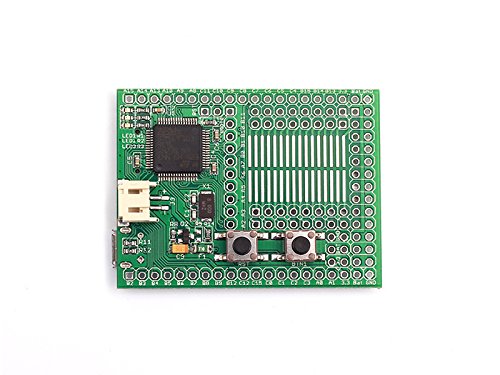
- Less than half the size of a business card ¨C just 54mm x 41mm
- Using the popular JavaScript language, Espruino supports Strings, Maps, Objects, and Dynamic Arrays right out of the box!
- 72Mhz ARM microcontroller with 256KB of Flash memory and 48KB of RAM
- Micro USB connector, Micro SD card connector, and a JST Battery connector with a wide input voltage range of 3.6v to 15v
- Red, Green and Blue LEDs, with 2 pushbuttons (one of which is reset by default)
- Solder an HC-05 Bluetooth module (not included) directly onto the board and program and debug Espruino wirelessly!
- 44 GPIO pins on a 0.1" pin spacing, with 26 PWM pins, 16 ADC pins, 5 USARTs, 3 SPI, 2 I2C and 2 DACs
- Power Consumption:35mA run, 12mA sleep, <0.05mA in deep sleep
- Prototype area which can be used for servo headers, wireless modules and SOIC surface mount parts such as motor drivers
- Built in drivers for the TI CC3000 WiFi and WIZnet W5500 Ethernet modules (not included), as well as a graphics library with vector font Open Source software and hardware
- CE and RoHS Compliant
- On-chip RTC with external 32kHz Oscillato
- Start User Guide
- Tutorial and Examples
- Modules
- Forum
Features:
- Works on Windows, Linux, MacOS and Android (via Bluetooth or USB OTG)
- Less than half the size of a business card ¨C just 54mm x 41mm
- Using the popular JavaScript language, Espruino supports Strings, Maps, Objects, and Dynamic Arrays right out of the box!
- 72Mhz ARM microcontroller with 256KB of Flash memory and 48KB of RAM
- Micro USB connector, Micro SD card connector, and a JST Battery connector with a wide input voltage range of 3.6v to 15v
- Red, Green and Blue LEDs, with 2 pushbuttons (one of which is reset by default)
- Solder an HC-05 Bluetooth module (not included) directly onto the board and program and debug Espruino wirelessly!
- 44 GPIO pins on a 0.1" pin spacing, with 26 PWM pins, 16 ADC pins, 5 USARTs, 3 SPI, 2 I2C and 2 DACs
- Power Consumption:35mA run, 12mA sleep, <0.05mA in deep sleep
- Prototype area which can be used for servo headers, wireless modules and SOIC surface mount parts such as motor drivers
- Built in drivers for the TI CC3000 WiFi and WIZnet W5500 Ethernet modules (not included), as well as a graphics library with vector font Open Source software and hardware
- CE and RoHS Compliant
- On-chip RTC with external 32kHz Oscillato
- Start User Guide
- Tutorial and Examples
- Modules
- Forum
SeeedStudio - Espruino Board v1.4 - Small Computer - DIY Maker Open Source BOOOLE
Price is below average
Current Price
$61.58
Average
$64.56
Min Price
$60.96
Max Price
$71.03
Price dynamics
5%
Description
Espruino is a small computer that anyone can use to control things around them. Its JavaScript interpreter gives you instant feedback so that you can experiment and develop whatever your level of experience. Even if you've never written code before, you can still use the graphical code editor to write programs without typing a single word!
Features:
- Works on Windows, Linux, MacOS and Android (via Bluetooth or USB OTG)
- Less than half the size of a business card ¨C just 54mm x 41mm
- Using the popular JavaScript language, Espruino supports Strings, Maps, Objects, and Dynamic Arrays right out of the box!
- 72Mhz ARM microcontroller with 256KB of Flash memory and 48KB of RAM
- Micro USB connector, Micro SD card connector, and a JST Battery connector with a wide input voltage range of 3.6v to 15v
- Red, Green and Blue LEDs, with 2 pushbuttons (one of which is reset by default)
- Solder an HC-05 Bluetooth module (not included) directly onto the board and program and debug Espruino wirelessly!
- 44 GPIO pins on a 0.1" pin spacing, with 26 PWM pins, 16 ADC pins, 5 USARTs, 3 SPI, 2 I2C and 2 DACs
- Power Consumption:35mA run, 12mA sleep, <0.05mA in deep sleep
- Prototype area which can be used for servo headers, wireless modules and SOIC surface mount parts such as motor drivers
- Built in drivers for the TI CC3000 WiFi and WIZnet W5500 Ethernet modules (not included), as well as a graphics library with vector font Open Source software and hardware
- CE and RoHS Compliant
- On-chip RTC with external 32kHz Oscillato
- Start User Guide
- Tutorial and Examples
- Modules
- Forum
Features:
- Works on Windows, Linux, MacOS and Android (via Bluetooth or USB OTG)
- Less than half the size of a business card ¨C just 54mm x 41mm
- Using the popular JavaScript language, Espruino supports Strings, Maps, Objects, and Dynamic Arrays right out of the box!
- 72Mhz ARM microcontroller with 256KB of Flash memory and 48KB of RAM
- Micro USB connector, Micro SD card connector, and a JST Battery connector with a wide input voltage range of 3.6v to 15v
- Red, Green and Blue LEDs, with 2 pushbuttons (one of which is reset by default)
- Solder an HC-05 Bluetooth module (not included) directly onto the board and program and debug Espruino wirelessly!
- 44 GPIO pins on a 0.1" pin spacing, with 26 PWM pins, 16 ADC pins, 5 USARTs, 3 SPI, 2 I2C and 2 DACs
- Power Consumption:35mA run, 12mA sleep, <0.05mA in deep sleep
- Prototype area which can be used for servo headers, wireless modules and SOIC surface mount parts such as motor drivers
- Built in drivers for the TI CC3000 WiFi and WIZnet W5500 Ethernet modules (not included), as well as a graphics library with vector font Open Source software and hardware
- CE and RoHS Compliant
- On-chip RTC with external 32kHz Oscillato
- Start User Guide
- Tutorial and Examples
- Modules
- Forum
Price will be lower
in next 2 weeks
in next 2 weeks
According to the data, price will be lower in next two weeks, so not waste your money and track better price!
Product review & video
okay so this is the weo terminal which i was sent by seed studio uh to have a play around with now i did say to them that it wasn't really my thing because i've played around with it and it's beyond my skills i mean there are loads and loads of tutorials you can see here get started with weoterminal and all the features and specifications and it talks you through lots of things that i just don't do with my pie but i know that the whole maker side is a huge side of it and this is actually a really good quality display and there is loads and loads of features in it but i've been for quite a few hours trying to get to install various things on it and not many things have been working for me but i know it's just that it's not my forte i don't really do this i don't do any coding but let's have a look at it and show you various things about it so it's 120 megahertz up to 200 megahertz cpu sp



Similar products