Description
How to use?
1. Pre-heating the cleaning fluid.
2. Remove ink cartridges and the print head.
3. Choose the right type of syringe according to the color of the clogged print head that needs to be cleaned.
4. Inject the cleaning fluid into the print head that needs cleaning with a syringe. Leaving the bottom of the print head be soaked for about 8 hours.
5. Install the print head into the ink cartridge and load the printer, then run the "nozzle cleaning" function twice in printer driver.
PS: Please refer to the manual instructions for more details.
Notice:
1. After removing the ink cartridges, you could wrap them in plastic wrap and put them in a ziploc bag to prevent them from drying out.
2. The print head must be completely dry after being soaked, and then it can be installed in the printer. Otherwise it may cause short circuit that will lead to the damage of the print head.
3. Don't skip the longer soak if the shorter ones don't work. If that fails, It is recommend to try again after a day or two.
Package:
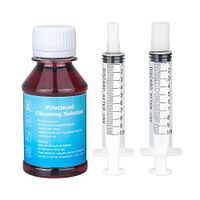
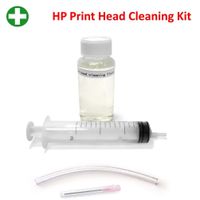
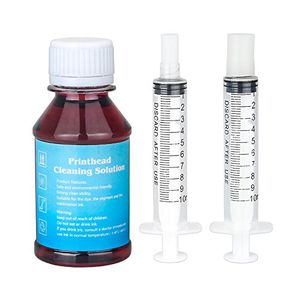
1× Printhead Cleaning Fluid(100ml)
2× Syringe(10ml)
1× instruction manual
1. Pre-heating the cleaning fluid.
2. Remove ink cartridges and the print head.
3. Choose the right type of syringe according to the color of the clogged print head that needs to be cleaned.
4. Inject the cleaning fluid into the print head that needs cleaning with a syringe. Leaving the bottom of the print head be soaked for about 8 hours.
5. Install the print head into the ink cartridge and load the printer, then run the "nozzle cleaning" function twice in printer driver.
PS: Please refer to the manual instructions for more details.
Notice:
1. After removing the ink cartridges, you could wrap them in plastic wrap and put them in a ziploc bag to prevent them from drying out.
2. The print head must be completely dry after being soaked, and then it can be installed in the printer. Otherwise it may cause short circuit that will lead to the damage of the print head.
3. Don't skip the longer soak if the shorter ones don't work. If that fails, It is recommend to try again after a day or two.
Package:
1× Printhead Cleaning Fluid(100ml)
2× Syringe(10ml)
1× instruction manual
Printhead Cleaner, TBTeekk Inkjet Printer Cleaning Fluid for Canon Print Head Nozzles 100ml Cleaner Kit - Red
Current Price
$15.99
Average
$15.74
Min Price
$14.99
Max Price
$16.99
Price dynamics
2%
Description
How to use?
1. Pre-heating the cleaning fluid.
2. Remove ink cartridges and the print head.
3. Choose the right type of syringe according to the color of the clogged print head that needs to be cleaned.
4. Inject the cleaning fluid into the print head that needs cleaning with a syringe. Leaving the bottom of the print head be soaked for about 8 hours.
5. Install the print head into the ink cartridge and load the printer, then run the "nozzle cleaning" function twice in printer driver.
PS: Please refer to the manual instructions for more details.
Notice:
1. After removing the ink cartridges, you could wrap them in plastic wrap and put them in a ziploc bag to prevent them from drying out.
2. The print head must be completely dry after being soaked, and then it can be installed in the printer. Otherwise it may cause short circuit that will lead to the damage of the print head.
3. Don't skip the longer soak if the shorter ones don't work. If that fails, It is recommend to try again after a day or two.
Package:
1× Printhead Cleaning Fluid(100ml)
2× Syringe(10ml)
1× instruction manual
1. Pre-heating the cleaning fluid.
2. Remove ink cartridges and the print head.
3. Choose the right type of syringe according to the color of the clogged print head that needs to be cleaned.
4. Inject the cleaning fluid into the print head that needs cleaning with a syringe. Leaving the bottom of the print head be soaked for about 8 hours.
5. Install the print head into the ink cartridge and load the printer, then run the "nozzle cleaning" function twice in printer driver.
PS: Please refer to the manual instructions for more details.
Notice:
1. After removing the ink cartridges, you could wrap them in plastic wrap and put them in a ziploc bag to prevent them from drying out.
2. The print head must be completely dry after being soaked, and then it can be installed in the printer. Otherwise it may cause short circuit that will lead to the damage of the print head.
3. Don't skip the longer soak if the shorter ones don't work. If that fails, It is recommend to try again after a day or two.
Package:
1× Printhead Cleaning Fluid(100ml)
2× Syringe(10ml)
1× instruction manual
Price will be lower
in next 2 weeks
in next 2 weeks
According to the data, price will be lower in next two weeks, so not waste your money and track better price!
Similar products