Description
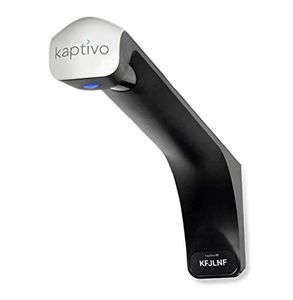
Use the Kaptivo whiteboard camera to improve remote collaboration and streamline whiteboard image capture without changing the way you work. Kaptivo, which attaches to the top of any whiteboard, automatically saves images and shares content in real time via livestream through any web browser or video conference integration. Images are instantly enhanced to remove any reflections, glare, and people blocking the board. Content is shared securely via the cloud, or within your internal private network only (self-hosted). Features Securely livestream whiteboard content to anyone on any device via web browser or video conference without apps, downloads or plug-ins Download snapshots and multi-page presentations of whiteboard content with important changes Share images via project management software and video conference integrations Affordable pricing enables installations across the entire enterprise Requirements: Standard white or glass dry-erase board. Kaptivo is optimized to capture images in a space up to 6 ft x 4 ft (1.8m x 1.2m) Standard dry-erase markers For best results use a wall-mounted board and with the included mounting hardware. Mobile mounts with suction cups are also available. Connectivity and Sharing Connect via Wi-Fi, Ethernet, or HDMI converter (sold separately) Share your whiteboard live over the Internet (cloud mode) or over your internal private network only (self-hosted mode) Powered via USB or Power over Ethernet
Kaptivo Collaboration for Standalone Whiteboards - Enterprise Edition for Remote Meetings, Teams, Classrooms. Self-Host via Private Networks and VPN
Price is below average
Current Price
$840
Average
$907.75
Min Price
$779
Max Price
$1 150
Price dynamics
7%
Description
Use the Kaptivo whiteboard camera to improve remote collaboration and streamline whiteboard image capture without changing the way you work. Kaptivo, which attaches to the top of any whiteboard, automatically saves images and shares content in real time via livestream through any web browser or video conference integration. Images are instantly enhanced to remove any reflections, glare, and people blocking the board. Content is shared securely via the cloud, or within your internal private network only (self-hosted). Features Securely livestream whiteboard content to anyone on any device via web browser or video conference without apps, downloads or plug-ins Download snapshots and multi-page presentations of whiteboard content with important changes Share images via project management software and video conference integrations Affordable pricing enables installations across the entire enterprise Requirements: Standard white or glass dry-erase board. Kaptivo is optimized to capture images in a space up to 6 ft x 4 ft (1.8m x 1.2m) Standard dry-erase markers For best results use a wall-mounted board and with the included mounting hardware. Mobile mounts with suction cups are also available. Connectivity and Sharing Connect via Wi-Fi, Ethernet, or HDMI converter (sold separately) Share your whiteboard live over the Internet (cloud mode) or over your internal private network only (self-hosted mode) Powered via USB or Power over Ethernet
Price will be lower
in next 2 weeks
in next 2 weeks
According to the data, price will be lower in next two weeks, so not waste your money and track better price!
Product review & video
[Music] hi it's Catherine Nicholson here from the virtual training team this is a tripod but we're going to look at how to use white boards at virtually today we're in Microsoft teams I'm on the desktop app on my PC and we're going to explore how we can use white boards when we're running virtual workshops the meetings in Microsoft teams virtual whiteboards are brilliant because you can do way more with them then you can do these things so let's take a look if you want to share a whiteboard from a teams meeting just click the share button here in the bottom and then on the right hand side there you can see the whiteboard option now if we use the whiteboard that's in Microsoft teams let's just use that one to begin with you'll find that unfortunately it is a bit limited and all you can really do is draw which is still fun and you and your colleagues who are in the meeting with you can al


Similar products