- HomeAutomotiveTires & WheelsAccessories & PartsTire Pressure Monitoring Systems (TPMS)Replacement Sensors
Description
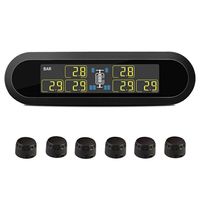
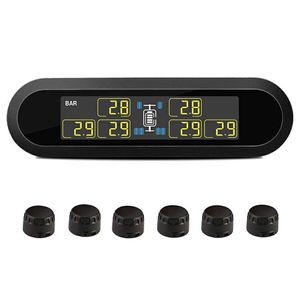
Tire pressure monitoring system with 6 sensors save gas,forsee air leakage,reduce tire wearout,balance tire pressure,ensure safety driving
How to set the sensors into correct tire?
1. Turn on your monitor(press the right button for 5seconds until monitor is on)
2. Press "set" button for 3~5 seconds(no release) until the monitor enter into parameter mode, and press left button or right button to the page which you can see "on" near the tire or two "--" near the tire.
3. Press "set" button one time, the tire and "--" flashing, then take out the tire(which number is corresponding to the flashing tire). For example, "1" sensor is corresponding to left front tire. and you should tighten the sensor into the tire, then release, repeat 1 or 2 times, you will see "--" turns into "on", then this sensor is matched to the tire.
4. Repeat step 3 to other sensors until all sensors matched.
5. After pairing successful, Press "set" button until 3~5 seconds to exit to standby mode.
Note: Please power on the monitor first. Otherwise, The pressure and degree may show up on the monitor after a long time.
Displayer Parameter :
Working Temperature:(-20℃-80℃)
Storage Temperature:(-30℃-85℃)
Input Voltage:DC5V
Transmitting Frequency:433.92MHz
Size( L*W*H )mm:119*34*24mm
Weight:104g
Sensor Parameter :
Working Temperature:(-40℃-105℃)
Storage Temperature:(-40℃-120℃)
Pressure Range:0-130psi(0-9bar)
Pressure Precision:±1.5PSI(±0.1bar)
Temperature Precision:±3℃
Transmitting Power:<10dbm@50Ω
Transmitting Frequency:433.92MHz
Battery Life:2 years
Size:Height:15mm;Diameter:23mm
Weight:9.5g
Package Content:
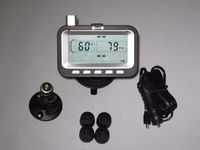
1x T650 Monitor
6x Sensors
6x Theftproof nut
1x USB power cord
1x Anti-slip mat
1x Spanner
1x Open cover wrench
How to set the sensors into correct tire?
1. Turn on your monitor(press the right button for 5seconds until monitor is on)
2. Press "set" button for 3~5 seconds(no release) until the monitor enter into parameter mode, and press left button or right button to the page which you can see "on" near the tire or two "--" near the tire.
3. Press "set" button one time, the tire and "--" flashing, then take out the tire(which number is corresponding to the flashing tire). For example, "1" sensor is corresponding to left front tire. and you should tighten the sensor into the tire, then release, repeat 1 or 2 times, you will see "--" turns into "on", then this sensor is matched to the tire.
4. Repeat step 3 to other sensors until all sensors matched.
5. After pairing successful, Press "set" button until 3~5 seconds to exit to standby mode.
Note: Please power on the monitor first. Otherwise, The pressure and degree may show up on the monitor after a long time.
Displayer Parameter :
Working Temperature:(-20℃-80℃)
Storage Temperature:(-30℃-85℃)
Input Voltage:DC5V
Transmitting Frequency:433.92MHz
Size( L*W*H )mm:119*34*24mm
Weight:104g
Sensor Parameter :
Working Temperature:(-40℃-105℃)
Storage Temperature:(-40℃-120℃)
Pressure Range:0-130psi(0-9bar)
Pressure Precision:±1.5PSI(±0.1bar)
Temperature Precision:±3℃
Transmitting Power:<10dbm@50Ω
Transmitting Frequency:433.92MHz
Battery Life:2 years
Size:Height:15mm;Diameter:23mm
Weight:9.5g
Package Content:
1x T650 Monitor
6x Sensors
6x Theftproof nut
1x USB power cord
1x Anti-slip mat
1x Spanner
1x Open cover wrench
B-Qtech Wireless Solar Power TPMS Tire Pressure Monitoring System RV Truck TPMS with 6 Sensors for Car RV Truck Tow Motorhome Travel Trailer's Pressure and Temperature (RV TPMS)
Price is below average
Current Price
$122.66
Average
$124.25
Min Price
$118.66
Max Price
$128.88
Price dynamics
1%
Description
Tire pressure monitoring system with 6 sensors save gas,forsee air leakage,reduce tire wearout,balance tire pressure,ensure safety driving
How to set the sensors into correct tire?
1. Turn on your monitor(press the right button for 5seconds until monitor is on)
2. Press "set" button for 3~5 seconds(no release) until the monitor enter into parameter mode, and press left button or right button to the page which you can see "on" near the tire or two "--" near the tire.
3. Press "set" button one time, the tire and "--" flashing, then take out the tire(which number is corresponding to the flashing tire). For example, "1" sensor is corresponding to left front tire. and you should tighten the sensor into the tire, then release, repeat 1 or 2 times, you will see "--" turns into "on", then this sensor is matched to the tire.
4. Repeat step 3 to other sensors until all sensors matched.
5. After pairing successful, Press "set" button until 3~5 seconds to exit to standby mode.
Note: Please power on the monitor first. Otherwise, The pressure and degree may show up on the monitor after a long time.
Displayer Parameter :
Working Temperature:(-20℃-80℃)
Storage Temperature:(-30℃-85℃)
Input Voltage:DC5V
Transmitting Frequency:433.92MHz
Size( L*W*H )mm:119*34*24mm
Weight:104g
Sensor Parameter :
Working Temperature:(-40℃-105℃)
Storage Temperature:(-40℃-120℃)
Pressure Range:0-130psi(0-9bar)
Pressure Precision:±1.5PSI(±0.1bar)
Temperature Precision:±3℃
Transmitting Power:<10dbm@50Ω
Transmitting Frequency:433.92MHz
Battery Life:2 years
Size:Height:15mm;Diameter:23mm
Weight:9.5g
Package Content:
1x T650 Monitor
6x Sensors
6x Theftproof nut
1x USB power cord
1x Anti-slip mat
1x Spanner
1x Open cover wrench
How to set the sensors into correct tire?
1. Turn on your monitor(press the right button for 5seconds until monitor is on)
2. Press "set" button for 3~5 seconds(no release) until the monitor enter into parameter mode, and press left button or right button to the page which you can see "on" near the tire or two "--" near the tire.
3. Press "set" button one time, the tire and "--" flashing, then take out the tire(which number is corresponding to the flashing tire). For example, "1" sensor is corresponding to left front tire. and you should tighten the sensor into the tire, then release, repeat 1 or 2 times, you will see "--" turns into "on", then this sensor is matched to the tire.
4. Repeat step 3 to other sensors until all sensors matched.
5. After pairing successful, Press "set" button until 3~5 seconds to exit to standby mode.
Note: Please power on the monitor first. Otherwise, The pressure and degree may show up on the monitor after a long time.
Displayer Parameter :
Working Temperature:(-20℃-80℃)
Storage Temperature:(-30℃-85℃)
Input Voltage:DC5V
Transmitting Frequency:433.92MHz
Size( L*W*H )mm:119*34*24mm
Weight:104g
Sensor Parameter :
Working Temperature:(-40℃-105℃)
Storage Temperature:(-40℃-120℃)
Pressure Range:0-130psi(0-9bar)
Pressure Precision:±1.5PSI(±0.1bar)
Temperature Precision:±3℃
Transmitting Power:<10dbm@50Ω
Transmitting Frequency:433.92MHz
Battery Life:2 years
Size:Height:15mm;Diameter:23mm
Weight:9.5g
Package Content:
1x T650 Monitor
6x Sensors
6x Theftproof nut
1x USB power cord
1x Anti-slip mat
1x Spanner
1x Open cover wrench
Price will be lower
in next 2 weeks
in next 2 weeks
According to the data, price will be lower in next two weeks, so not waste your money and track better price!
Similar products