- HomeElectronicsCar & Vehicle ElectronicsVehicle Electronics AccessoriesAudio & Video AccessoriesBluetooth Car Kits
Description
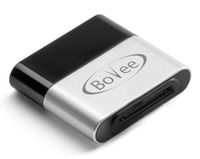
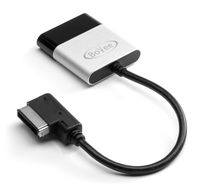
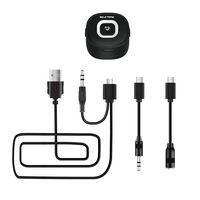
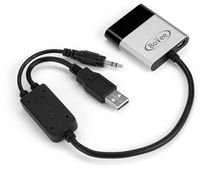
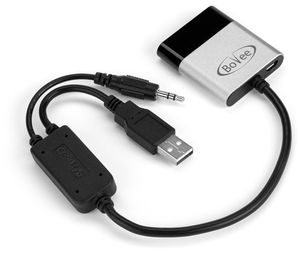
Tired of not being able to stream music wireless to your car? The plug and play tune2air bluetooth adapter streaming works as if factory fit with your BMW x5 2007 or any BMW and MINI Cooper having iPod integration. The WMA3000B is a plug-and-play adapter designed for integrating wireless Bluetooth music streaming (works with Android or iPhone) with the original USB/AUX iPod integration kit found in the glovebox. If your has this option then the WMA3000B will be compatible. Instead of manually plugging the iPod into the cable connected to the AUX/USB socket every time you enter the car, you instead connect the Tune2Air WMA3000B with integrated Y-Cable to the original AUX/USB sockets which you would have normally connected your OEM BMW/Mini iPod lead to. The Tune2Air is then left in the car permanently connected to the original iPod socket. Once the Tune2Air is connected to your car and paired with your iPhone/iPod, every time you re-enter the vehicle the Bluetooth connection will be established automatically, meaning that your full music library will be instantly accessible on your in-car iPod interface, without having to remove the phone from your bag/pocket and manually plugging into the cable. This allows for a much more enjoyable in-car music experience as you can simply get in and drive, without the risk of leaving the iPhone/iPod in the car after the journey.
Bovee Bluetooth Car Kit for BMW x5 2007 - Android and iPhone Music Interface Adaptor for in car iPod Integration (WMA3000B USB/AUX Connector)
Current Price
$89
Average
$89
Min Price
$89
Max Price
$89
Description
Tired of not being able to stream music wireless to your car? The plug and play tune2air bluetooth adapter streaming works as if factory fit with your BMW x5 2007 or any BMW and MINI Cooper having iPod integration. The WMA3000B is a plug-and-play adapter designed for integrating wireless Bluetooth music streaming (works with Android or iPhone) with the original USB/AUX iPod integration kit found in the glovebox. If your has this option then the WMA3000B will be compatible. Instead of manually plugging the iPod into the cable connected to the AUX/USB socket every time you enter the car, you instead connect the Tune2Air WMA3000B with integrated Y-Cable to the original AUX/USB sockets which you would have normally connected your OEM BMW/Mini iPod lead to. The Tune2Air is then left in the car permanently connected to the original iPod socket. Once the Tune2Air is connected to your car and paired with your iPhone/iPod, every time you re-enter the vehicle the Bluetooth connection will be established automatically, meaning that your full music library will be instantly accessible on your in-car iPod interface, without having to remove the phone from your bag/pocket and manually plugging into the cable. This allows for a much more enjoyable in-car music experience as you can simply get in and drive, without the risk of leaving the iPhone/iPod in the car after the journey.
Price will be lower
in next 2 weeks
in next 2 weeks
According to the data, price will be lower in next two weeks, so not waste your money and track better price!
Product review & video
[Music] hi this is david from is my world I'm going to show you the tent where the WMA 3000 be so this model is specifically designed for the BMW's and the mini morris that don't have Bluetooth connectivity in the car so that's going to let you play music from your mobile phones from your iPhone or Samsung devices to the car stereo a via via Wireless via bluetooth so you can have your mobile phone anywhere so I'll show you the package so this is the the new 2012 w 3000 be be serious for the BMW and of course you have the manual I'll show you step by step how to do it it's very easy okay so let's stop play with it so we're gonna wait we're right now when a bmw x5 2011 so we're going to connect the cable so normally in the BMWs you have here USB and the auxiliary connection so you just simply plug in the device in the two connections like this and there we go and you can see that device i


Similar products