- HomeElectronicsCar & Vehicle ElectronicsVehicle Electronics AccessoriesAudio & Video AccessoriesBluetooth Car Kits
Description
Guidelines for use:
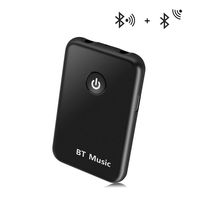
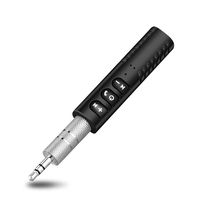
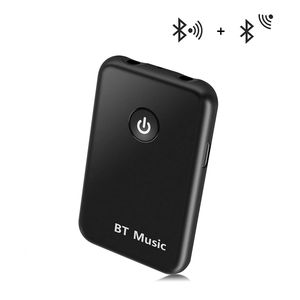
1. On/Off: Press and hold the power button for 3 seconds. After power on, the default is Bluetooth transmission status. To switch modes, press the power button briefly.
2. The indicator light is blue when receiving, and the indicator is red when transmitting.
3, Bluetooth name: "YPF-BT"
RX mode (Bluetooth receiver):
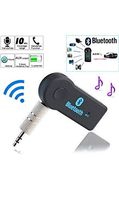
1. Adjust the Bluetooth AUX Adapter status to Receive mode and connect the device to a non-Bluetooth headset/home speaker or car audio system using a 3.5 mm audio cable.
2. Pair the adapter with the smart device.
3. Now you can enjoy music or hands-free calling through headphones, speakers, home stereo system / car audio system.
TX mode ((Bluetooth transmitter):
1 Adjust the Bluetooth AUX adapter status to transfer mode and plug it into a non-Bluetooth media device (such as MP3, CD/DVD player, TV) via a 3.5mm audio cable or RCA cable.
2. Pair the device with a Bluetooth headset or TV.
3. Now you can enjoy music through the Bluetooth speaker/Bluetooth headset on a non-Bluetooth media device!
Specification parameters:
Bluetooth version: 4.2
Bluetooth Protocol Support: A2DP and AVRCP
Supports multi-format decoding: MP3, WAV, WMA, APE, FLAC
Transmission distance: 10M (33ft)
Charging input voltage: DC 5V
Working time: ≥8h
Charging time: ≥1.5h
Packing list:
Wireless audio adapter x1
Product Manual x1
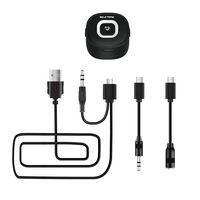
USB charging cable x1
3.5MM audio cable x1
RCA Audio Line x1
Warm tips:
1. Different Bluetooth devices (such as Bluetooth headsets) use different programs and protocols, and the search connection time will be different.
2. If the pairing fails or cannot be connected for a long time, you can restart the adapter and reconnect it once.
3. It is recommended that you fully charge it before using it for the first time.
1. On/Off: Press and hold the power button for 3 seconds. After power on, the default is Bluetooth transmission status. To switch modes, press the power button briefly.
2. The indicator light is blue when receiving, and the indicator is red when transmitting.
3, Bluetooth name: "YPF-BT"
RX mode (Bluetooth receiver):
1. Adjust the Bluetooth AUX Adapter status to Receive mode and connect the device to a non-Bluetooth headset/home speaker or car audio system using a 3.5 mm audio cable.
2. Pair the adapter with the smart device.
3. Now you can enjoy music or hands-free calling through headphones, speakers, home stereo system / car audio system.
TX mode ((Bluetooth transmitter):
1 Adjust the Bluetooth AUX adapter status to transfer mode and plug it into a non-Bluetooth media device (such as MP3, CD/DVD player, TV) via a 3.5mm audio cable or RCA cable.
2. Pair the device with a Bluetooth headset or TV.
3. Now you can enjoy music through the Bluetooth speaker/Bluetooth headset on a non-Bluetooth media device!
Specification parameters:
Bluetooth version: 4.2
Bluetooth Protocol Support: A2DP and AVRCP
Supports multi-format decoding: MP3, WAV, WMA, APE, FLAC
Transmission distance: 10M (33ft)
Charging input voltage: DC 5V
Working time: ≥8h
Charging time: ≥1.5h
Packing list:
Wireless audio adapter x1
Product Manual x1
USB charging cable x1
3.5MM audio cable x1
RCA Audio Line x1
Warm tips:
1. Different Bluetooth devices (such as Bluetooth headsets) use different programs and protocols, and the search connection time will be different.
2. If the pairing fails or cannot be connected for a long time, you can restart the adapter and reconnect it once.
3. It is recommended that you fully charge it before using it for the first time.
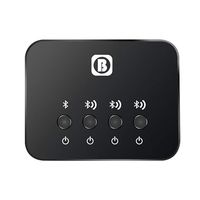
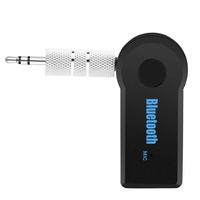
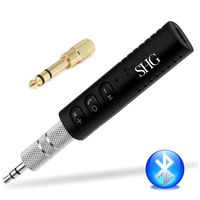
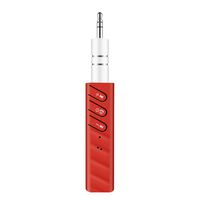
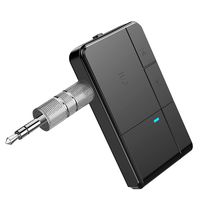
Bluetooth Transmitter/Receiver,2-in-1 Wireless 3.5mm Audio Adapter for TV/Home Sound System/Car Stereo System,by FIRSTELEC
Price is below average
Current Price
$9.99
Average
$18.85
Min Price
$9.99
Max Price
$25.99
Price dynamics
47%
Description
Guidelines for use:
1. On/Off: Press and hold the power button for 3 seconds. After power on, the default is Bluetooth transmission status. To switch modes, press the power button briefly.
2. The indicator light is blue when receiving, and the indicator is red when transmitting.
3, Bluetooth name: "YPF-BT"
RX mode (Bluetooth receiver):
1. Adjust the Bluetooth AUX Adapter status to Receive mode and connect the device to a non-Bluetooth headset/home speaker or car audio system using a 3.5 mm audio cable.
2. Pair the adapter with the smart device.
3. Now you can enjoy music or hands-free calling through headphones, speakers, home stereo system / car audio system.
TX mode ((Bluetooth transmitter):
1 Adjust the Bluetooth AUX adapter status to transfer mode and plug it into a non-Bluetooth media device (such as MP3, CD/DVD player, TV) via a 3.5mm audio cable or RCA cable.
2. Pair the device with a Bluetooth headset or TV.
3. Now you can enjoy music through the Bluetooth speaker/Bluetooth headset on a non-Bluetooth media device!
Specification parameters:
Bluetooth version: 4.2
Bluetooth Protocol Support: A2DP and AVRCP
Supports multi-format decoding: MP3, WAV, WMA, APE, FLAC
Transmission distance: 10M (33ft)
Charging input voltage: DC 5V
Working time: ≥8h
Charging time: ≥1.5h
Packing list:
Wireless audio adapter x1
Product Manual x1
USB charging cable x1
3.5MM audio cable x1
RCA Audio Line x1
Warm tips:
1. Different Bluetooth devices (such as Bluetooth headsets) use different programs and protocols, and the search connection time will be different.
2. If the pairing fails or cannot be connected for a long time, you can restart the adapter and reconnect it once.
3. It is recommended that you fully charge it before using it for the first time.
1. On/Off: Press and hold the power button for 3 seconds. After power on, the default is Bluetooth transmission status. To switch modes, press the power button briefly.
2. The indicator light is blue when receiving, and the indicator is red when transmitting.
3, Bluetooth name: "YPF-BT"
RX mode (Bluetooth receiver):
1. Adjust the Bluetooth AUX Adapter status to Receive mode and connect the device to a non-Bluetooth headset/home speaker or car audio system using a 3.5 mm audio cable.
2. Pair the adapter with the smart device.
3. Now you can enjoy music or hands-free calling through headphones, speakers, home stereo system / car audio system.
TX mode ((Bluetooth transmitter):
1 Adjust the Bluetooth AUX adapter status to transfer mode and plug it into a non-Bluetooth media device (such as MP3, CD/DVD player, TV) via a 3.5mm audio cable or RCA cable.
2. Pair the device with a Bluetooth headset or TV.
3. Now you can enjoy music through the Bluetooth speaker/Bluetooth headset on a non-Bluetooth media device!
Specification parameters:
Bluetooth version: 4.2
Bluetooth Protocol Support: A2DP and AVRCP
Supports multi-format decoding: MP3, WAV, WMA, APE, FLAC
Transmission distance: 10M (33ft)
Charging input voltage: DC 5V
Working time: ≥8h
Charging time: ≥1.5h
Packing list:
Wireless audio adapter x1
Product Manual x1
USB charging cable x1
3.5MM audio cable x1
RCA Audio Line x1
Warm tips:
1. Different Bluetooth devices (such as Bluetooth headsets) use different programs and protocols, and the search connection time will be different.
2. If the pairing fails or cannot be connected for a long time, you can restart the adapter and reconnect it once.
3. It is recommended that you fully charge it before using it for the first time.
Price will be lower
in next 2 weeks
in next 2 weeks
According to the data, price will be lower in next two weeks, so not waste your money and track better price!
Similar products